

Short answer: A dental website is a “place of public accommodation” under the Americans with Disabilities Act, which means it has to be usable by patients who navigate the web with a screen reader, a keyboard, or magnification. Most dental sites aren’t — 94.8% of the top one million home pages had detectable accessibility failures in 2025 (WebAIM) — and that gap is now a legal liability. Florida is the #2 state in the country for ADA Title III lawsuits (Seyfarth Shaw), so a Tampa practice with an inaccessible website is exposed to a demand letter and quietly turning away the more than 1 in 4 U.S. adults who live with a disability (CDC). This is the checklist that fixes both problems.
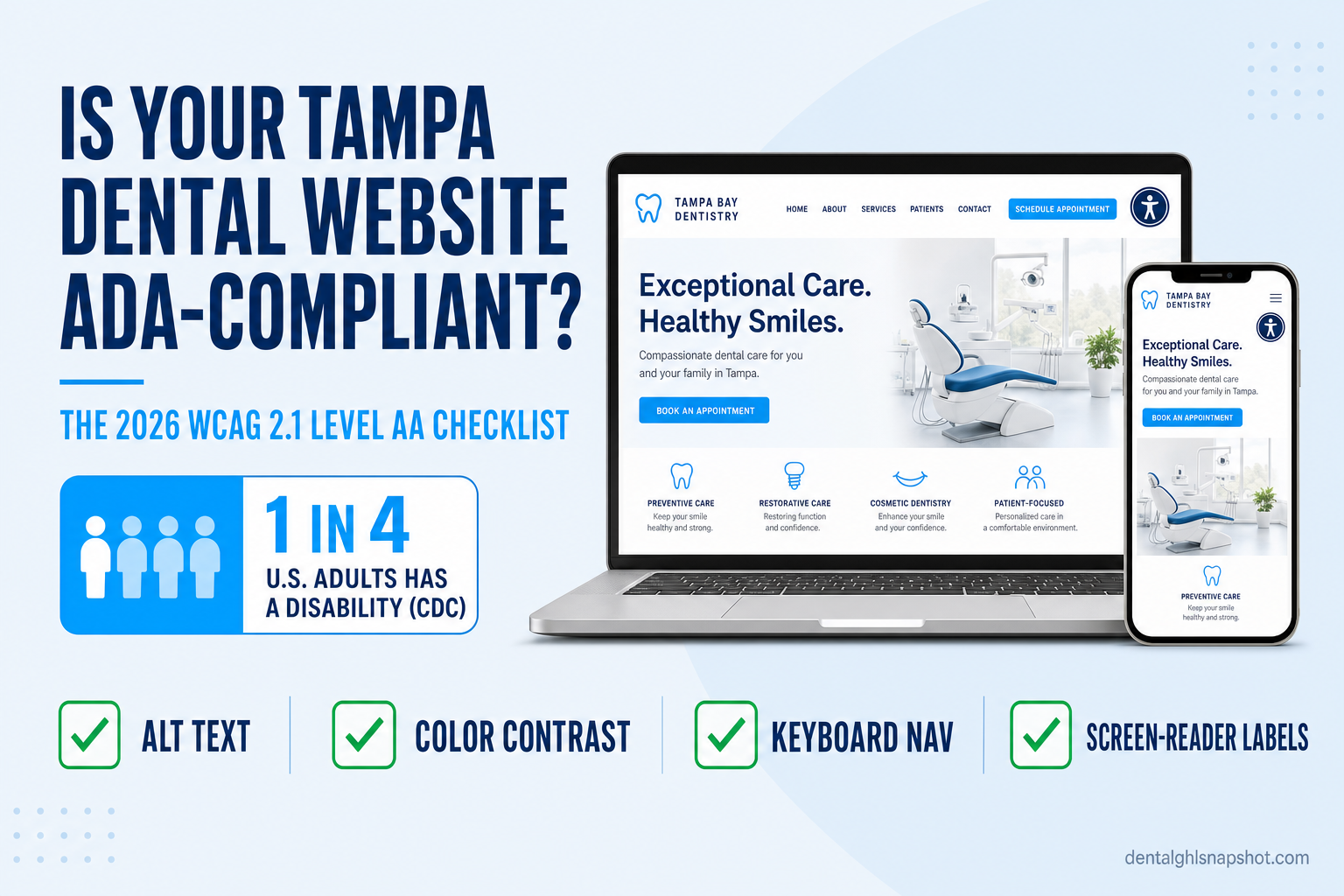
Table of contents
- What “ADA-compliant website” actually means for a dental practice
- Why Tampa and Florida practices are especially exposed
- The real cost: lawsuits and the patients you never see
- What the law actually requires in 2026
- The 2026 ADA compliance checklist for dental websites
- Why accessibility overlays and widgets aren’t the answer
- The durable fix: an accessible-by-default Astro website
- How to check your own site in ten minutes
- FAQ
What “ADA-compliant website” actually means for a dental practice
There’s no separate “website law.” The Americans with Disabilities Act of 1990 requires that businesses open to the public — “places of public accommodation,” which a dental office plainly is — give people with disabilities equal access to their goods and services. Courts across the country, and the DOJ itself, have consistently held that this obligation extends to a business’s website (American Bar Association).
In practice, “ADA-compliant” means your site meets the Web Content Accessibility Guidelines (WCAG) at Level AA — the technical standard published by the W3C and used as the benchmark by regulators and plaintiffs alike. Level AA means the page satisfies every Level A and Level AA success criterion (W3C). Concretely, that’s things a patient never thinks about until they can’t do them:
- A blind patient using a screen reader can hear what every image and button is (“Book an appointment,” not “image_04.jpg”).
- A patient with a motor disability can complete your appointment-request form using only a keyboard.
- A patient with low vision can read your hours and phone number because the text has enough contrast against its background.
- A patient who is deaf or hard of hearing gets captions on any video and doesn’t miss information that’s delivered by sound alone.
None of that is exotic. It’s the difference between a website that welcomes the more than 1 in 4 U.S. adults with a disability (CDC) and one that locks them out — and, increasingly, the difference between a clean audit and a demand letter.
Why Tampa and Florida practices are especially exposed
Every U.S. dental practice is covered by the ADA. But if you run one in Tampa, St. Petersburg, or anywhere in the Bay area, you’re operating in one of the most active litigation environments in the country.
When you count all ADA Title III cases filed in federal court in 2024, Florida ranked second in the nation with 1,823 filings, behind only California (3,252) and ahead of New York (1,471) (Seyfarth Shaw). Website-specific accessibility suits follow the same pattern: Florida was the #2 state for federal website accessibility lawsuits, with 470 filings in 2024, up from 385 the year before (Seyfarth Shaw).
Federal ADA Title III lawsuit filings by state, 2024. Florida ranks second in the nation. Source: Seyfarth Shaw, ADA Title III blog.
Two facts make this personal for a small practice. First, these suits overwhelmingly hit small businesses: 67% of 2024 digital accessibility cases were filed against companies with under $25 million in annual revenue (UsableNet) — dentists, clinics, and local service businesses, not just national brands. Second, this is a repeat-play game: roughly one in four 2024 lawsuits targeted a business that had already been sued before (UsableNet), because plaintiffs’ firms run automated scanners across thousands of sites looking for the same handful of failures. An inaccessible dental site in a hotspot like Florida isn’t hiding in the crowd — it’s on a list.
The real cost: lawsuits and the patients you never see
The legal exposure is the headline, but it’s only half the cost. Most ADA website claims settle before trial, and the numbers vary widely — but between plaintiff’s attorney’s fees, your own defense costs, and the remediation you’ll have to do anyway, a single demand letter routinely runs into five figures. And because the barriers are structural, fixing one site under legal pressure is far more expensive than building it right the first time.
The quieter cost is the patient you never meet. When your booking form can’t be completed with a keyboard, or your “Request Appointment” button is an unlabeled graphic a screen reader announces as nothing, a patient who wants to become your patient simply can’t. Look at who that is:
Share of U.S. adults with a disability, by functional type (a person may have more than one). Source: CDC, “Disability Impacts All of Us.”
Vision, mobility, and cognitive disabilities all directly affect how someone uses a website — and they add up to a large share of your local market. Adults with disabilities in the U.S. hold roughly $490 billion in disposable income (American Institutes for Research). For a practice trying to fill the hygiene column, an accessible site isn’t charity; it’s simply not turning away paying patients — the same logic behind making sure a fast, mobile-first website doesn’t bounce high-intent searchers before it loads.
What the law actually requires in 2026
Here’s what changed and what didn’t.
The standard is WCAG 2.1 Level AA. In April 2024, the DOJ finalized a rule under ADA Title II formally adopting WCAG 2.1 Level AA as the accessibility standard for state and local government websites (ADA.gov). Private businesses like dental offices fall under Title III, for which the DOJ has not issued a separate technical regulation — but that’s a thinner shield than it sounds. In the absence of a codified Title III standard, the DOJ’s enforcement actions and federal courts consistently use WCAG 2.1 AA as the yardstick (American Bar Association). So while a Tampa practice isn’t bound by the Title II deadlines, WCAG 2.1 AA is the practical target you’ll be measured against.
WCAG has moved on, too. The current W3C Recommendation is now WCAG 2.2, published in October 2023, which adds a handful of criteria (larger touch targets, more forgiving authentication) on top of 2.1 (W3C). Building to 2.2 AA is future-proofing; meeting 2.1 AA is the floor.
The takeaway for a practice owner: you don’t need to become a lawyer or a WCAG expert. You need a website that was built to the AA standard and is tested against it — which is a build decision, not a legal one.
The 2026 ADA compliance checklist for dental websites
Here is the practical, non-technical version of what “WCAG 2.1 AA” means for a dental site, in the order you’d actually work through it.
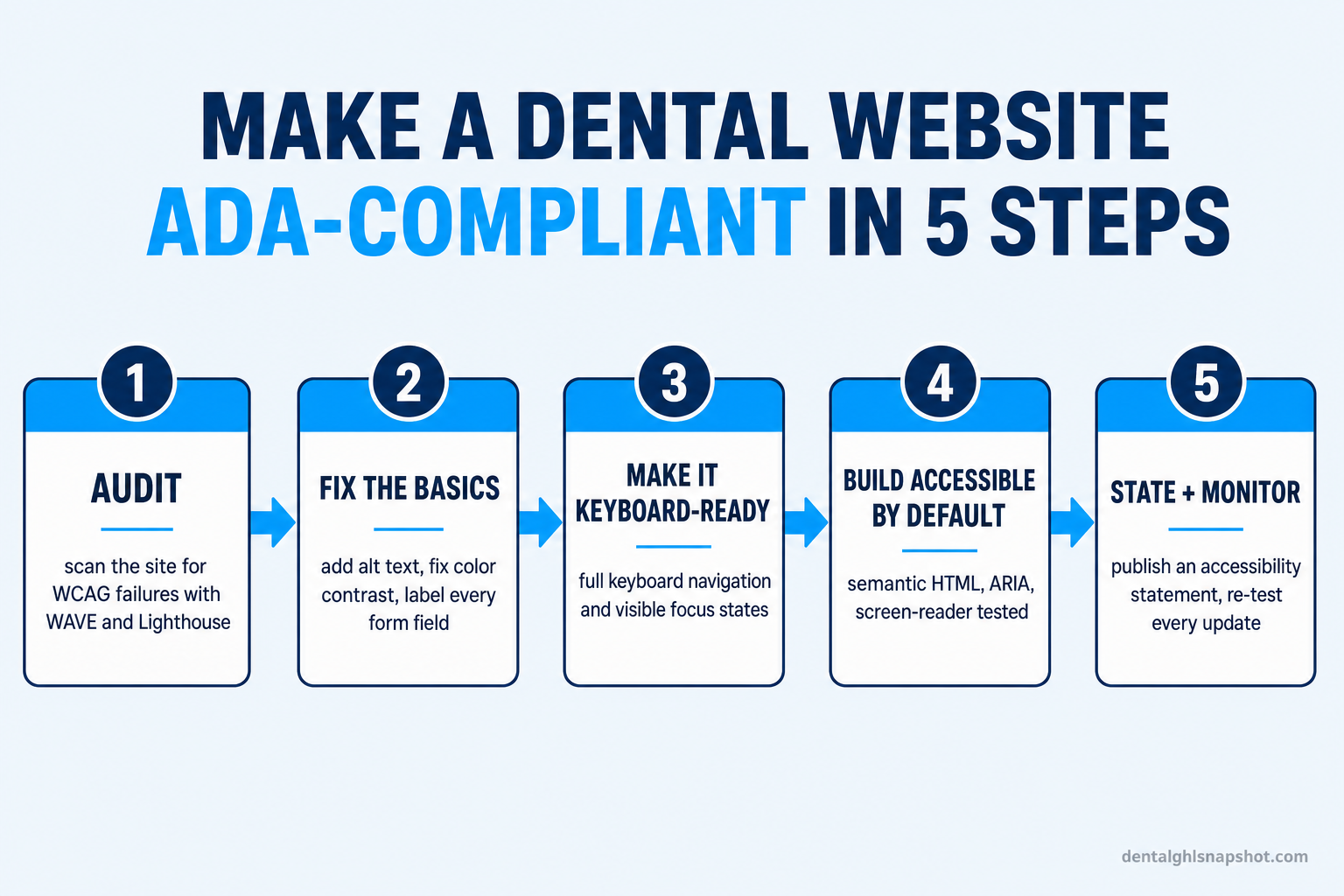
1. Audit what you have. Before you fix anything, measure it. Free tools like the WAVE browser extension and Google’s Lighthouse (built into Chrome) will flag most machine-detectable failures — missing alt text, contrast problems, missing form labels, empty links — in a couple of minutes. They won’t catch everything (automated tools detect roughly a third of issues), but they’ll show you the scale of the problem. Given that the average home page has 51 detectable errors (WebAIM), most dental sites light up like a Christmas tree.
2. Fix the high-frequency basics. The same failures show up on almost every non-compliant site, and they’re the ones plaintiffs’ scanners look for:
- Alt text on every meaningful image. Team photos, the office exterior, service icons, and especially any image that acts as a link or button need a text alternative a screen reader can announce.
- Color contrast. Body text needs a contrast ratio of at least 4.5:1 against its background (3:1 for large text). That pale-gray-on-white “Book Now” caption almost certainly fails.
- Labeled forms. Every field in your appointment-request and contact forms needs a programmatic label, and errors (“phone number required”) must be announced, not just shown in red.
- Real headings and link text. Use proper heading structure (one H1, logical H2s) and descriptive links (“Request an appointment,” never “click here”).
3. Make it fully keyboard-operable. Unplug your mouse and try to book an appointment using only the Tab, Enter, and arrow keys. Every link, button, menu, and form field must be reachable and usable, and you must be able to see where you are — a visible focus outline. If your dropdown menu or booking widget traps the keyboard or hides the focus indicator, it fails.
4. Build accessible by default. The durable fixes live in the code: semantic HTML (real buttons and landmarks, not clickable divs), correct ARIA only where needed, and screen-reader testing with something like VoiceOver or NVDA. This is where a properly built site pulls away from a page-builder site, and where retrofitting an old WordPress or Wix template gets painful.
5. Publish a statement and keep monitoring. Add an accessibility statement page describing your commitment and a way to report problems — it’s both good faith and, in many settlements, a required deliverable. Then re-test on every change. Accessibility isn’t a one-time project; a new plugin, a new photo without alt text, or a new form can reintroduce a barrier overnight.
Why accessibility overlays and widgets aren’t the answer
If you’ve researched this, you’ve seen the ads: a single line of JavaScript, an “accessibility widget,” and you’re compliant. Be skeptical. These overlay tools bolt a floating toolbar onto an inaccessible site rather than fixing the underlying code — and they’ve become a target, not a shield. In 2024, 25% of website accessibility lawsuits — 1,023 cases — specifically named an accessibility overlay or widget as a barrier (UsableNet). Hundreds of accessibility professionals have publicly pledged not to use them.
The reason is simple: an overlay can’t add the alt text you never wrote, can’t restructure your headings, and can’t make a broken booking widget keyboard-operable. It papers over the surface while the real barriers — and the legal exposure — remain. Genuine compliance is a property of how the site is built, not a script you paste on top.
The durable fix: an accessible-by-default Astro website
The reliable way to be ADA-compliant is to start from a foundation that’s built to WCAG 2.1 AA and tested against it — not to keep retrofitting a template that fights you.
That’s the foundation behind our Get a Website service. We build dental sites on Astro, which ships clean, semantic, static-first HTML — the exact substrate accessibility depends on — and we build to the AA standard: alt text on every image, AA-contrast color, labeled forms, full keyboard operability, visible focus states, and an accessibility statement page. The same clean foundation is what makes the site fast (a guaranteed 90+ Google PageSpeed score) and easy for Google and AI answer engines to read, so accessibility, speed, and SEO all come from the same build rather than three separate projects.
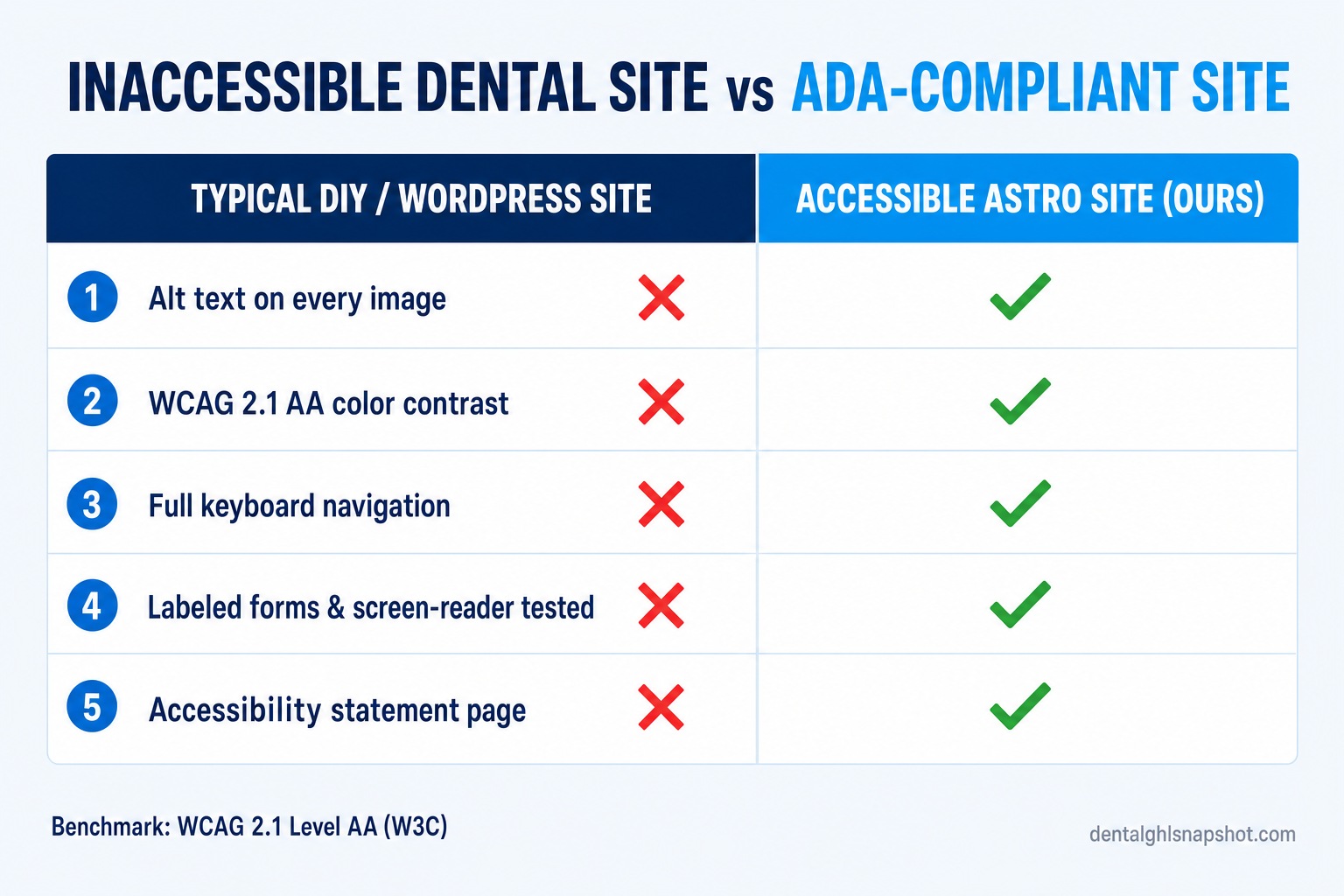
| Plan | Typical DIY / WordPress / Wix site | Accessible-by-default Astro site (ours) |
|---|---|---|
| Price | Accessible by accident, if at all | From $97/mo + $499 build |
| Feature 1 | Alt text and labels missing across the site | Alt text, ARIA and labeled forms built in |
| Feature 2 | Low-contrast text fails WCAG 4.5:1 | AA-contrast palette and visible focus states |
| Feature 3 | Booking widget traps or hides keyboard focus | Full keyboard operability, screen-reader tested |
| Feature 4 | "Fixed" with an overlay widget — a lawsuit target | Semantic, static HTML — no overlay band-aids |
| Feature 5 | No accessibility statement, no re-testing | Accessibility statement page + re-test on every edit |
Speed, structure, and accessibility are the foundation; the build also captures the visitor once they arrive, with an AI chat widget that answers questions and books 24/7 and the same prebuilt-website approach behind the snapshot. It’s the difference between a site that’s a liability and one that’s a booking machine — the kind of foundation behind results like this Tampa implant center.
What changes when the site is built to the standard
Missing alt text and labels, low-contrast copy, a booking form you can't complete with a keyboard. Invisible to screen-reader users, exposed to a Florida demand letter, and quietly turning away 1 in 4 potential patients. 'Fixed' with an overlay widget that plaintiffs now target.
Semantic, static HTML built to WCAG 2.1 AA. Alt text, labeled forms, AA contrast, full keyboard navigation, visible focus, screen-reader tested, plus an accessibility statement. Welcoming to every patient, defensible if challenged — and fast and SEO-ready from the same build.
How to check your own site in ten minutes
You don’t have to wait for a demand letter to find out where you stand. Run these three checks today:
- Scan it with a free tool. Install the WAVE browser extension or open Chrome DevTools and run a Lighthouse accessibility audit on your home page and your appointment page. Read the errors: missing alt text, low contrast, and unlabeled form fields are the usual suspects, and they map directly to WCAG AA failures.
- Unplug your mouse and try to book. Using only the keyboard (Tab to move, Enter to activate), navigate from your home page to a submitted appointment request. If you get stuck, lose track of where the focus is, or can’t reach a field, a real patient will too.
- Turn on a screen reader and listen. On a Mac, enable VoiceOver (Cmd-F5); on Windows, install the free NVDA. Close your eyes and try to find your phone number and book a visit. If images announce as filenames or buttons say nothing, those are the failures a lawsuit — and a patient — will find first.
If any of those checks fail, the fix isn’t another plugin or a paste-on widget — it’s a site built to the standard. To sanity-check the economics, our pricing page and a quick walkthrough call will get you concrete numbers, and if you’d rather just ask a question first, reach out here.
Frequently asked questions
Frequently asked questions
Does my dental practice website legally have to be ADA-compliant?
In practice, yes. A dental office is a 'place of public accommodation' under Title III of the ADA, and U.S. courts and the Department of Justice have consistently held that the obligation to provide equal access extends to a business's website (American Bar Association). There is no separate Title III technical regulation, but WCAG 2.1 Level AA is the standard regulators and plaintiffs apply, so it's the practical benchmark to build to.
What standard makes a website ADA-compliant?
The Web Content Accessibility Guidelines (WCAG) at Level AA. In April 2024 the DOJ formally adopted WCAG 2.1 Level AA for state and local government sites under Title II (ADA.gov), and courts apply the same standard to private businesses. The current W3C version is WCAG 2.2, published October 2023 (W3C); building to 2.2 AA future-proofs you, while 2.1 AA is the floor.
How likely is a Tampa dental practice to get an ADA website lawsuit?
More likely than most owners realize. Florida ranked #2 in the nation for federal ADA Title III filings in 2024 with 1,823 cases, and #2 specifically for website accessibility suits with 470 filings (Seyfarth Shaw). Nationally, 67% of digital accessibility cases targeted businesses under $25M in revenue and about a quarter hit repeat defendants (UsableNet) — small local practices are squarely in scope.
Do accessibility overlay widgets make my site ADA-compliant?
No. Overlay tools add a floating toolbar on top of an inaccessible site without fixing the underlying code, and they've become a lawsuit target rather than a defense: in 2024, 25% of website accessibility lawsuits (1,023 cases) specifically cited an overlay or widget as a barrier (UsableNet). Genuine compliance comes from how the site is built — semantic HTML, alt text, labeled forms, keyboard operability — not a pasted-on script.
How do I check if my current dental website is accessible?
Run three quick checks: (1) scan your home and booking pages with the free WAVE extension or Chrome's Lighthouse audit to flag missing alt text, low contrast, and unlabeled forms; (2) unplug your mouse and try to complete an appointment request using only the keyboard; (3) turn on a screen reader (VoiceOver on Mac, NVDA on Windows) and try to find your phone number and book. Failures in any of these are the same ones a lawsuit or a lost patient will find.
Why is accessibility easier to get right on an Astro-built site than on WordPress?
Accessibility depends on clean, semantic HTML, and Astro ships static-first, semantic markup by default rather than the plugin- and page-builder-generated markup that accumulates on a typical WordPress or Wix dental site. That makes it far easier to build to WCAG 2.1 AA — real buttons and landmarks, labeled forms, AA contrast, keyboard focus — and keep it that way. It's the same clean foundation that also delivers a fast, SEO-friendly site; accessibility, speed, and search all come from one build.
About the author
Marisa Velez is a Dental Practice Growth Strategist based in Scottsdale, Arizona. She has spent more than a decade helping general and cosmetic dental practices fill the hygiene column and turn one-time patients into lifelong recare, focusing on the numbers that actually move production — new-patient cost, no-show rate, and treatment acceptance — and translating them into systems a busy front desk can live with.
Related posts
- Astro vs WordPress for Dental Websites: Speed, SEO, and Cost Compared
- Slow Dental Website, Empty Chairs: How Page Speed Costs Practices New Patients
- Local SEO for Dentists: How to Rank in the Google Map Pack in 2026
- How to Get Your Dental Practice Found in AI Search
- Dental Website Chatbot: Turn Website Visitors Into Booked Appointments