

Short answer: For a U.S. dental practice in 2026, the framework your website is built on quietly decides how many “dentist near me” searchers actually become booked patients. WordPress powers roughly 43% of all websites, but the plugin-and-page-builder stack most dental sites bolt onto it makes pages heavy and slow — and slow pages lose patients and rank worse. Astro takes the opposite approach: it ships almost zero JavaScript by default, serves static-first pages from the edge, and routinely scores 90–100 on Google PageSpeed. Since 53% of mobile visitors abandon a page that takes longer than three seconds to load and Google now folds Core Web Vitals into its ranking signals, a faster Astro site both ranks higher and converts more of the traffic you already pay for. WordPress still wins on a few things — this guide is the honest head-to-head on speed, SEO, security, and cost.
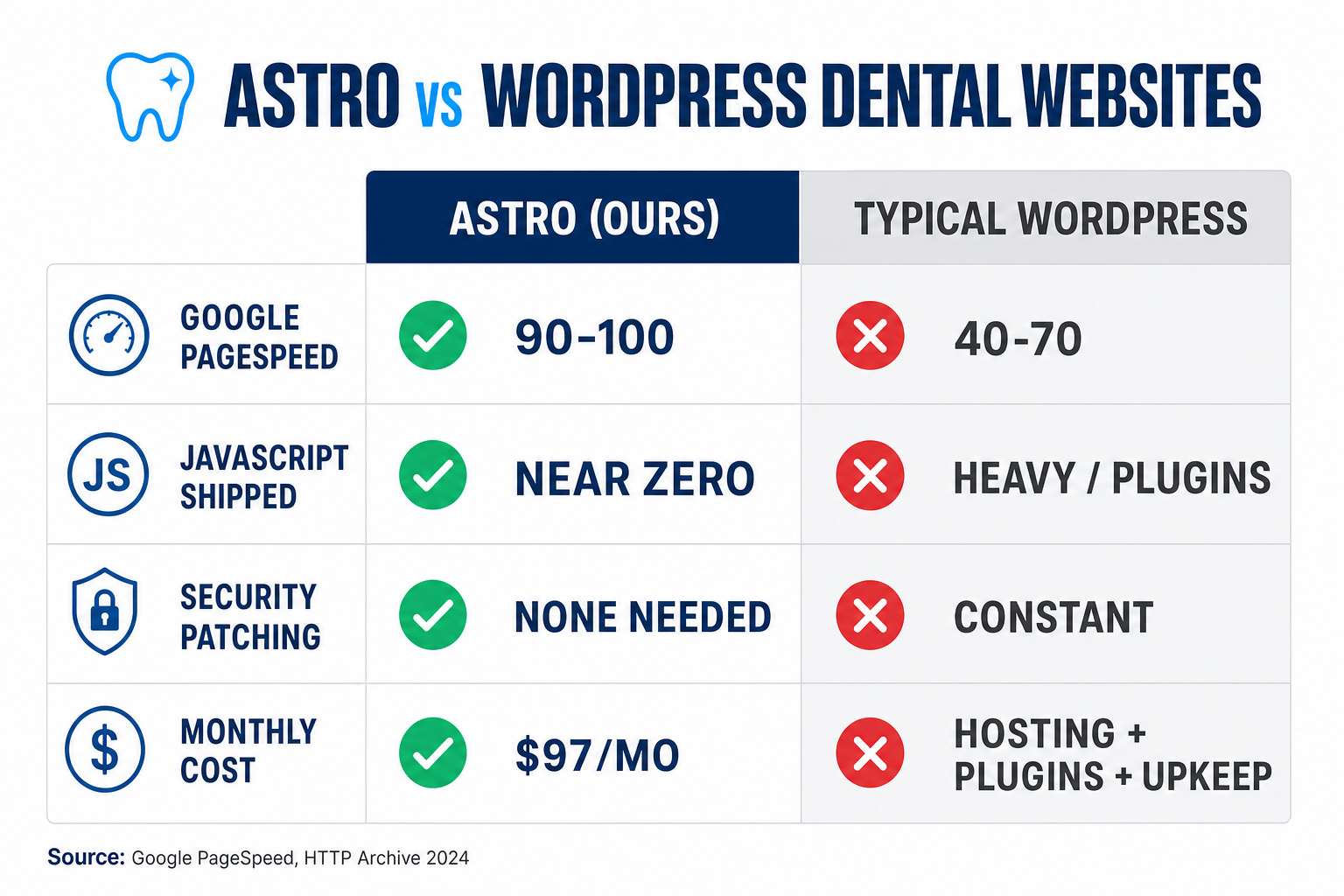
Table of contents
- Why website speed is really a patient-count problem
- Astro vs WordPress at a glance
- Round 1: Page speed & Core Web Vitals
- Round 2: SEO and winning “dentist near me”
- Round 3: Security & maintenance
- Round 4: Cost and who edits the site
- Where WordPress still wins
- The verdict for dental practices
- FAQ
Why website speed is really a patient-count problem
Before comparing frameworks, it helps to see why this argument is worth having at all. A dental website has one job: turn a stranger who Googled a toothache into a booked new patient. Everything between the click and the booking is friction — and the single biggest, most invisible source of friction is load time.
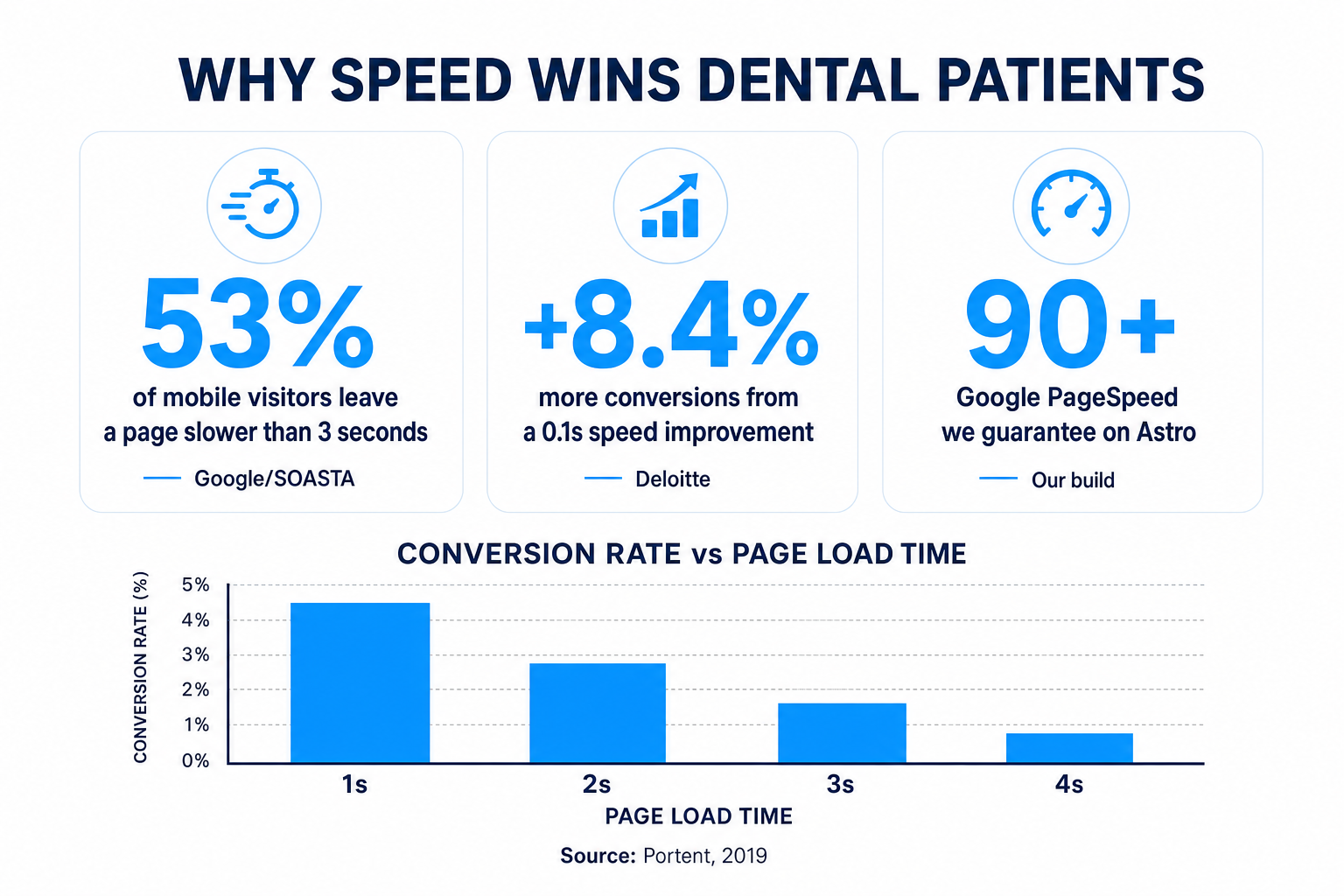
The data is blunt. Google’s mobile research found that 53% of visits are abandoned if a mobile page takes longer than three seconds to load (Google/SOASTA, 2016). It gets steeper from there: as page load time grows from one second to three, the probability that someone bounces rises 32%; stretch it to five seconds and bounce probability climbs 90% (Think with Google, 2017).
Increase in bounce probability as mobile page load time grows. Source: Think with Google, 2017.
And bouncing isn’t the only cost — conversion follows the same curve. Portent’s analysis of 94 million page views found e-commerce conversion rates peak in the 0–2 second window (around 3.05% at one second) and collapse to roughly 0.67% by four seconds (Portent, 2019). Deloitte and Google put a dollar figure on it: a mere 0.1-second improvement in mobile load time lifted retail conversions 8.4% and average order value 9.2% (web.dev / Deloitte, 2020).
Translate that to a practice: you spend on Google Ads, local SEO, and social to get a prospective patient onto your site. If the page is slow, half of them are gone before they read a word — and the ones who stay are less likely to book. You paid for the click either way. Speed decides whether it turns into production.
Astro vs WordPress at a glance
Here’s the honest, row-by-row comparison — a typical plugin-built WordPress dental site versus the Astro build we ship. (A hand-optimized, developer-maintained WordPress site can beat these WordPress numbers; most dental practices don’t have one.)
| Plan | Astro (our Get a Website build)Recommended | Typical WordPress dental site |
|---|---|---|
| Price | $497 one-time + $97/mo | Hosting + plugins + maintenance |
| Feature 1 | Google PageSpeed 90–100, guaranteed | PageSpeed commonly 40–70 on mobile once plugins stack up |
| Feature 2 | Ships near-zero JavaScript by default — static-first pages from the edge | Ships heavy JavaScript from the theme + every plugin |
| Feature 3 | Core Web Vitals green out of the box | Often fails one or more Core Web Vitals |
| Feature 4 | Editable meta titles, descriptions & schema on every page | Meta & schema editable — but usually via yet another plugin |
| Feature 5 | Local SEO, location pages, schema & llms.txt built in | SEO depends on plugins you configure and keep updated |
| Feature 6 | No plugins to patch — dramatically smaller attack surface | 7,966 new WordPress vulnerabilities disclosed in 2024 |
| Feature 7 | Managed Cloudflare hosting, domain & SSL included | Hosting, domain & SSL billed and managed separately |
| Feature 8 | Custom code and AI chat widget supported | Custom code possible, but page builders fight you |
| Feature 9 | We maintain it — up to 10 change tickets/month | You (or a paid dev) patch core, theme & plugins forever |
| Get an Astro site → | See the difference |
Round 1: Page speed & Core Web Vitals
This is the round that matters most, and it isn’t close for a typical dental site.
Why Astro is fast by design. Astro renders your pages to static HTML at build time and ships zero JavaScript by default — interactivity is opt-in through “islands” that hydrate only the specific components that need it (Astro Docs). A patient loading your “New Patients” page downloads HTML and a little CSS, not a framework runtime plus a dozen plugin scripts. That’s why we can guarantee a 90+ PageSpeed score — often a perfect 100 — on the dental sites we build.
Why WordPress usually isn’t. WordPress itself can be fast. The problem is how dental sites get built on it: a heavy theme, a drag-and-drop page builder (Elementor, Divi), and a stack of plugins, each adding CSS and JavaScript to every page. The result routinely lands in the 40–70 PageSpeed range on mobile — the exact range where the speed penalties above kick in.
This is not a niche concern. Across the whole web, only 43% of mobile origins pass all three Core Web Vitals, versus 54% on desktop (HTTP Archive Web Almanac, 2024). The most commonly failed metric is Largest Contentful Paint — the “how fast does the main content appear” score that heavy pages struggle with.
Percentage of websites passing all three Core Web Vitals. Source: HTTP Archive Web Almanac, 2024.
For a dental practice, “passing Core Web Vitals” isn’t a vanity metric — it’s table stakes for the mobile searches where most of your new patients actually find you. Our companion piece on local SEO for dentists covers how ranking and speed reinforce each other.
Round 2: SEO and winning “dentist near me”
Speed and SEO are the same fight. Google confirmed that Core Web Vitals are part of its page-experience ranking signals (Google Search Central), so a faster site earns a ranking edge — all else equal — over a slower competitor.
And the searches at stake are overwhelmingly local and mobile. Roughly 46% of all Google searches have local intent (BrightLocal), and 76% of people who run a “near me” search on a smartphone visit a business within a day (Think with Google). When someone searches “emergency dentist near me” at 9 p.m., they’re deciding now — and a page that loads instantly with the right local schema is the one that wins the click and the call.
Here’s where the framework choice compounds. Good dental SEO in 2026 needs:
- Editable titles, meta descriptions, and schema on every page — so each service and location page targets its own keyword.
- Fast-loading location pages — one per neighborhood or suburb you serve.
- Structured data (LocalBusiness, FAQ, Service) that Google and AI answer engines can read.
- An
llms.txtfile so AI search tools (ChatGPT, Perplexity, Google AI Overviews) can find and cite you.
On Astro, all of that is baked into the build. On WordPress, each piece is another plugin to install, configure, and keep updated — and every plugin is more weight on the exact page-speed score you’re trying to protect. You can get there on WordPress; you just have to fight the platform’s own tendency to bloat to do it.
Round 3: Security & maintenance
This is the round nobody thinks about until it goes wrong — and it’s where WordPress’s popularity becomes a genuine liability for a practice that handles patient contact information.
Because WordPress runs so much of the web, it’s the biggest target. In Sucuri’s 2023 report, WordPress made up 95.5% of the infected websites they cleaned (Sucuri). That figure reflects Sucuri’s WordPress-heavy customer base rather than a per-site risk rate — but the vulnerability pipeline is real and enormous: 7,966 new WordPress vulnerabilities were disclosed in 2024, and 3,044 of them were in plugins (only one was in WordPress core), per Patchstack. Sucuri also found that 39.1% of infected CMS sites were running outdated software at the time of compromise — meaning the fix existed, but nobody had applied the update.
That last point is the real story. WordPress security is mostly a maintenance problem: someone has to patch core, the theme, and every plugin, forever. Miss a cycle and you’re in the 39%.
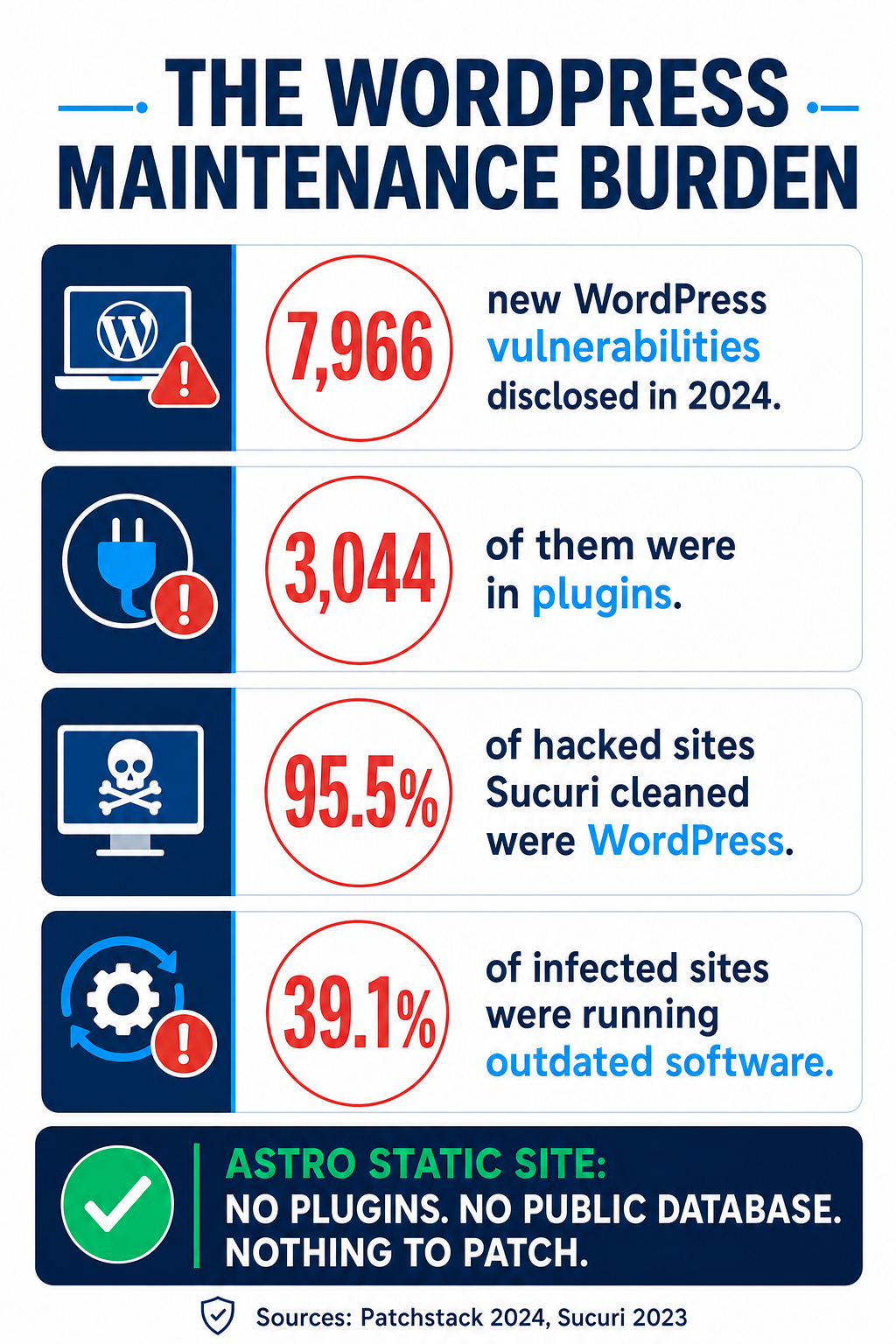
An Astro site sidesteps most of this by construction. There’s no PHP executing on your server for every visitor, no plugin ecosystem to patch, and no database exposed to the public internet — the site is pre-built static files served from Cloudflare’s edge. The attack surface a dental practice has to worry about shrinks dramatically. For the practices we host, we handle updates and monitoring as part of the $97/month — so “did we patch the booking plugin?” stops being a question anyone has to remember.
Round 4: Cost and who edits the site
WordPress is often sold as “free,” and the software is. The total cost isn’t. A real WordPress dental site typically means separate bills for managed hosting, a premium theme, premium plugins (booking, forms, SEO, security, backups), and — the big one — ongoing maintenance. Professional WordPress maintenance is commonly quoted anywhere from a couple hundred to several thousand dollars a month depending on scope (Codeable, illustrative vendor range), on top of the plugin renewals and hosting.
Our Astro build folds all of that into one predictable line: $497 one-time, then $97/month covering managed Cloudflare hosting, your domain, SSL, ongoing maintenance, and up to 10 change tickets a month. No per-edit agency fees, no surprise “the plugin update broke the site” invoice. (See the full breakdown on the Get a Website page, and how it fits alongside the rest of your stack on our pricing page.)
There’s also the question of who edits it. On WordPress, “editable by the front desk” usually means giving a non-technical team member the keys to a page builder where one wrong drag can break the layout — or break Core Web Vitals. Our model is different: you send change requests, we make them, and the site stays fast. If you’d rather have full custom control — a patient portal, a bespoke intake flow, a niche integration — that’s a GHL / custom development conversation, not a plugin.
Where WordPress still wins
We’d rather you make a good decision than just agree with us, so here’s the honest other side.
- You have a large, self-managed content operation. If your practice publishes constantly and your team is already fluent in the WordPress editor, that familiarity has real value.
- You need a specific plugin ecosystem. Some membership, LMS, or e-commerce use cases have mature WordPress plugins with no equal elsewhere. If your site is really a store or a course platform, that matters.
- You already have a fast, well-maintained WordPress site and a developer who keeps it that way. If it passes Core Web Vitals today and someone reliably patches it, there’s no urgent reason to move. “Fast and maintained” beats “new framework” every time.
The catch is that all three describe a minority of dental practices. Most practices want a fast, professional, bookable site they don’t have to think about — which is exactly the case Astro is built for.
The verdict for dental practices
For the typical U.S. dental practice, the framework decision comes down to one question: do you want a website that quietly loses patients, or one that quietly wins them?
WordPress can absolutely be made fast — but for most practices it isn’t, because the way dental sites get built on it (heavy themes, page builders, plugin stacks) fights the very speed that drives rankings and bookings. Astro starts from the other end: near-zero JavaScript, static-first pages, Core Web Vitals green by default, and the SEO/schema/llms.txt groundwork built in rather than bolted on. Given that 53% of mobile visitors leave a slow page and Google rewards fast ones, that head start compounds every single day your site is live.
If you have the developer and the discipline to keep a WordPress site fast, do that. If you’d rather skip the plugins, the patching, and the page-speed anxiety and just have a fast dental site that ranks and books — that’s the Astro website we build, and it’s live in about ten working days.
Frequently asked questions
Is Astro really faster than WordPress for a dental website?
For a typical plugin-built dental site, yes — meaningfully. Astro ships almost no JavaScript by default and serves static-first pages, which is why we guarantee a 90+ Google PageSpeed score. A stock WordPress dental site with a page builder and a stack of plugins commonly lands in the 40–70 range on mobile. A hand-optimized, developer-maintained WordPress site can close much of that gap, but most practices don't have one. It's worth remembering that only 43% of mobile sites pass all three Core Web Vitals.
Does page speed actually affect my Google ranking?
Yes. Google confirmed that Core Web Vitals are part of its page-experience ranking signals. Speed is a tiebreaker rather than the single biggest factor — relevance and links still matter more — but between two similar dental practices competing for 'dentist near me,' the faster site has the edge, and it also keeps more of the visitors it earns.
Can I still edit my Astro website myself?
You send change requests and we make them — usually same or next business day, with up to 10 tickets a month included in the $97/month. That's a deliberate trade: the site stays fast and unbroken because a page builder isn't in the hands of someone who might accidentally tank the layout or the speed score. If you want deeper self-service or custom app features, that's a custom development conversation.
Is WordPress less secure than Astro?
WordPress isn't insecure by nature, but its scale makes it the biggest target, and its plugin model means constant patching. In 2024, 7,966 new WordPress vulnerabilities were disclosed — 3,044 in plugins, and Sucuri found 39.1% of infected sites were running outdated software. An Astro site has no plugin ecosystem and no public database or PHP executing per request, so the attack surface is far smaller — and we handle updates as part of hosting.
What does an Astro dental website cost?
Our Get a Website build is $497 one-time plus $97/month, which covers managed Cloudflare hosting, your domain, SSL, maintenance, and up to 10 change tickets a month. Add automatic blogging for $197/month total, or ask about the multi-location bulk plan. There are no per-edit agency fees or surprise plugin-renewal bills.
Written by Devin Okafor, GoHighLevel Automation Specialist based in Austin, Texas. Devin builds and ships GoHighLevel snapshots and fast dental websites for practices and the agencies that serve them, and is opinionated about keeping systems simple enough to maintain. This article is educational and does not constitute a guarantee of specific rankings, traffic, or revenue.