

Short answer: Patients do not unsubscribe because you remind them about a cleaning. They unsubscribe because you remind them five times, on three channels, for a visit they already booked, in a message that reads like a robot. Automating hygiene recall the right way means the system remembers who is due, contacts them once in a human voice, stops the moment they book, and never double-messages across text, email, and the phone. Do that and the hygiene column refills itself. Below is the whole six-stage engine, the messages you can copy, and the compliance line you cannot cross.
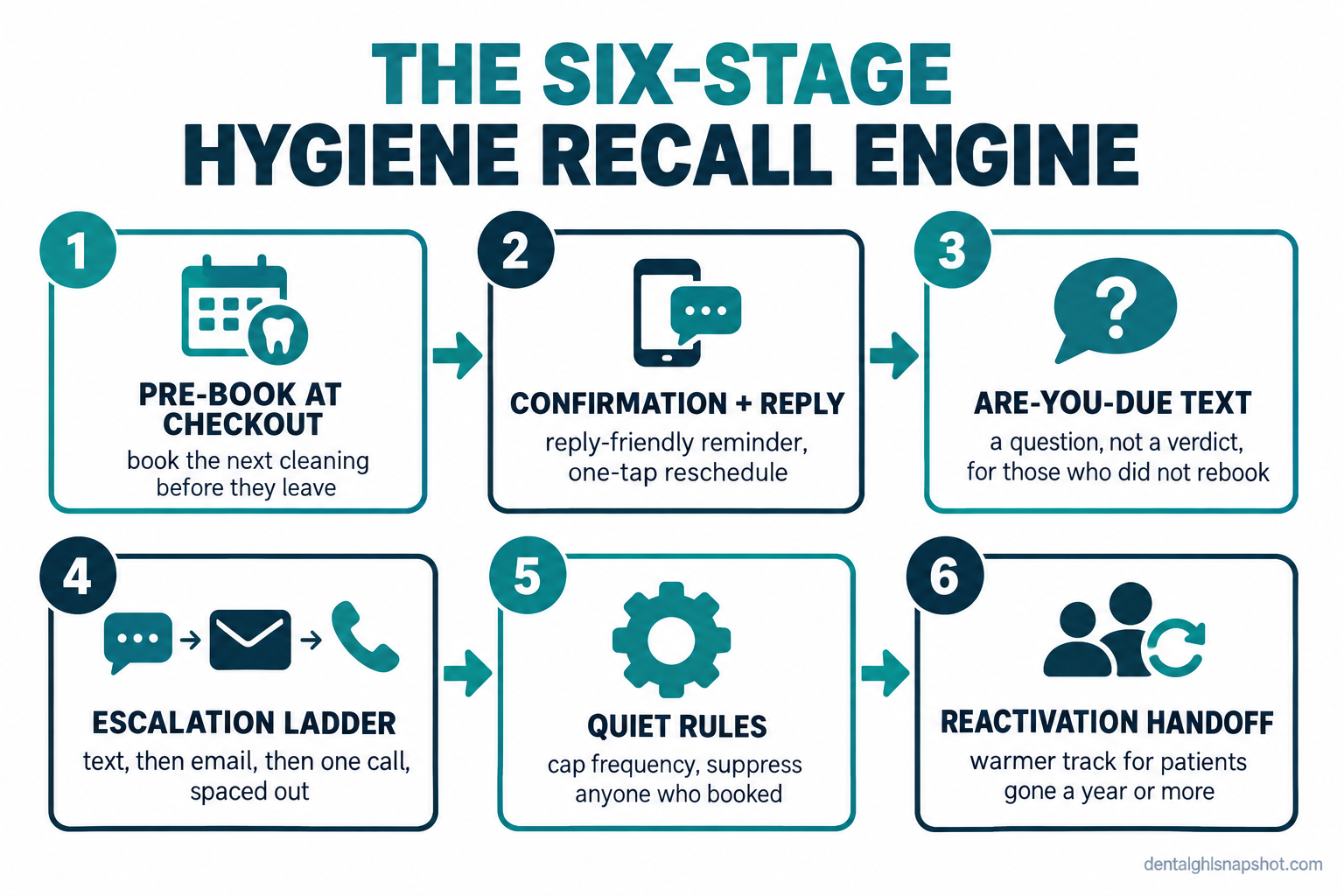
Table of contents
- What a leaky recall system is quietly costing you
- What “annoying” actually means (the over-recall trap)
- The six-stage hygiene recall engine
- Steal this: the exact recall messages
- Run it for your practice size
- The compliance line you cannot cross
- Objections and honest answers
- FAQ
What a leaky recall system is quietly costing you
It is the first Monday of the month and you are looking at the hygiene schedule three weeks out. There are holes. Not because patients are unhappy, but because they were in your chair six or nine months ago, meant to come back, and then life happened. Nobody called. So the column that should be the steadiest money in the practice has gaps, and you have to explain the slow week.
That gap never shows up as a complaint. It shows up as a hygienist standing idle for forty minutes, a doctor’s exam that did not happen, and restorative work a cleaning would have caught sitting undiagnosed. The average general practice does about $942,290 in annual gross billings (ADA 2024 Survey of Dental Practice), and a meaningful slice of that flows through the hygiene chair.
The timing makes it worse. Plenty of practices have room right now: the ADA Health Policy Institute reported that in early 2026 about one in three dentists said they were not busy enough, up from roughly one in four in 2024 (ADA HPI). And around one in three adults aged 18 to 64 had no dental visit at all in the past year (CDC/NCHS). You do not have a demand problem. You have a follow-up problem, and follow-up is the repeatable work software is good at and a busy front desk is not.
What “annoying” actually means (the over-recall trap)
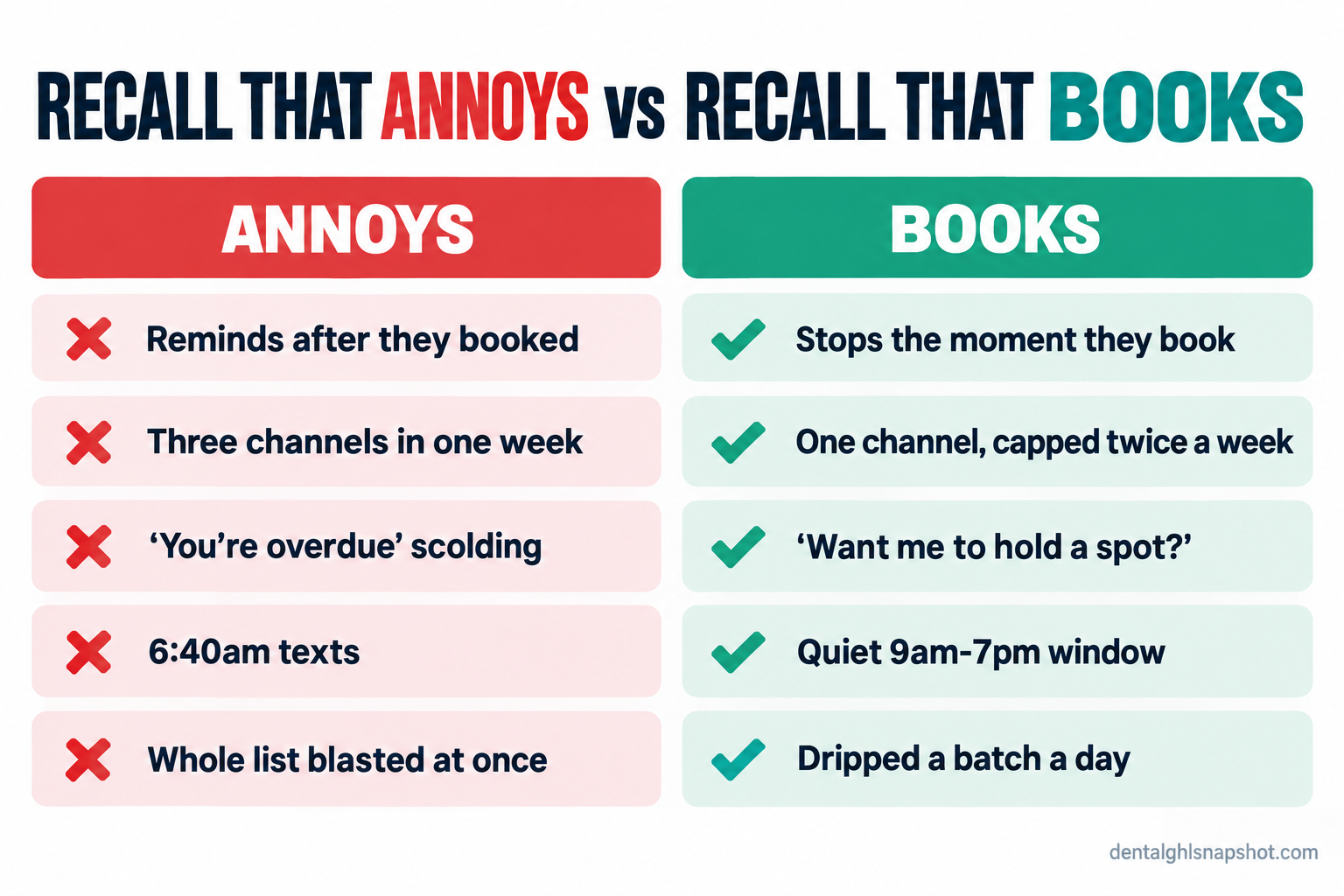
Here is the part most “recall tips” articles skip, and it is the reason patients hit the opt-out link. Annoying is not about the topic; nobody is offended that you want to clean their teeth. Annoying is a volume and relevance problem: the text that arrives the day after they confirmed, the postcard and email and call that all land in the same week, and being scolded as “overdue” when they are a low-risk patient who does not need to come in as often as your template assumes.
That last one has evidence behind it. The INTERVAL trial, a four-year randomized study of adult recall intervals, found no evidence of a difference in oral health between patients on a fixed six-month recall and those on a risk-based schedule (NIHR INTERVAL trial). Chasing a healthy adult every six months did not make their gums healthier. It just gave them more reasons to tune you out. The goal is not to contact patients more; it is to contact the right patient at the right interval, once, the way a good receptionist’s memory would: know who is due, reach out once, back off the instant they respond.
The six-stage hygiene recall engine
Think of recall as six stages, not one blast. Five run as automations; one, the pre-book, happens at the front desk. Set them up in order, each earning its keep before you add the next, and building only the first three still fixes most of the leak:
- Pre-book before they leave the chair.
- The pre-visit confirmation that invites a reply.
- The “are you due” recall text.
- The gentle escalation ladder across text, email, and one call.
- The quiet rules that cap frequency and suppress booked patients.
- The reactivation handoff for the truly lapsed.
Each stage below includes the real copy and, just as important, how it breaks.
Steal this: the exact recall messages
Copy these into your templates; the names and times are placeholders. Notice what they share: a clear next step, an open door to reply, a STOP option on the first automated message, and nothing clinical.
Stage 1: Pre-book before they leave the chair
This is not a message, it is a habit, and the single best move on this list. A patient who schedules the next cleaning before they walk out never becomes a recall problem. The front desk asks, every time:
“You’re all set for today. You’re due back around March, so let’s get it on the calendar now while you’re here. Mornings or afternoons easier for you?”
It is the cheapest recall you will run, and the ones who pre-book drop out of every automation below.
How it breaks: the team treats it as optional and offers it only when they remember. Make it a fixed step in the checkout script, the way collecting the copay is, and track the pre-book rate. Our front-desk phone scripts cover the checkout conversation.
Stage 2: The pre-visit confirmation that invites a reply
For everyone who pre-booked, the job is to make sure they show and to make moving the time easy, so a conflict becomes a reschedule, not a no-show.
Hi Maria, it’s Riverside Dental. You’re booked for your cleaning with Dana on Tue 3/12 at 2:00 PM. Reply Y to confirm, or tap [reschedule link] to move it. Questions? Just reply, a real person reads these. Reply STOP to opt out.
Send it two days out, with a short nudge the morning of. A patient who can answer “can I come at 3 instead?” in the thread does not ghost out of avoidance. See our guide to two-way texting that patients actually reply to.
How it breaks: the confirmation fires but does not suppress the recall list, so the same patient gets an “are you due?” text the next week though they are clearly booked. Wire the booking to shut off recall for that patient, or you have built the exact annoyance you were trying to avoid.
Stage 3: The “are you due” recall text
The workhorse for patients who left without rebooking. The wording is everything: ask a question, not a verdict.
Hi James, it’s Riverside Dental. Looks like you’re about due for your checkup and cleaning. Want me to hold a spot this month? Reply YES and I’ll send a few times that work. Reply STOP to opt out.
“Want me to hold a spot?” invites a yes. “You are overdue” invites a wince. Only the YES replies come back to a human, so the front desk works interest, not a cold call list that never gets finished.
How it breaks: you blast the entire overdue list on day one and bury the front desk in sixty replies at once, half of which go unanswered until the interest cools. Drip it, a batch each day.
Appointment attendance rate (%) by reminder type, pooled across controlled studies. Source: Cochrane systematic review.
Stage 4: The gentle escalation ladder
Some patients miss the first text. Do not just resend it. Change the channel and spacing, and cap the sequence so nobody gets more than a handful of touches.
Day 0, text: Hi James, about due for your cleaning, want me to hold a spot? Reply YES. Day 5, email: subject line “Ready to get your cleaning back on the calendar?” with a one-click booking button. Day 12, one human call or voicemail: “Hi James, it’s Dana at Riverside Dental, just making sure you don’t fall behind on your cleaning. Call or text us back whenever is good.”
Three touches over twelve days, then the sequence ends. If they do not respond, they move to the reactivation track in stage 6, not into an endless loop.
How it breaks: the channels fire independently, so a patient gets the text, email, and call in the same day, reads it as desperation, and opts out. Sequence the ladder on one timeline per patient, and let the booking suppress every remaining step.
Stage 5: The quiet rules that keep it from feeling like spam
This stage is invisible to patients, which is the point. These guardrails separate a system patients tolerate from one they report as junk.
- A booking suppresses everything. The moment a patient schedules, every pending recall, reminder, and reactivation message to them switches off. This is the big one.
- A frequency cap. No patient hears from you more than about twice in any seven-day window, no matter how many automations qualify them.
- A quiet window. Nothing automated sends before 9am or after 7pm local time, and nothing on Sunday. A 6:40am recall text is the fastest way to earn a STOP.
- One channel owns each patient. With a good mobile number and consent, text, and fall back to email only if texting fails. Do not run both for the same visit.
- Honor STOP instantly and everywhere. An opt-out should quiet that patient across the whole system, not just one campaign.
How it breaks: each campaign is built in isolation, so caps are per-campaign instead of per-patient. A patient who qualifies for recall, a birthday message, and a reactivation nudge in the same week gets all three. Enforce caps at the patient level.
Stage 6: The reactivation handoff for truly lapsed patients
A patient gone a year or more is not a recall case anymore. They need a warmer, lower-pressure message that acknowledges the gap without guilt.
Hi Priya, it’s Riverside Dental. It’s been a while, and we’d love to see you back. No pressure at all, but if you’d like to get a cleaning on the books, reply here and we’ll make it easy. Reply STOP to opt out.
Move anyone the ladder did not reach into this track: a couple of gentle touches a few weeks apart, then rest. For the full playbook on mining the lapsed-patient list, see our guide to recall and reactivation that fills the hygiene column.
How it breaks: you keep hammering long-gone patients with the standard “you’re overdue” language, which reads as tone-deaf after a year of silence. Separate the tracks and soften the voice.
Run it for your practice size
The engine is the same at every size. What scales is who watches it and how much reporting you need.
The hygiene recall engine by practice size
| Plan | Solo (1 dentist, 2 ops) | Group (2-3 dentists, 1-3 hygienists)Recommended | Multi-location |
|---|---|---|---|
| Price | Lean + automated | Owned + dripped | Routed + measured |
| Feature 1 | Pre-book at checkout as a fixed habit | Provider-aware templates per hygienist | Recall routed by location and provider |
| Feature 2 | Automated confirmations and are-you-due texts | A named owner watches the reply inbox | A reply-time standard the team is held to |
| Feature 3 | One global frequency cap and quiet window | Overdue list dripped a batch a day, not blasted | Patient-level caps across all campaigns |
Most of the holes in a solo practice close with the first three stages alone. Multi-location practices live or die on the patient-level caps, because a patient who exists in two location databases can otherwise get double the messages.
The compliance line you cannot cross
Recall messaging is legal and encouraged. Careless recall messaging is where practices get into trouble. Four rules.
HIPAA decides what a message can say. It may carry the date, time, provider name, and a booking link, which HHS permits for appointment reminders without separate authorization (HHS). It must never carry anything clinical: a procedure, tooth number, diagnosis, treatment plan, or balance, all of which show on a lock screen.
TCPA decides whether you can send at all. You need consent, a working STOP opt-out honored immediately, and a record of that consent; patients can revoke consent in any reasonable way (FCC). Several states, including Washington, Oklahoma, Maryland, and Florida, have stricter mini-TCPA statutes that apply based on where the patient is. Serving patients across a state line? Assume the strictest rule applies.
A BAA is required with any vendor that sends messages on your behalf, before the first message goes out.
The FTC decides how you ask for reviews. Ask every patient the same way. Sending the review link only to patients you expect to rate you well, or routing unhappy patients to a private form, is review suppression under the FTC’s Consumer Reviews and Testimonials Rule (FTC). For the full breakdown of consent language, see our guide on whether you can legally text your dental patients.
Objections and honest answers
“Won’t more automated recall just annoy patients?” Only if you build it badly. The annoyance comes from volume and bad timing, not recall itself. Cap the frequency, suppress anyone who booked, keep a quiet window, and ask a question instead of scolding. The four-year INTERVAL trial shows over-contacting low-risk patients buys no clinical benefit anyway.
“We already pay for Dentrix, Eaglesoft, or our PMS. Why add anything?” Maybe you do not need to. Check first. A lot of practice-management recall is a one-way postcard replacement that fires reminders but cannot hold a reply, drip a list, or suppress a patient who booked. If your tool does all of that and someone turned it on, use it. The gap only exists if your software sends a reminder but cannot run the whole engine above.
“Do I need to be technical to run this?” No. The setup is templates, a booking link, a shared inbox, and a few rules, configured once. After that the front desk taps a canned reply most of the time and types a real one when a patient asks something real. Automating recall removes work; it does not add a software project to your week.
“What if a patient really does not want to come in as often?” Then let them. Respect the interval they want, note it, and lengthen their recall. Fighting a low-risk adult who prefers a longer gap is how you lose them. A patient on a schedule they chose is worth more than one you nagged into a single visit and never saw again.
Where to start this week
Start with the two stages that need no software: pre-booking at checkout, and the reply-friendly confirmation. Then turn on the are-you-due drip for your overdue list, a batch a day, with suppression in place so nobody who books hears from you again. That is most of the leak closed in a week.
Back to that Monday schedule with holes in it. Those holes are not a demand problem. They are a follow-up problem, and follow-up is the one thing a well-built recall system does better than a busy front desk ever could: it never forgets, never gets interrupted, and, built right, never annoys the people it is bringing back.
How do I automate dental hygiene recall without annoying patients?
Build recall as a staged system, not a repeated blast. Pre-book at checkout, confirm booked visits with a reply-friendly message, send a single question-shaped 'are you due?' text to those who did not rebook, and escalate across channels only with spacing and caps. The rule that prevents most complaints: the moment a patient books, every pending recall message to them shuts off automatically.
How often should a dental practice send recall reminders?
Cap it at the patient level, not the campaign level: no more than about twice in any seven-day window across all automations combined, sent only between roughly 9am and 7pm local time. The interval itself should be risk-based. A four-year randomized trial found no oral-health difference between fixed six-month recall and a risk-based schedule for low-risk adults.
Is automated dental recall texting HIPAA compliant?
It can be. A recall message may include the date, time, provider name, and a booking link, which HHS allows for appointment reminders without separate authorization. It must not include a procedure, diagnosis, tooth number, treatment plan, or balance, because that shows on a lock screen. You also need consent, a working STOP opt-out, and a signed Business Associate Agreement with any vendor that sends messages for you.
What is the difference between recall and reactivation?
Recall keeps active patients on their interval, the people due again soon. Reactivation wins back patients gone a year or more. Recall can be a simple 'you're about due' nudge, while reactivation should be warmer and lower-pressure. Treating a long-lapsed patient with standard 'overdue' language reads as tone-deaf and gets you opted out.
Does automated recall actually get more patients to show up?
Reminders meaningfully lift attendance. A Cochrane systematic review found a text reminder raised appointment attendance to about 78.6%, compared with 67.8% with no reminder and 80.3% with a live phone call. A text does nearly as well as a call at a fraction of the staff time, which is why automating the reminder is one of the clearest wins for a busy front office.