

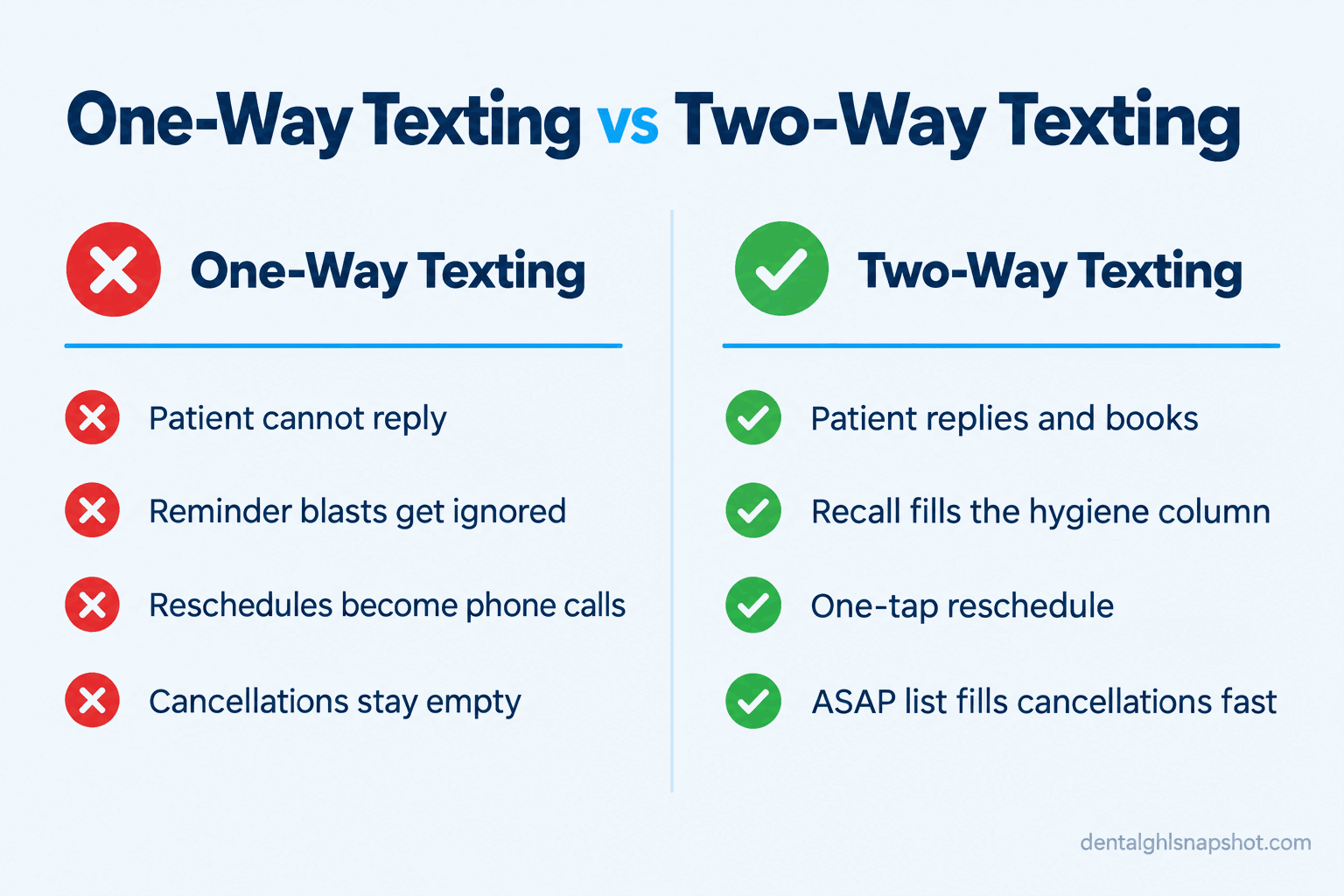
Short answer: Patients ignore your texts when the text cannot be answered. A one-way “Reply C to confirm” blast is a vending machine, and people treat it like one. Two-way texting is a conversation: the reminder invites a reply, the reschedule is one tap, a real question reaches a real person, and the recall text asks “want me to hold a spot?” instead of shouting “you’re overdue.” That shift, from broadcast to back-and-forth, turns a silent contact list into booked chairs and filled cancellations. Below is the whole system, the messages you can copy, how each one breaks, and the compliance line you cannot cross.
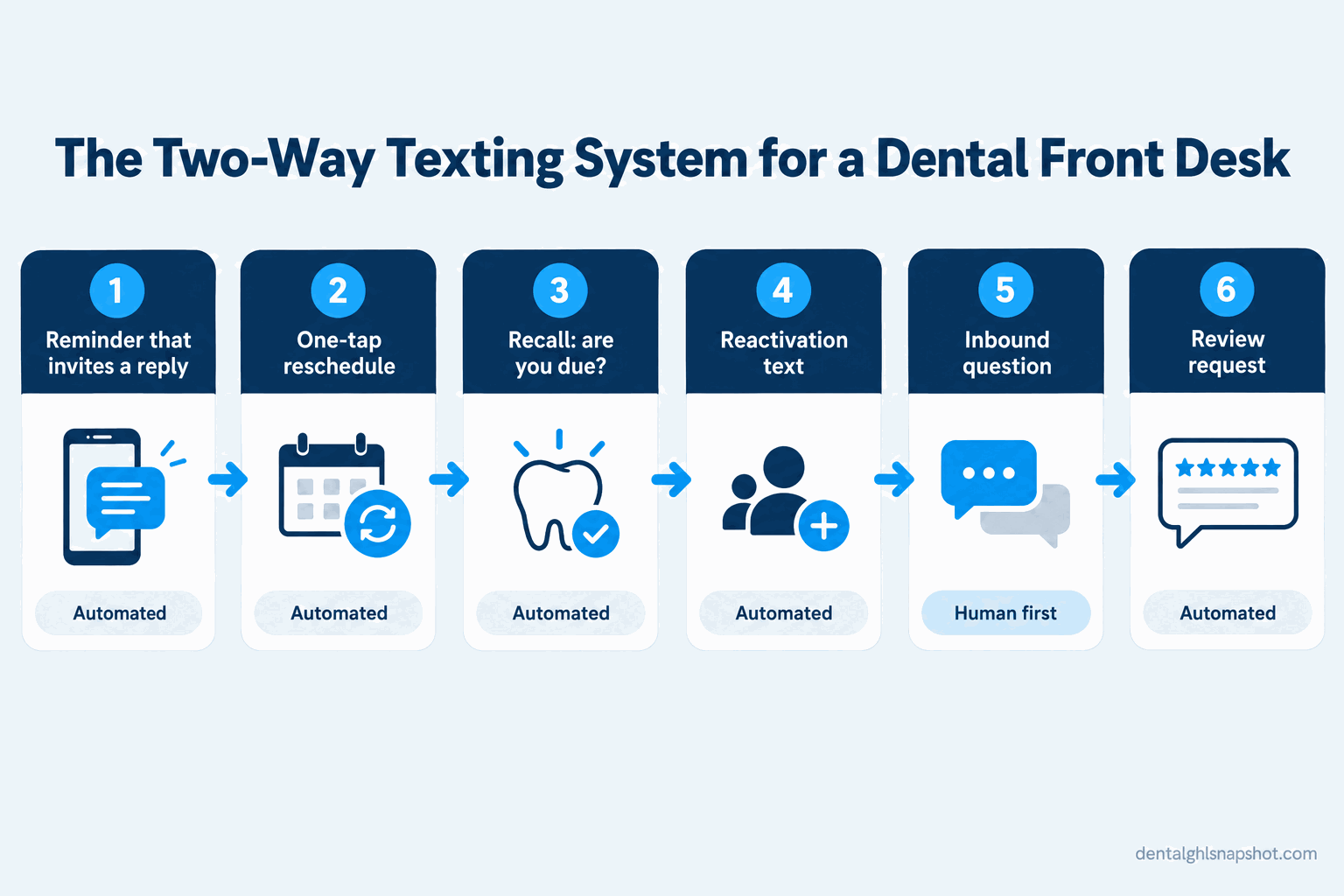
Table of contents
- What one-way texting is quietly costing you
- What “two-way texting” actually means
- The six conversations that make up the system
- Steal this: the exact messages patients reply to
- Run it for your practice size
- The compliance line you cannot cross
- Objections and honest answers
- FAQ
What one-way texting is quietly costing you
It is 7:50 on a Monday. You are still setting up the operatories and the phone is already ringing. It is a patient calling to move Thursday’s cleaning, because the reminder text she got on Saturday had no way to reply, so she is interrupting your morning to do it. While you are on that call, another line rings out to voicemail. That was a new patient shopping around, and by the time you call back she has booked somewhere else. Both were two-way texting problems wearing a phone-call costume: a reschedule that should have been a tap, and a new patient who should have gotten an answer by text in seconds. Instead they landed on the one thing the front desk never has enough of, someone free to pick up the phone.
The market is not the problem. Nearly every adult you serve is reachable by text: Pew Research Center reports that 98% of U.S. adults own a cellphone and 91% own a smartphone (Pew, Mobile Fact Sheet). The problem is that most practices only push texts and never receive them. And the timing hurts, because many practices have room on the schedule: the ADA Health Policy Institute reported that in Q1 2026, around one-third of dentists said they were not busy enough, up from one-quarter in Q1 2024 (ADA HPI). Empty chairs and an unanswerable phone are a bad combination.
And patients drift off entirely: about 34.5% of adults aged 18 to 64 had no dental visit in the past year (CDC/NCHS Data Brief 435). Every unfilled cancellation is production leaking out, because you can talk at patients but not with them.
What “two-way texting” actually means
Two-way texting means a patient can reply to any message you send and reach either an automation or a human, on the same thread and number. That sounds obvious, but it is not what most practices have. A lot of the “texting” in practice management software is one-way: it fires a confirmation request and flips a status when the patient taps a canned reply. Ask a real question, “can I move my daughter’s appointment too,” and the message goes into a void.
Two-way texting keeps the thread open. The routine parts (reminders, recall, review asks) are automated, and the moment a patient says something that is not a canned reply, it lands in a shared inbox a person watches. You are not hiring someone to text all day: software carries the routine 90%, a human handles the 10% that needs judgment, and the patient cannot tell the difference.
The six conversations that make up the system
Break the system into six conversations. Five start as automations. One, the inbound question, is human first. Set them up in this order, and each earns its keep before you add the next.
- The reminder that invites a reply, so confirmations and reschedules happen in the thread, not on your phone.
- The one-tap reschedule and cancel, so a conflict becomes a moved appointment, not a no-show.
- The recall “are you due” text, so the hygiene column refills itself without a call list.
- The reactivation text, so lapsed patients come back on their own schedule.
- The inbound question, the human-first channel where new patients and insurance questions get answered fast.
- The review request after the visit, so happy patients become public proof, compliantly.
Steal this: the exact messages patients reply to
Copy these into your templates; the names and times are placeholders. Notice what they share: a real practice name, a clear next step, an open door to reply, a STOP option on the first message of any automated series, and nothing clinical.
Conversation 1: the reminder that invites a reply
Hi Maria, it’s Riverside Dental. You’re booked with Dr. Lee on Tue 3/12 at 2:00 PM. Reply Y to keep it, or tap [reschedule link] to move it. Need anything before then? Just reply here, a real person reads these. Reply STOP to opt out.
Send it about two days out, then a shorter nudge the morning of. The line saying a person reads replies invites the small question (“do I need to bring anything?”) that, unanswered, becomes a reason to skip.
How it breaks: you send it from a number nobody monitors, so a patient replies “can we do 3 instead?” and hears nothing, and learns that texting you is pointless. Route every non-canned reply to a shared inbox with an owner.
Conversation 2: the one-tap reschedule and cancel
No problem, Maria, let’s find a better time. Tap [booking link] to see open slots, or tell me a day that works and I’ll hold one.
The goal is to make moving an appointment easier than ghosting it. Most no-shows are not defiance; the patient hit a conflict and calling felt like a chore. When the reschedule is a tap, you keep the relationship and free the slot early enough to backfill.
How it breaks: the link dumps the patient into a clunky booking page that asks for information you already have, and every extra field loses people. Pre-fill what you know and show real open times, not a “request a callback” form.
Conversation 3: the recall “are you due” text
Hi James, it’s Riverside Dental. Our records show you’re due for your checkup and cleaning. Want me to hold a spot this month? Reply YES and I’ll send you a few times.
This is the quiet workhorse. Instead of a staffer working a call list that never gets finished, the recall list texts itself and only the interested replies come back for a human to book. Ask a question, not a status: “want me to hold a spot?” gets a reply where “you are overdue” gets a shrug.
How it breaks: you blast the whole overdue list on day one and bury the front desk in eighty replies at once. Drip it, a batch a day, so every “YES” gets booked the same day.
Conversation 4: the reactivation text for lapsed patients
Hi Dana, it’s Riverside Dental. It’s been a while since we’ve seen you and we’d love to get you back in the chair. Reply BOOK and I’ll send a few times that work, or tap [booking link]. Reply STOP to opt out.
Most of next quarter’s production is already in your database, in patients who drifted off after one missed recall. A short, warm reactivation text to the twelve-to-eighteen-month lapsed list pulls a real chunk of them back. Keep it human and low-pressure.
How it breaks: you treat lapsed patients like leads and hammer them with five messages. One good text, maybe one gentle follow-up two weeks later, then stop. For more on mining that list, see our guide to recall and reactivation.
Conversation 5: the inbound question (human first)
Great question, Sam. We take most PPO plans. Text a photo of the front and back of your insurance card and we’ll check your coverage before your visit so there are no surprises. Want me to get you on the schedule in the meantime?
This one starts human. A new patient texts your main number, “do you take my insurance, can I get in this week, how much is a cleaning,” and a person answers fast. Speed is everything; the practice that replies in seconds wins the patient. Keep insurance answers general in the thread and move specifics to a coverage check, which also keeps plan details off a lock screen. If verifying coverage eats the front desk’s day, we wrote up how to fix it in automating insurance verification.
How it breaks: inbound texts land on a personal cellphone or in an inbox nobody owns, so a new-patient question sits for three hours. Give inbound texting the same status as the ringing phone: assigned, watched, answered fast.
Conversation 6: the review request after the visit
Hi Maria, thanks for coming in today! If you have 30 seconds, would you share how your visit went? [Google review link]. And if anything wasn’t perfect, reply here first, I’d genuinely like to make it right.
Send it a couple of hours after the appointment, while the visit is fresh. The line that matters legally: everyone gets the same message and the same public link. You can invite unhappy patients to reply to you, but you cannot withhold the review link from people you think will rate you low. That is review gating, exactly what the FTC’s rule targets. Ask everyone the same way.
How it breaks: you route the request by satisfaction, sending the Google link only to patients you expect to be happy. That is the violation, and unnecessary: a fast, human reply to an unhappy text usually fixes the problem before it becomes a public one-star.
None of this is a hunch. A Cochrane review found text reminders lifted appointment attendance to 78.6%, versus 67.8% with no reminder, about level with a live phone call at 80.3%.
Appointment attendance rate (%) by reminder type, pooled across controlled studies. Source: Cochrane systematic review, 2013.
Run it for your practice size
The system is the same at every size; the staffing and extras scale with you.
The two-way texting system by practice size
| Plan | Solo (1 dentist, 2 ops) | Group (2-3 dentists, 1-3 hygienists)Recommended | Multi-location |
|---|---|---|---|
| Price | Lean + automated | Owned inbox | Routed + measured |
| Feature 1 | One shared number for all patient texts | Provider-aware reminder and recall templates | Texts routed by location and provider |
| Feature 2 | Automated reminders, recall, and review asks | A named owner (or rotation) watches the inbox | A reply-time standard the team is held to |
| Feature 3 | Front desk checks the inbox between patients | Drip the overdue recall list, a batch a day | Reporting on reply, booking, and fill rates |
| Feature 4 | One-tap reschedule link in every message | Reactivation campaign to lapsed patients | Tagged pipelines for new-patient follow-up |
| Feature 5 | Simple ASAP list to fill same-day openings | Fast-fill ASAP list worked every morning | Templates kept consistent across every office |
The compliance line you cannot cross
Texting patients is legal and encouraged; texting them carelessly is where practices get into trouble. Three rulebooks apply at once.
HIPAA decides what a text can say. A message may carry the date, time, provider name, and a booking or reschedule link. Appointment reminders are permitted without separate authorization (HHS). It cannot carry anything clinical: a procedure, tooth number, diagnosis, treatment plan, or balance, because all of that shows on a lock screen.
TCPA decides whether you can send at all. You need the patient’s consent, a working STOP opt-out honored immediately, and a record of that consent. Under the FCC’s rules, patients can revoke consent in any reasonable way and you must honor it (FCC). And it is not just the federal rule: several states, including Washington, Oklahoma, Maryland, and Florida, have stricter mini-TCPA statutes that apply based on where the patient is, not where you sit. Serving patients across state lines? Assume the strictest rule applies.
A BAA is required with any vendor that touches patient data. If a texting platform sends messages for you, it is a business associate, and you need a signed Business Associate Agreement before a single message goes out. For the full breakdown of consent language, read our guide on whether you can legally text your patients.
The FTC decides how you ask for reviews. Asking only your happy patients, or routing requests by satisfaction score, is review suppression under the FTC’s Consumer Reviews and Testimonials Rule, effective October 2024 (FTC). Knowing violators can face civil penalties up to $51,744 per violation under the 2024 adjusted amount. Ask every patient the same way.
Objections and honest answers
“Won’t patients find automated texts annoying?” The annoyance comes from one-way blasts they cannot answer and cannot stop, not from texting itself. Cap the frequency, make it a message that reads like a person, and let patients set the pace by replying.
“We already pay for Dentrix, Eaglesoft, or Weave, why add anything?” Maybe you do not need to. Check what you have first: a lot of practice-management texting is one-way confirm-only, or true two-way but nobody turned it on or assigned the inbox. If your tool supports a real shared, monitored thread, use it. The gap only exists if your software pushes reminders but cannot hold a conversation. If you are weighing tools, our Weave alternatives comparison lays out who each fits.
“Do I need to be technical to run this?” No. The setup is templates, a booking link, and a shared inbox, configured once. After that the front desk taps a canned reply most of the time and types a real one when a patient asks something real, the same skills they already use on the phone.
“Who is going to watch the inbox all day?” Nobody, and that is the point. Automations carry reminders, recall, reactivation, and review asks with no one watching. Only genuine inbound questions surface to a human, far fewer than the calls you field now. Assign the inbox the way you assign the phone.
The bottom line
Back to that Monday morning. In a two-way world, the patient who wanted to move Thursday tapped the reschedule link on Saturday and never called, and the new patient shopping around texted your main number, got an answer in under a minute, and booked. Your phone rang less and your chairs filled more.
That is the promise of two-way texting for dental practices: fewer interruptions, more booked chairs, and patients who feel like they can reach you. Start with the reminder that invites a reply, add the reschedule link, then the recall drip. Each conversation pays for itself before you add the next.
What is two-way texting for a dental practice?
Two-way texting means patients can reply to any message you send and reach either an automation or a real person on the same thread and number. Reminders, recall, and review requests are automated; real questions about insurance or scheduling route to a staffer. It differs from one-way texting, where the practice only pushes reminders and a reply goes nowhere.
Is two-way texting with patients HIPAA compliant?
It can be, if you follow the rules. A text may include the date, time, provider name, and a booking or reschedule link, which HHS confirms is allowed for appointment reminders without separate authorization. It must not include a procedure, diagnosis, tooth number, treatment plan, or balance, because that shows on a lock screen. You also need consent, a working STOP opt-out, and a signed Business Associate Agreement with any vendor sending messages for you.
Does my practice management software already do two-way texting?
Check before you buy anything new. A lot of built-in texting is one-way confirm-only, and some true two-way features ship turned off or without an assigned inbox. If your current tool supports a real shared, monitored thread, use it. The gap only exists if your software pushes reminders but cannot hold a conversation a person watches.
How is two-way texting different from SMS marketing?
SMS marketing is a broadcast: one message to many patients, like a promotion or a recall blast, with no expectation of a reply. Two-way texting is conversational: the patient replies, reschedules, and gets answers on the same thread. You need both, but two-way texting is what actually books the appointment, because it lets the patient act in the moment.
Will two-way texting help fill last-minute cancellations?
Yes, better than the phone does. When a slot opens, a short text to an ASAP list of patients who wanted an earlier date can fill it in minutes, because people reply the instant they see it. A round of phone calls rarely reaches enough patients in time. It is one of the clearest ways two-way texting protects the hygiene column.
Can we send review requests only to patients we know are happy?
No. Sending the review link only to patients you expect to rate you well, or routing unhappy patients to a private form, is review suppression under the FTC's Consumer Reviews and Testimonials Rule (effective October 2024), which carries steep per-violation penalties. Send every patient the same request and the same public link. You can still invite anyone who had a bad visit to reply to you directly, so long as you do not withhold the link.