

Short answer: For a San Diego dental practice, the three ways you can capture a website visitor are not equal. A static contact form takes the patient’s message and does nothing until someone checks the inbox — and the typical website form converts fewer than 2 out of every 100 visitors (Ruler Analytics). Live chat is faster, but only while a human is watching it — which, chairside, is almost never. An AI chat widget is the only one of the three that answers in seconds, holds a real conversation about insurance and availability, and books the appointment itself — 24 hours a day. That matters because 89% of patients say being able to schedule anytime through an online tool is important to them (Experian Health, 2024), and 23% of businesses never respond to a web lead at all (Harvard Business Review). This is the head-to-head, with the data behind it.
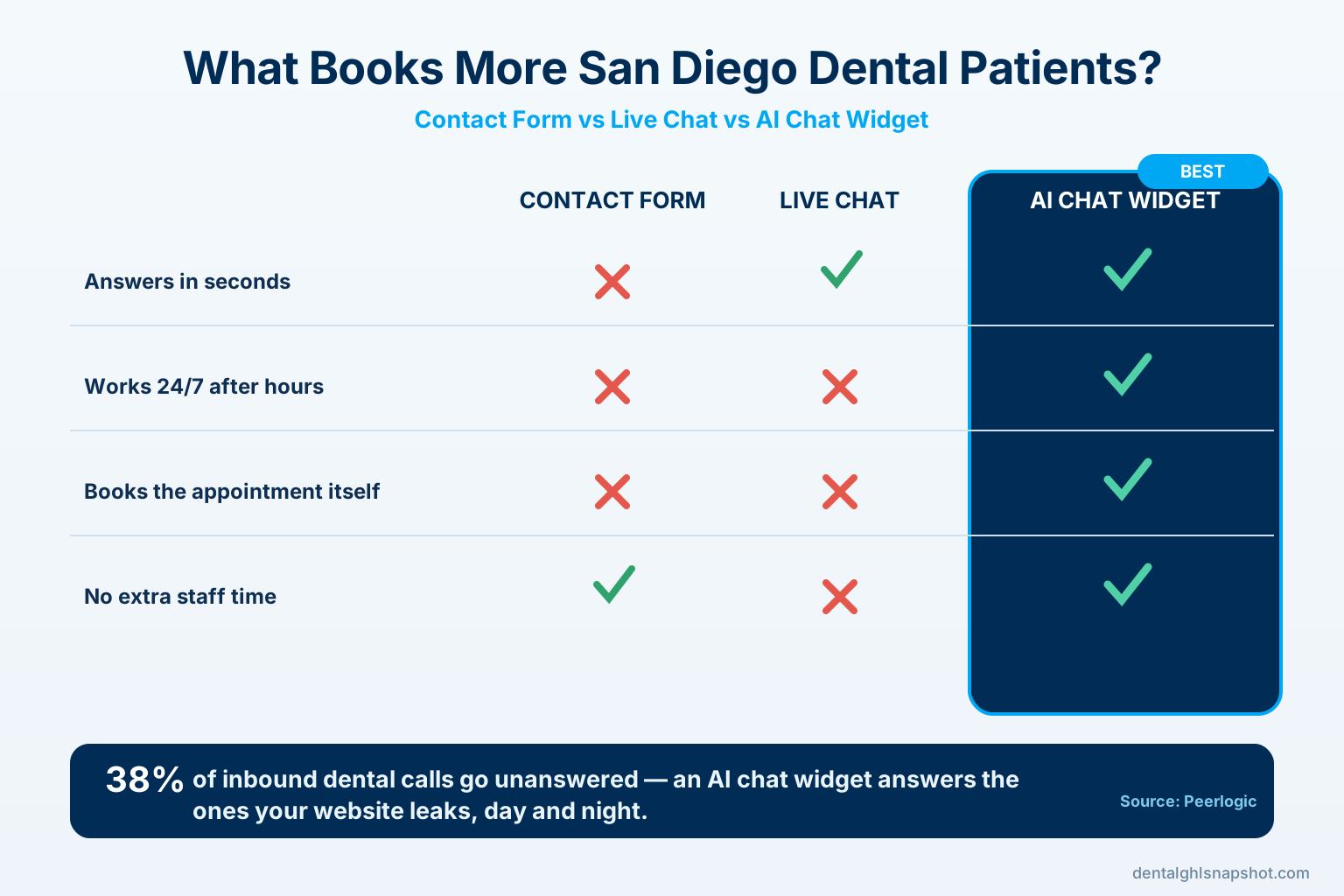
Table of contents
- Why the way you capture website visitors decides who books
- The three options, defined
- The one number that decides it: response speed
- Head-to-head: which books more patients
- After hours is where the AI widget wins outright
- What an AI chat widget should actually do for a dental practice
- When a form or live chat still makes sense
- How to add an AI chat widget in San Diego
- How to tell if it’s working
- FAQ
Why the way you capture website visitors decides who books
Most San Diego practices spend real money getting a patient to the website — Google Ads, local SEO, social, referrals. Then the entire return on that spend hinges on one moment: the visitor decides whether to reach out. What you put in front of them at that moment — a form, a live-chat box, or an AI widget — quietly determines how many of those hard-won visits become booked appointments.
The market makes the stakes higher here than almost anywhere. California is home to 30,280 active dentists, more than any other state (ADA Health Policy Institute), and San Diego County — with roughly 3.3 million residents (U.S. Census Bureau) — is one of its densest metros for care. A patient searching “dentist near me” in North Park or La Jolla is handed a wall of options. If your site makes them wait, the next practice is one tap away.
And they are waiting. The most-cited audit of lead response, Harvard Business Review’s study of 2,241 U.S. companies, found the average business took 42 hours to answer a web inquiry and 23% never answered at all (HBR).
A dental front desk isn’t ignoring patients on purpose — it’s chairside, verifying insurance, and answering a ringing phone. But to the patient, a form that goes unanswered for two days feels exactly like being ignored. This is the same speed-to-lead problem behind answering missed calls with an instant text-back — except here it plays out on your website, before the patient ever dials.
The three options, defined
Before comparing them, it’s worth being precise about what each tool actually is, because they get lumped together as “contact us” features when they behave completely differently.
- Static contact form. A set of fields — name, phone, message — that emails your inbox when submitted. It is asynchronous by design: the patient sends a note and hopes someone reads it. There’s no conversation, no answer to “do you take my insurance?”, and no booking. Its ceiling is low: across industries the average website form converts about 1.7% of visitors (Ruler Analytics).
- Live chat (staffed). A chat window answered by a human — usually the front desk. When someone is genuinely watching it, live chat is excellent: fast, warm, personal. The catch is the word staffed. In a busy practice, the person who would answer chat is the same person checking in the 9:00 and calling about a pre-auth. Nights and weekends, no one is there at all.
- AI chat widget. An automated, AI-powered chat that greets every visitor, answers the handful of questions that decide whether they book, and turns interested visitors into a booked appointment or captured lead — instantly, around the clock, without a human. The best ones hold a natural conversation instead of forcing a rigid menu. (For a deeper look at what one does, see our guide to the dental website chatbot.)
The difference that matters is simple: only one of the three answers a patient at 9:40 on a Sunday night, and only one of the three can actually book the visit on its own.
The one number that decides it: response speed
Every study on converting an inbound lead points at the same lever — how fast you respond. The classic MIT / Lead Response Management research found that contacting a web lead within 5 minutes rather than 30 makes you 21× more likely to qualify it, and 100× more likely to even connect (Lead Response Management study). HBR’s audit adds the other half: firms that responded within an hour were 7× more likely to have a meaningful conversation than those that waited just an hour longer, and 60× more likely than those who waited a day (HBR).
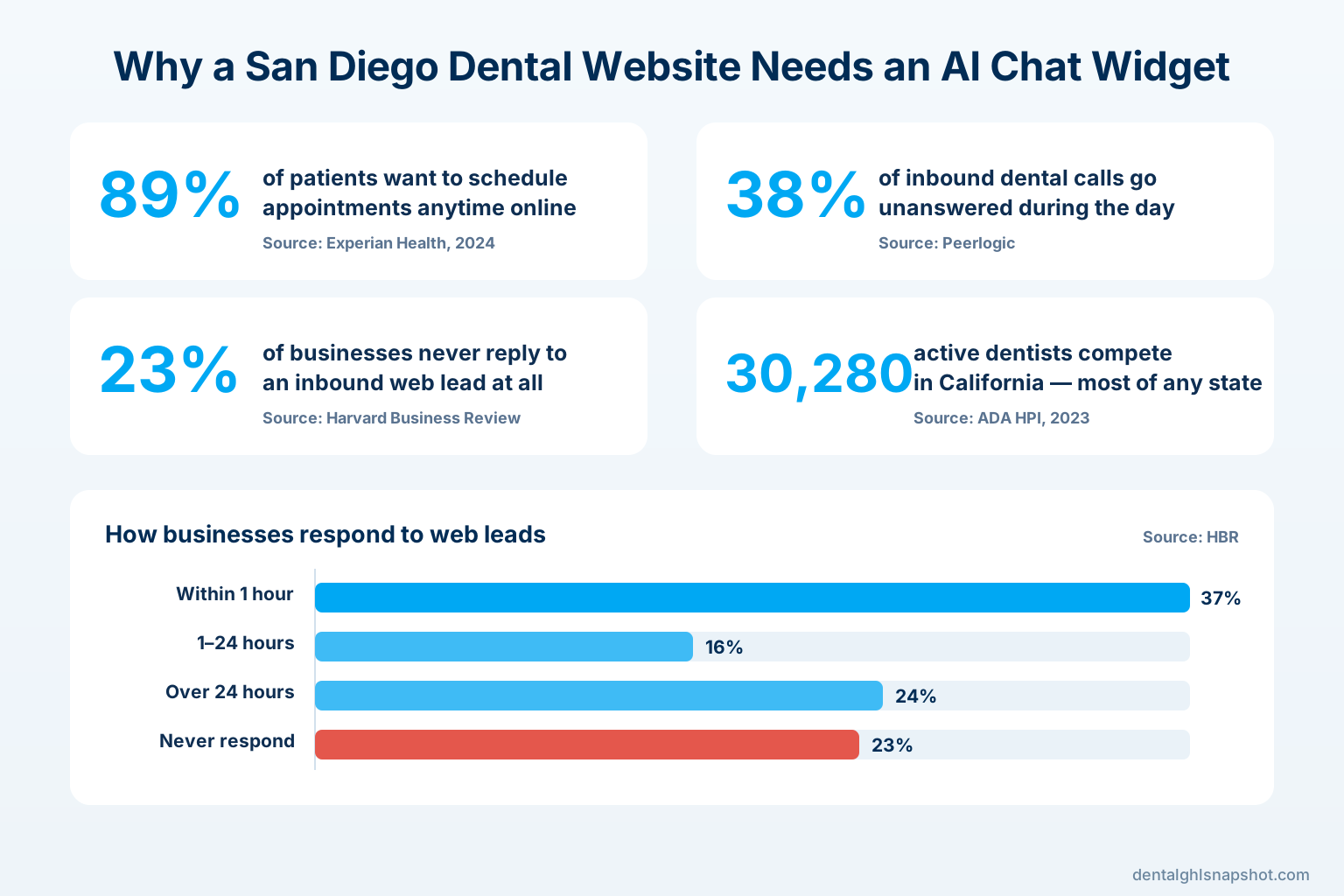
Now look at how businesses actually perform against that bar. HBR found only a minority reach a lead quickly, and nearly a quarter never respond at all:
How U.S. businesses respond to inbound web leads (share of companies, %). Source: Harvard Business Review, audit of 2,241 companies.
A contact form lands your practice somewhere in the slow bars — the message waits for a human. Live chat can hit “within minutes,” but only while it’s staffed. An AI chat widget is the only option built to answer in seconds, every time, which is the window the data says actually matters. That’s the same logic we apply to the phone in our speed-to-lead playbook for dental practices: the first responder wins, and machines respond faster than any front desk can.
Head-to-head: which books more patients
Put the three options side by side on the things a San Diego patient actually experiences. Read each column top to bottom — it’s the honest picture of what each tool does and doesn’t do.
Contact form vs live chat vs AI chat widget for a dental website
| Plan | Static contact form | Live chat (staffed) | AI chat widgetRecommended |
|---|---|---|---|
| Price | Passive | Staff time | 24/7 automated |
| Feature 1 | Answers the patient: no — it only collects a message | Answers the patient: yes — when a human is watching | Answers the patient: yes — instantly, every time |
| Feature 2 | Response time: whenever a human next checks the inbox (often hours) | Response time: fast during a shift, silent when the desk is busy | Response time: seconds, around the clock |
| Feature 3 | After hours & weekends: sits unread until the office reopens | After hours & weekends: usually offline — no one is staffing it | After hours & weekends: fully active — the shift never ends |
| Feature 4 | Answers insurance / availability questions: no | Answers insurance / availability questions: yes, if that person knows | Answers insurance / availability questions: yes, from your rules |
| Feature 5 | Books the appointment: no — a staffer must call back | Books the appointment: only if the staffer stops to do it | Books the appointment: yes — checks the calendar and writes it in |
| Feature 6 | Typical conversion: under 2% of visitors (Ruler Analytics) | Cost: pulls your front desk away from patients in the chair | Cost: no added salary; frees the front desk for chairside work |
The pattern is clear: a contact form and live chat each fail at a different moment — the form fails on speed, live chat fails on coverage. The AI widget is the only one that holds up on both. It doesn’t replace your team’s warmth; it handles the repetitive front-door questions so the visit is already booked by the time your front desk sees it.
After hours is where the AI widget wins outright
The single biggest gap between the three tools shows up when the office is closed. This is not a small slice of demand. Patients overwhelmingly want to handle scheduling on their own time — 89% say the ability to schedule anytime via an online or mobile tool is important to them (Experian Health). A toothache doesn’t wait for 9 a.m., and a new-in-town parent lining up a dentist does it after the kids are asleep.
A form captures those late-night visitors but leaves them waiting until morning — by which point many have already booked elsewhere. Live chat is simply dark. The AI widget is the only one still working, and the stakes are measured in real dollars. In dental specifically, Peerlogic’s study of 4,280 inbound calls across 26 practices found 38% went unanswered during business hours, and only 14% of new patients leave a voicemail — the other 86% call the next practice on the list (Peerlogic). The same study values a single missed new-patient call at roughly $850 in first-year revenue and up to $8,000 in lifetime value:
Estimated value of a single missed new-patient dental call ($). Source: Peerlogic.
If the phone leaks that much value during the day, a website with no after-hours answer leaks it all night. An AI chat widget is the patch: it captures the intent while it’s hot instead of hoping the patient tries again tomorrow. It’s the website twin of an AI receptionist on the phone — same instant-answer principle, different front door.
What an AI chat widget should actually do for a dental practice
Not all chat widgets earn their place. A good dental one does five specific jobs, and it’s worth holding any tool to this list:
- Answer the make-or-break questions. “Do you take my insurance?” “Do you see kids?” “Can I get in this week?” “How much is a cleaning without insurance?” These four questions decide most bookings — the widget should answer them warmly from your own rules, not dodge them.
- Qualify without interrogating. It should collect name, contact, reason for visit, and insurance in a natural back-and-forth, not a 10-field form. (Keep protected health information out of chat — collect enough to book, nothing clinical.)
- Book against real availability. The widget should check your actual calendar and write the appointment in, the way online scheduling does — not just “someone will call you back.”
- Hand off to a human when it should. Genuinely complex, clinical, or emotional conversations should route to your team, with the context already captured.
- Log everything in your CRM. Every conversation, lead, and booking should land in one system your front desk already sees, so nothing falls through and you can measure what chat is worth.
That last point is why the widget shouldn’t live as an island. In the Dental GHL Snapshot it’s wired into the same CRM as your reminders, recall, and reviews, so a patient booked at midnight by the widget flows straight into the new-patient onboarding sequence automatically.
When a form or live chat still makes sense
An honest comparison admits where the other two options are fine. A contact form is perfectly good for low-urgency, non-booking messages — a records request, a billing question, a careers inquiry. Keep one; just don’t make it the only way a new patient can reach you.
Live chat with a real person genuinely shines for a practice that has dedicated, non-chairside staff to watch it during the day — a larger group or a DSO location with a front-office team member whose job includes it. The strongest setup isn’t actually “AI or human.” It’s the AI widget handling every visitor instantly and 24/7, then handing the nuanced conversations to a human on shift. You get instant coverage and a personal touch, without asking one overworked coordinator to somehow do both while a patient waits with an open chart.
How to add an AI chat widget in San Diego
You don’t need to become a chatbot engineer. There are two clean paths, depending on where your practice is:
- Already have a website you like? Add the AI chat widget as part of the Dental GHL Snapshot — it installs the widget plus the AI caller, SMS reminders, recall, and review automation as one pre-built system, live within 24 hours, for a one-time $997.
- Website is slow, dated, or hard to edit? Get a new one with the widget built in. Our Get-a-Website service ships a fast, Astro-built practice site with a guaranteed 90+ PageSpeed, the AI chat widget, and a CRM for $497 one-time + $97/month — because a chat widget on a site that takes six seconds to load still loses the patient before the chat ever opens. (Here’s what page speed actually costs a practice.)
Either way, the setup work — writing the answers to your common questions, connecting your calendar, keeping it compliant with California dental-advertising and HIPAA rules — is done for you. That’s the difference between a widget that books patients and a bot that annoys them.
How to tell if it’s working
A chat widget is easy to measure, so hold it to numbers that connect to production, not to “conversations had”:
- Engagement rate. Share of visitors who start a chat. This tells you the widget is visible and inviting, not buried.
- Chat-to-booking rate. Of the people who chat, how many end up with an appointment on the calendar. This is the number that pays for the widget.
- After-hours share. What percentage of captured leads and bookings arrived outside office hours? That’s the volume your form-and-phone setup was silently losing every week.
- Response time. With AI it should be seconds, every time — the metric MIT and HBR prove matters most.
- Cost per booked patient. Bookings from chat against what the system costs. Compare it to your ad cost per new patient; the widget usually wins because it converts traffic you already paid for.
Read those five monthly and you’ll know exactly what your website’s front door is worth — and how many San Diego patients your old form was quietly turning away. To model it for your own practice, the pricing page and a short walkthrough call are the fastest way.
Frequently asked questions
Frequently asked questions
Is an AI chat widget better than live chat for a dental practice?
For most practices, yes — because of coverage. Live chat with a real person is excellent while someone is watching it, but a dental front desk is chairside and on the phone most of the day, and offline at night and on weekends. An AI chat widget answers every visitor in seconds, 24/7, and can book the appointment itself. The ideal setup is the AI widget handling everyone instantly, then handing genuinely complex conversations to a human on shift.
Won't a contact form do the same job for free?
A form captures a message, but it doesn't answer the patient or book them — a staffer has to follow up, and the average website form converts under 2% of visitors (Ruler Analytics). Since 23% of businesses never respond to a web lead at all (HBR), a form quietly leaks most of the traffic you paid to get. Keep a form for records and billing questions; use an AI widget for new-patient booking.
Why does response speed matter so much for booking patients?
Because the first practice to respond usually wins. Contacting a lead within 5 minutes rather than 30 makes you 21× more likely to qualify it (MIT / Lead Response Management), and responding within an hour makes you 7× more likely to have a real conversation than waiting just an hour longer (HBR). An AI widget responds in seconds, every time — a speed no front desk can match by hand.
How much of my website traffic is booking after hours anyway?
More than most practices realize. 89% of patients say scheduling anytime via an online tool is important to them (Experian Health), and a lot of that intent lands at night and on weekends when your office is closed. A contact form makes those visitors wait until morning and a live-chat box is dark; an AI widget is the only option still booking them while your competitors sleep.
Will the AI chat widget book straight into the calendar my front desk already uses?
Yes. It checks your real availability, books the appointment, and logs the patient in your CRM, and appointments can sync to the calendar your team already runs on — so your front desk sees the booking in the tool they use every day. Every chat and booking is visible with your own login.
Is a dental chat widget compliant with privacy and advertising rules?
It can be, and it must be. The widget educates and books — never promising clinical outcomes or guaranteed insurance benefits — which keeps you clear of California dental-board advertising rules. Because chat isn't a secure channel, it collects only contact details and reason for visit, keeping protected health information out of the conversation consistent with HIPAA best practice, and honors opt-outs.
How do I add an AI chat widget to my San Diego practice?
Two ways. If you like your current website, the AI chat widget comes pre-built inside the Dental GHL Snapshot ($997 one-time, live within 24 hours) alongside the AI caller, SMS reminders, recall, and reviews. If your site is slow or dated, our Get-a-Website service ships a fast Astro site with the widget built in for $497 + $97/month. Either way the setup and compliance are done for you.
About the author
Marisa Velez is a Dental Practice Growth Strategist based in Scottsdale, Arizona. She has spent more than a decade helping general and cosmetic practices fill the hygiene column and turn one-time visitors into lifelong recare, focusing on the numbers that actually move production — new-patient cost, no-show rate, and treatment acceptance. She writes about growth systems that respect both the schedule and the patient.
Related posts
- Dental Website Chatbot: Turn Visitors Into Booked Appointments — a deeper look at what an AI widget does and how it’s built.
- Speed-to-Lead for Dental Practices — the five-minute rule, applied across every channel.
- Missed-Call Text-Back for Dental Practices — the same instant-response fix, for your phone.
- How Page Speed Costs Dental Practices New Patients — why a slow site loses the patient before chat even opens.
- Online Scheduling for Dental Practices — letting patients book themselves, day or night.