

Short answer: In Charlotte, the practice that lands in Google’s Map 3-pack for “dentist near me” isn’t usually the one with the best website — it’s the one with the most reviews, the highest star rating, and the freshest dates. With roughly 1,570 dental practices competing across the metro (Orbital, industry data) and 68% of consumers refusing to even consider a business under 4 stars (BrightLocal), review volume and recency are now a ranking input, not a vanity metric. You can’t win that on willpower and sticky notes — you win it by automating the ask so every happy patient gets a well-timed, one-tap request the same day they leave the chair.
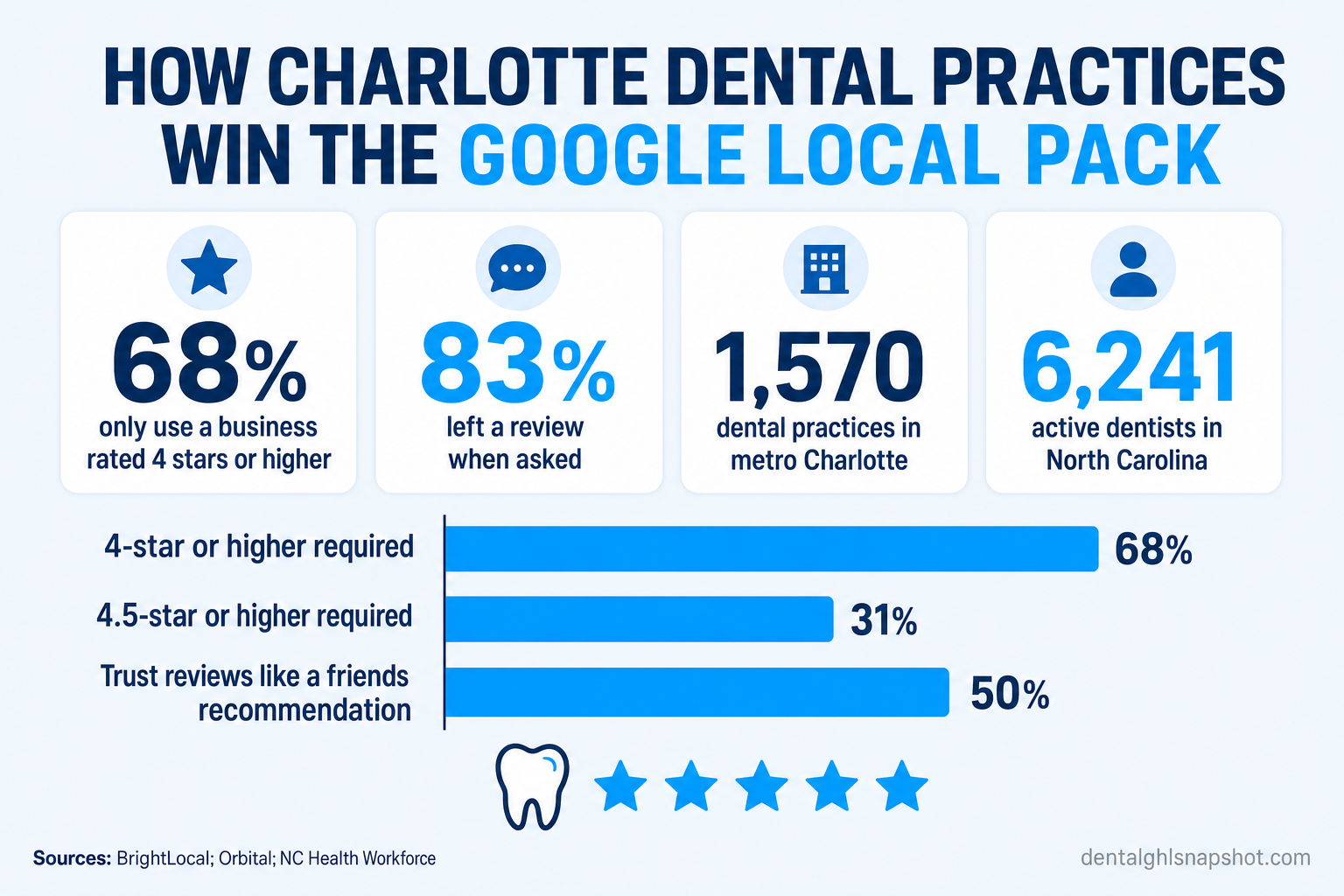
Table of contents
- Why reviews decide who wins Charlotte’s Map 3-pack
- The real bar: what Charlotte patients require before they call
- Why most practices undercollect (it isn’t the patients)
- The automated review-harvesting playbook — step by step
- Don’t skip the reply: responding is a ranking and trust signal
- Manual asking vs. automated harvesting
- Keep it compliant: HIPAA, TCPA, and Google’s rules
- How to roll it out in a Charlotte practice
- Frequently asked questions
Why reviews decide who wins Charlotte’s Map 3-pack
When someone in Ballantyne, NoDa, or Matthews searches “dentist near me,” Google shows them a map and three highlighted listings above everything else. That block — the Map 3-pack — captures the overwhelming majority of clicks and calls. Rank fourth and you’re effectively invisible on mobile, where most local searches happen.
What decides who lands in those three slots? According to Whitespark’s Local Search Ranking Factors — the industry’s long-running survey of local SEO experts — Google Business Profile signals are the single most important driver of Map-pack visibility, and review signals (how many reviews you have, your average rating, and how recent the reviews are) rank among the strongest inputs after that. Reviews aren’t a “nice to have” that sits beside your SEO. In local search, they are a big part of your SEO.
Charlotte makes this brutally competitive. The metro is one of the fastest-growing in the country — home to roughly 2.8 million people and the nation’s second-largest banking center (Macrotrends) — and that growth has pulled in dentists to match. North Carolina now has about 6,241 active dentists (NC Health Workforce, UNC Sheps Center), and industry data counts roughly 1,570 active dental practices across metro Charlotte alone (Orbital). A new patient searching for you has a dozen practices one tap away. The one with 380 reviews at 4.8 stars, updated last week, wins before your website ever loads.
The real bar: what Charlotte patients require before they call
Star ratings aren’t a tiebreaker anymore — they’re a filter that runs before a patient will consider you at all. BrightLocal’s ongoing Local Consumer Review Survey puts hard numbers on it:
- 68% of consumers say they will only use a business rated 4 stars or higher — up sharply from 55% the year before.
- 31% go further and require 4.5 stars or more.
- 50% now trust online reviews as much as a personal recommendation from a friend or family member (BrightLocal, 2024).
Read those together and the takeaway is stark: roughly two out of three prospective patients filter you out of the running before they read a single word, purely on your star rating. In a metro with 1,570 practices, “we have pretty good reviews” is a losing position.
How star ratings filter your practice out before a Charlotte patient ever calls (% of consumers). Source: BrightLocal, Local Consumer Review Survey.
Recency matters just as much as the number on the badge. A wall of glowing reviews that all stop 18 months ago reads as a practice that peaked and faded. Both patients and Google’s local algorithm reward a steady drip of recent reviews — which is exactly what a one-time “please review us” email campaign can never deliver, and what automation does effortlessly.
Why most practices undercollect (it isn’t the patients)
Here’s the good news hiding in the data: patients are willing. When BrightLocal asked, 83% of people who were requested to leave a review actually left one (BrightLocal). The raw material walks out of your Charlotte office every single day — patients who are relieved, numbed-and-grateful, or genuinely delighted with their hygienist.
The gap isn’t willingness. It’s the ask itself, and specifically its consistency. On a slow Tuesday, a team member remembers to mention reviews at checkout. On a packed Friday with a full waiting room and a carrier on hold, nobody does. The patients who would have raved walk out, get back to their week, and never think about it again. Manual review collection is a coin flip against your busiest, most understaffed days — the exact days you see the most patients.
Responding to reviews is itself a trust signal (% of consumers who’d choose the business). Source: BrightLocal, Local Consumer Review Survey (2024).
Automation removes the coin flip. Instead of depending on a person to remember at the worst possible moment, the request fires automatically the moment a visit is marked complete — every patient, every day, whether it’s a quiet morning or a chaotic Friday. Consistency is the whole game, and consistency is precisely what a workflow does that a busy front desk cannot.
The automated review-harvesting playbook — step by step
Here’s the exact system the Dental GHL Snapshot ships pre-built — and the logic behind each step, so you can build or evaluate it yourself.
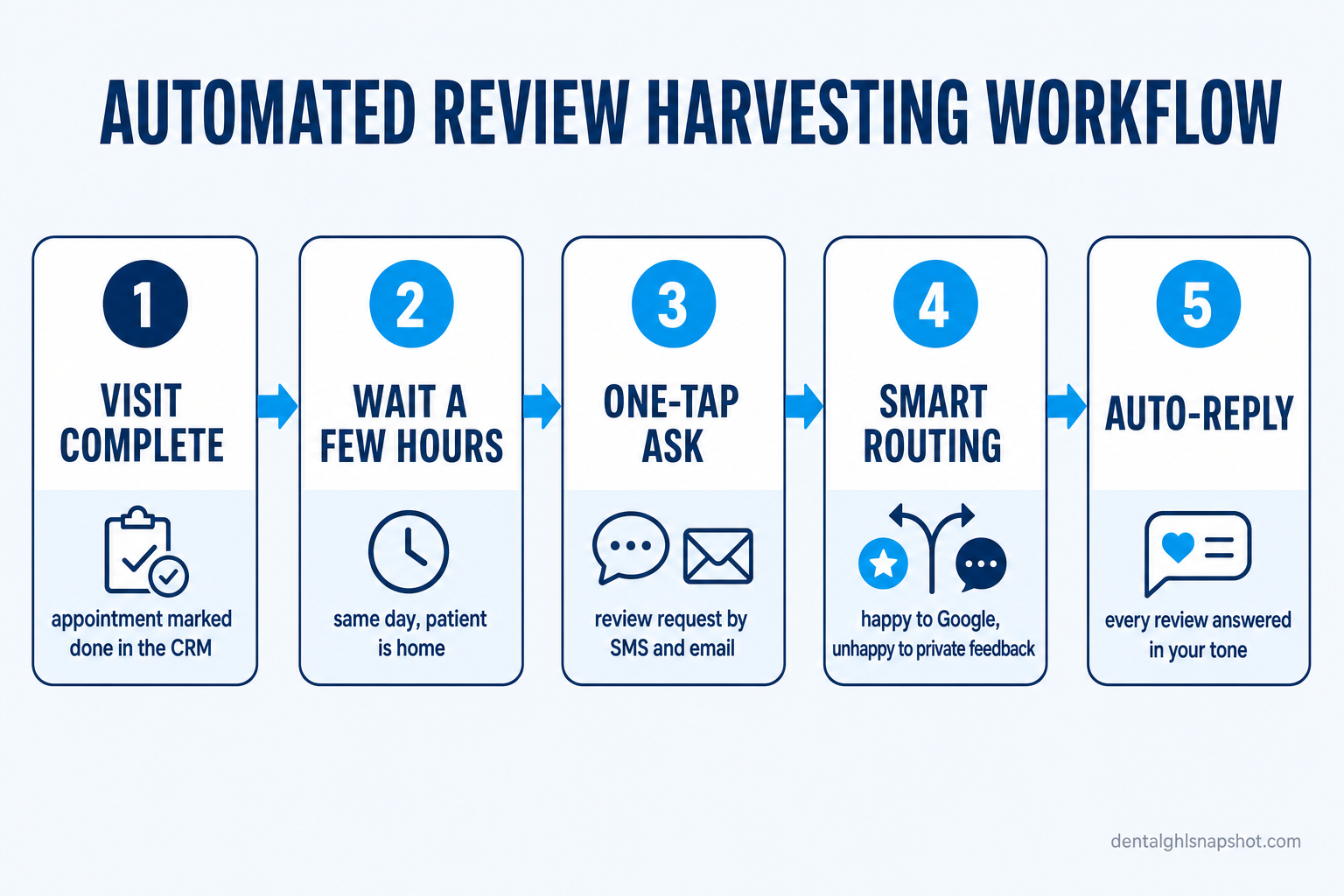
Step 1 — Trigger on “visit complete,” not on someone remembering
The workflow starts the instant a visit is marked complete in your calendar or CRM. No sticky note, no “did we ask them?” No dependency on how busy the front desk was. Every completed appointment enters the sequence automatically — that’s what turns a coin flip into a system.
Step 2 — Wait for the right moment (a few hours, same day)
The request shouldn’t hit while the patient is still numb in the parking lot. The snapshot waits a few hours — long enough that they’re home and comfortable, short enough that the visit is still fresh. Same-day, not someday. A request sent a few hours after the visit dramatically outperforms one sent a week later, when both the memory and the motivation have faded.
Step 3 — Send a one-tap ask by SMS and email
The patient gets a short, warm message with a direct Google review link — one tap lands them in the review box, already signed in. No app to download, no profile to hunt for, no account to create. Friction is where reviews die, and every extra tap sheds responses. SMS does the heavy lifting (near-instant open rates); email is the backup for patients who prefer it.
Step 4 — Smart routing: catch unhappy patients before they post
This is the step that separates a real system from a spray-and-pray blast. The workflow first asks how the visit went. A happy patient is sent straight to the public Google review link. A patient who signals frustration is quietly offered a private path to your office manager instead — a direct line to be heard.
Most upset patients don’t actually want to torch you online; they want their problem acknowledged. Give them a faster, more direct way to be heard, and you often solve the issue and prevent a one-star review written in the heat of the moment. (Important: this is about routing an honest ask, not suppressing criticism — more on the compliance line below.)
Step 5 — Auto-reply, then ask for the referral
When a review posts, the GMB reply automation drafts a warm, on-brand response so every review gets answered — the signal that BrightLocal found lifts you from a 47% to an 88% consideration rate. Then, because a patient happy enough to review you is also your warmest referral source, the snapshot follows a 5-star review with a light referral ask. Families and coworkers switch dentists together; a referred patient arrives pre-sold in a way no ad can match.
Don’t skip the reply: responding is a ranking and trust signal
Collecting reviews is only half the loop. Responding to them is the half most Charlotte practices skip — and it’s costing them patients who never call.
The BrightLocal data is blunt: 88% of consumers would choose a business that responds to all of its reviews, compared to just 47% for a business that responds to none (BrightLocal, 2024). A prospective patient reading your profile sees not just what people said, but whether you showed up. A thoughtful reply to a 5-star review says “we care”; a calm, professional reply to a critical one says “we handle problems like adults” — often more persuasive to a lurker than the complaint itself.
Doing this by hand for hundreds of reviews is another task that dies on busy days. Automating the drafting — a warm, human-reviewed response generated in your tone for every review — is what makes 100% response rates realistic. It also feeds Google’s freshness signals, since active profiles get crawled and favored.
Manual asking vs. automated harvesting
Most practices already “ask for reviews.” Here’s why the manual version quietly underperforms the automated one on the metric that matters: recent reviews on the board.
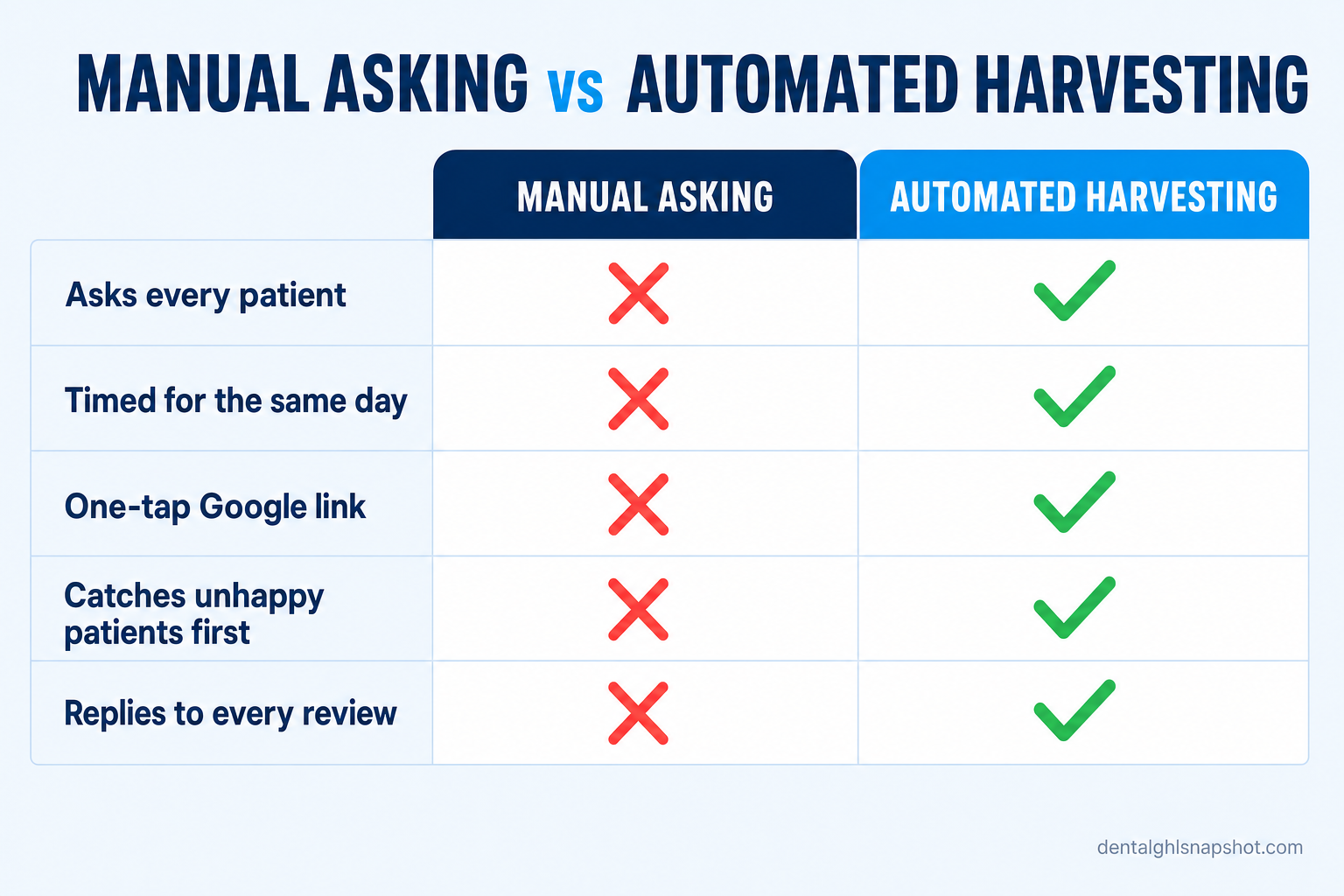
| Manual asking at checkout | Automated review harvesting | |
|---|---|---|
| Asks every patient | Only when someone remembers | Yes — every completed visit |
| Timed for the same day | Rarely — asked in person or not at all | Yes — a few hours post-visit |
| One-tap Google link | Verbal or a card; high friction | Direct link by SMS + email |
| Catches unhappy patients first | No — they post publicly | Yes — routed to a private path |
| Replies to every review | Sporadic | Auto-drafted, human-approved |
| Produces recent reviews | Spiky and inconsistent | Steady weekly drip |
The point isn’t that your team is doing it wrong. It’s that “remember to ask, every time, on the busiest days, with a link” is a job humans are structurally bad at and software is perfect for. Free the team for the warmth and judgment only they can provide; let the workflow own the consistency.
Keep it compliant: HIPAA, TCPA, and Google’s rules
Automating outreach to patients means three lines you cannot cross. Build these in from day one:
- No PHI in plain messages. “Thanks for visiting us today — mind sharing a quick review?” is fine. Referencing the specific procedure, diagnosis, or provider in an SMS is not. Keep clinical detail out of text and email, and keep the practice’s HIPAA obligations front of mind — the automation is a tool, but the compliance is yours.
- Honor messaging consent (TCPA). The same opt-in and STOP rules that govern your appointment reminders apply to review requests. Patients must be able to reply STOP and be removed, instantly.
- Solicit honestly; never gate dishonestly. It’s legitimate to ask every patient for feedback and to give an unhappy one a private way to reach you first. It is not legitimate to systematically suppress negative reviews or pay for positive ones — that violates Google’s policies and can run afoul of North Carolina dental-board advertising rules. Ask sincerely, route thoughtfully, and let real reviews be real.
How to roll it out in a Charlotte practice
You don’t need to overhaul your systems or retrain the team for a week. A clean rollout looks like this:
- Benchmark where you stand. Note your current Google review count, average rating, and the date of your most recent review. That last number — recency — is usually the weakest and the easiest to fix.
- Fix the one-tap link first. Make sure your Google review link drops patients straight into the review box. If your team is currently spelling out a URL or handing over a card, that friction alone is costing you most of your responses.
- Automate the same-day ask. Trigger the SMS + email request a few hours after every completed visit. This single change usually moves the needle fastest, because it makes the ask happen on the days it currently doesn’t.
- Turn on smart routing. Send happy patients to Google and unhappy ones to a private path — honestly, per the rules above.
- Automate replies. Draft a response to every review in your tone; a human gives it a quick approving glance. This is the step that lifts consideration from 47% to 88%.
- Layer in the referral ask. Follow 5-star reviews with a light referral invitation and watch your warmest channel compound.
Inside the Dental GHL Snapshot, all six steps are pre-built and wired together: review harvesting times and sends the ask, GMB reply automation handles the responses, and it plugs into the same SMS and CRM engine that runs your reminders — one system, installed in your GoHighLevel account within 24 hours, no per-review fees to stitch together. For the wider local-search picture, pair it with our guide to local SEO for dentists and getting found in AI search; for the fundamentals of the ask itself, see how dental practices earn more 5-star reviews.
Frequently asked questions
How many Google reviews does a Charlotte dental practice need to rank in the Map 3-pack?
There's no fixed threshold — it's relative to your competitors. In a dense metro like Charlotte with roughly 1,570 practices, you're competing against listings that often have hundreds of reviews at 4.7–4.9 stars. What matters most is closing the gap on three things at once: total review count, average star rating (68% of consumers won't consider a business under 4 stars, per BrightLocal), and recency — a steady stream of recent reviews rather than a stale spike. Automating the same-day ask is what makes that steady stream realistic.
Will patients actually leave a review if we automate the request?
The data says yes — willingness was never the problem. BrightLocal found that 83% of people who were asked to leave a review went on to leave one. What practices lack isn't willing patients; it's a consistent, well-timed ask. Automation fixes exactly that by requesting a review a few hours after every completed visit, with a one-tap Google link, whether the front desk was slammed that day or not.
Is automated review harvesting against Google's rules?
Asking every patient for an honest review is explicitly allowed and encouraged. What Google prohibits is 'review gating' in the sense of systematically suppressing negative reviews, and paying for or incentivizing positive ones. The compliant approach the snapshot uses asks everyone honestly and gives dissatisfied patients a faster private path to reach your office manager — it never hides or blocks anyone from posting publicly. Ask sincerely, route thoughtfully, and keep it honest.
Do we really need to respond to reviews, or is collecting enough?
Responding is roughly half the value. BrightLocal found 88% of consumers would choose a business that responds to all its reviews, versus just 47% for one that responds to none — a prospective patient reading your profile is judging whether you show up, not just what others said. Automating the drafting of on-brand replies (with a human approving them) is what makes a 100% response rate realistic without adding a task to your front desk.
How does this stay HIPAA-compliant if you're texting patients?
By keeping protected health information out of the messages entirely. A review request like 'Thanks for visiting us today — mind sharing a quick review?' contains no PHI. The practice never references the specific procedure, diagnosis, or clinical detail in plain SMS or email, honors TCPA opt-outs (reply STOP), and remains responsible for its own HIPAA handling and North Carolina dental-board advertising rules. The automation is configured to respect those boundaries, but the compliance obligation stays with the practice.
How fast can we launch review automation, and what does it cost?
The most cost-effective path is bundling review harvesting with the rest of your patient-communication system rather than paying a standalone reputation tool per review. The Dental GHL Snapshot includes review harvesting, GMB reply automation, SMS, and appointment automation for a one-time $997, installed in your GoHighLevel account within 24 hours. The cleanest way to start is to switch on the same-day ask and the one-tap link first, then layer in routing and replies.
About the author
Devin Okafor is a GoHighLevel Automation Specialist based in Austin, Texas. He builds and ships GoHighLevel snapshots for dental practices and the agencies that serve them, and has wired up hundreds of workflows for appointment reminders, speed-to-lead, review harvesting, and insurance follow-up. He’s opinionated about keeping automations simple enough for a busy front desk to actually maintain, and he writes about how each one earns its place inside the Dental GHL Snapshot.
Related posts
- How Dental Practices Earn More 5-Star Reviews Without Begging For Them
- Local SEO for Dentists: Ranking in the Map Pack
- How Dallas Dental Practices Get Found in AI Search
- Missed-Call Text-Back for Dental Practices
- Dental Recall & Reactivation on Autopilot
This article is educational and does not guarantee specific rankings, review volume, or results; competitive outcomes depend on your market, your existing profile, and execution. Dental GHL Snapshot is a GoHighLevel automation product — not a dental provider, clinician, or insurer. Practices are responsible for HIPAA-compliant handling of patient data (no PHI in plain SMS), TCPA-compliant messaging (reply STOP to opt out), compliance with Google’s review policies, and their own North Carolina state dental-board advertising rules.