

Short answer: To connect your dental practice management software to GoHighLevel, you sync three things — patients/contacts, appointments, and recare status — through your PMS’s API (Dentrix, Open Dental, Eaglesoft, Curve) or, when a system has no usable API, through a headless-browser bridge. Do it right and every new lead, booking, and lapsed patient flows automatically between the clinical system your team charts in and the marketing CRM that fills the schedule — ending the manual double data entry that makes records error-prone (manual record abstraction carries a 6.57% error rate, versus 0.14% with automated double-entry verification — PMC meta-analysis, 2023). It also lets you answer new patients inside the window that actually converts: contacting a web lead within an hour makes you 7× more likely to qualify it — and 60× more likely than waiting a day (Harvard Business Review). For a Houston practice competing against 16,692 Texas dentists (ADA Health Policy Institute via Becker’s) for a metro of roughly 7.8 million people (U.S. Census via CultureMap), that speed is the difference between booking the patient and losing them to the practice down Westheimer.
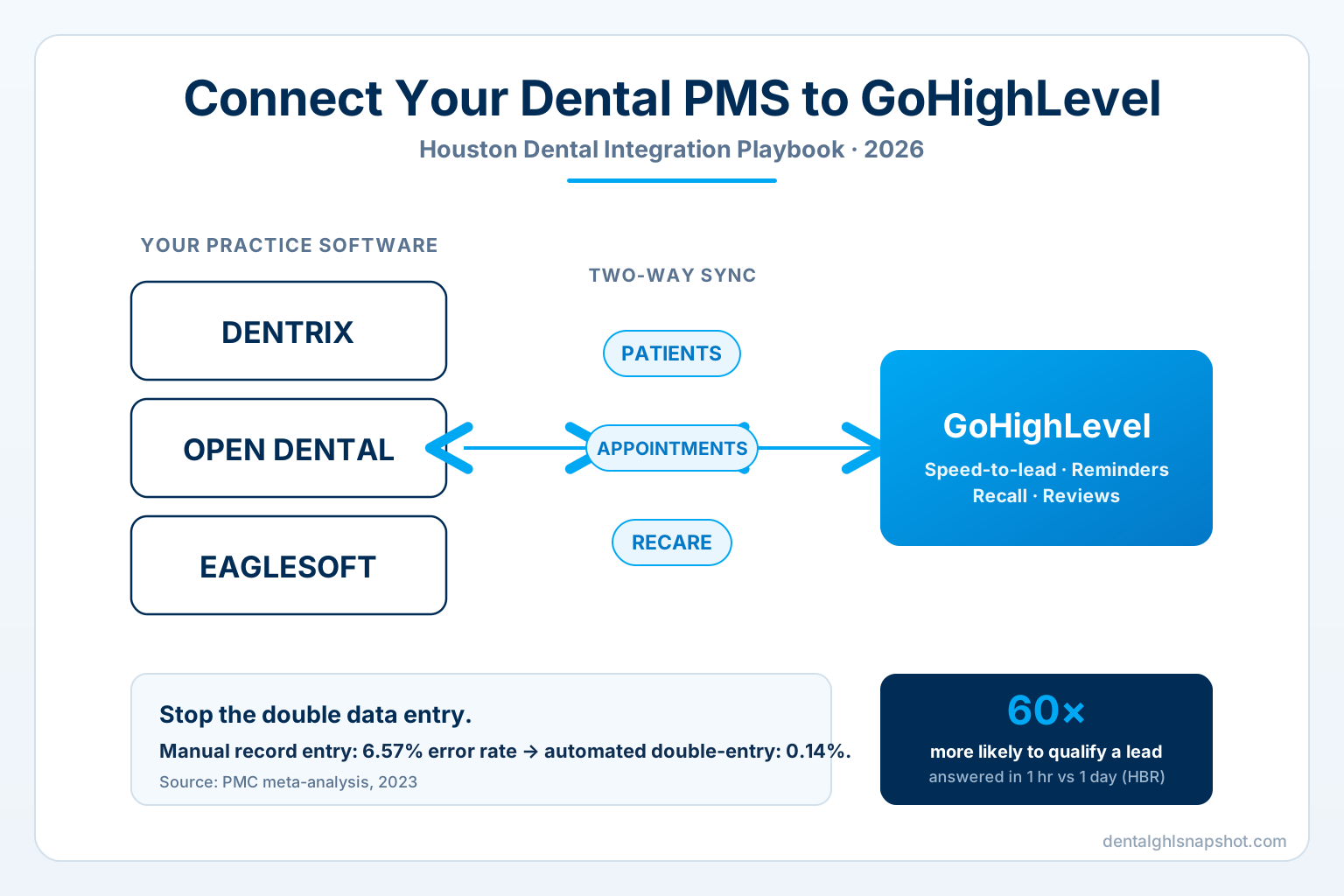
Table of contents
- Integration vs migration: what you’re actually building
- The hidden cost of a PMS that doesn’t talk to your CRM
- The Houston angle: a big, fast-growing, competitive market
- How to connect your dental PMS to GoHighLevel: a 6-step playbook
- Which dental systems integrate with GoHighLevel
- Build it yourself vs done-for-you
- How to tell the integration is working
- FAQ
Integration vs migration: what you’re actually building
These two words get used interchangeably, and confusing them is how projects go sideways. They are different jobs.
- Migration is a move. You leave a platform — an old CRM, a page builder, Weave, Solutionreach — and bring your contacts, pipelines, and history into GoHighLevel, then shut the old thing down. We wrote a full migration playbook for that.
- Integration is a marriage. Your clinical practice management system stays exactly where it is — it’s the legal patient record, and nobody’s asking your hygienists to chart somewhere new. Instead you build a bridge so the PMS and GoHighLevel share data automatically: a new patient in one appears in the other, a completed appointment triggers a review request, a lapsed recare date fires a reactivation sequence.
For almost every established Houston practice, integration is the right call. You keep Dentrix or Open Dental for clinical work and let GoHighLevel run the marketing, speed-to-lead, reminders, recall, and reviews on top — with the two kept in sync so your front desk never types the same patient twice.
The hidden cost of a PMS that doesn’t talk to your CRM
When your practice management software and your marketing tools live in separate silos, the cost shows up in three places: staff hours, data errors, and lost patients.
Staff hours. Administrative work is already the tax on modern practice. Physicians spend just 27% of the office day in direct patient time and 49% on EHR and desk work (American Hospital Association, reporting the Sinsky et al. study in Annals of Internal Medicine), and clinicians average 15.5 hours a week on paperwork and administration (Medscape, 2023). Every time your front desk copies a new patient’s name, number, and insurance from a web form into the PMS by hand — then copies it again into whatever sends the reminders — that tax compounds.
Data errors. Re-keying isn’t just slow; it’s wrong more often than you’d think. A 2023 meta-analysis found manual record abstraction carries a pooled error rate of 6.57%, versus 0.14% for automated double-entry verification (PMC). A separate PLOS ONE study measured 2.02% errors for single-key manual entry, halved to 1.01% with double-key entry (PLOS ONE). In a practice, those errors are a wrong phone number that kills a reminder, a misspelled email that bounces a recall, a transposed insurance ID that stalls verification.
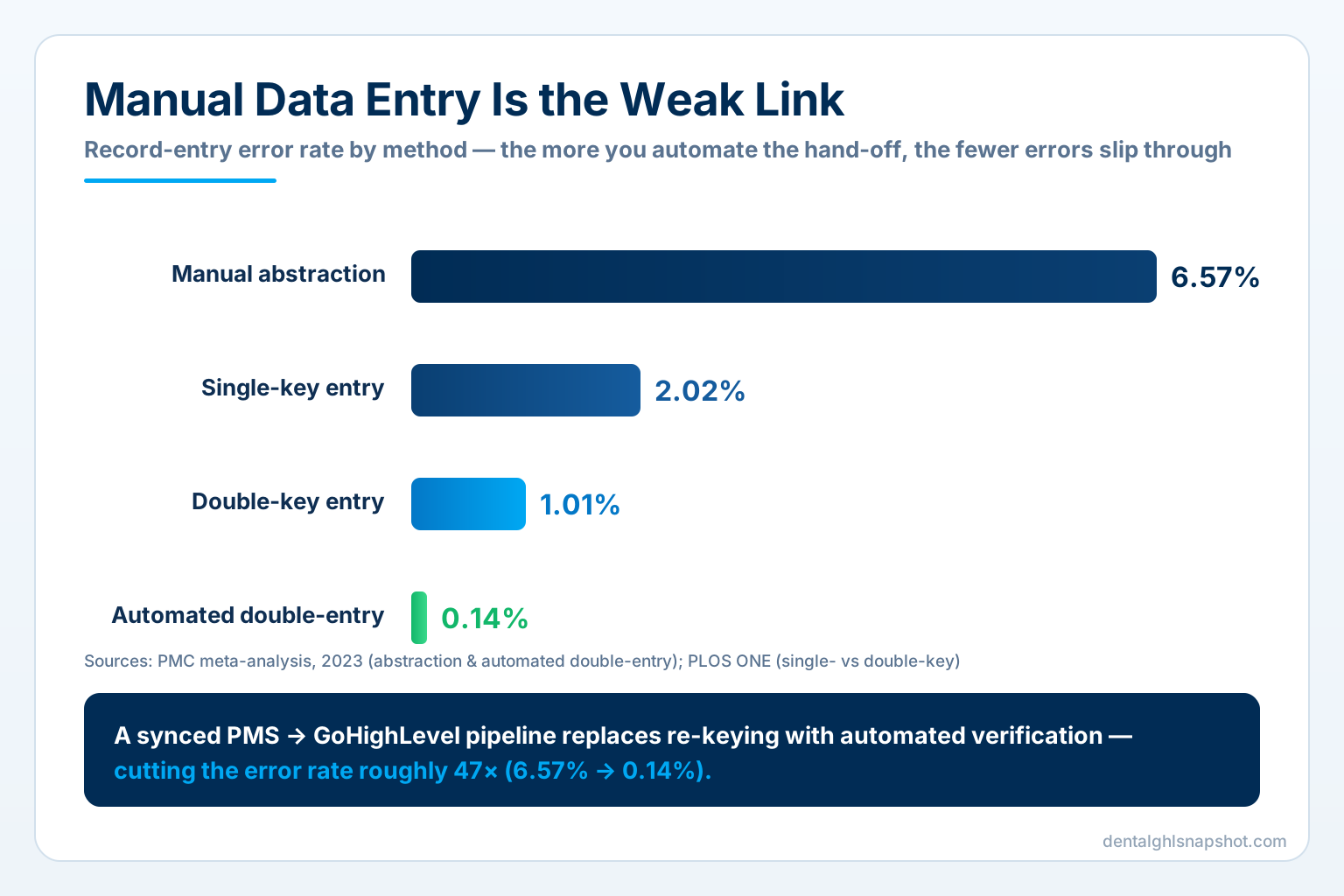
Data-entry error rate by method (%, lower is better). Sources: PMC meta-analysis, 2023; PLOS ONE.
Lost patients. The most expensive silo cost is invisible: the new patient who filled out your form at 9 p.m. and didn’t get a call until noon the next day — by which point they’d booked with someone faster. Harvard Business Review’s audit of 2,241 companies found that contacting a lead within an hour makes you 7× more likely to qualify it than waiting just an hour longer, and 60× more likely than waiting 24+ hours (HBR). The MIT / Lead Response Management study puts it even sharper: responding in 5 minutes rather than 30 makes you 21× more likely to qualify the lead (MIT study). A form that dumps into an inbox nobody watches can’t hit that window. A form that flows straight into a GoHighLevel speed-to-lead pipeline — with the patient’s record already synced to your PMS — can.
And it’s not only new patients. When recare dates don’t sync, recall slips, and no-shows are already a structural drain: the mean missed-appointment rate across healthcare settings is 15.2% (PeerJ systematic review, 2022), with an academic dental setting recording 14.3% of visits as no-shows (International Journal of Dentistry, 2025). An integrated system lets GoHighLevel see the recare date sitting in your PMS and reactivate the patient before the chair goes empty — the whole point of recall and reactivation automation.
The Houston angle: a big, fast-growing, competitive market
Houston is exactly the kind of market where an integrated front office pays for itself. The metro reached roughly 7.8 million residents (Harris County alone about 5.0 million) as of mid-2024 and is among the fastest-growing in the country (U.S. Census estimates via CultureMap). That’s a river of new movers who need a dentist — and who will pick the first practice that answers.
But the competition is real. Texas has 16,692 dentists, the second-largest supply of any state (ADA HPI via Becker’s), yet the state runs 54.2 dentists per 100,000 residents — below the U.S. average of 59.5 (ADA Health Policy Institute). Translation: there’s more demand per dentist than the national norm, but plenty of practices chasing it. Speed and follow-through win.
Dentists per 100,000 residents. Texas sits below the national average — strong demand, tight supply, competitive follow-up. Source: ADA Health Policy Institute, 2024.
In a market like this, the practice that captures the 9 p.m. form, texts back in minutes, and never lets a recare date slip is the one that grows. That capture-and-follow-through machine only works if the systems are connected.
How to connect your dental PMS to GoHighLevel: a 6-step playbook
Here’s the actual process, whether you build it in-house or hand it to a GHL development team. The order matters — most failed integrations skipped step 1 or step 4.
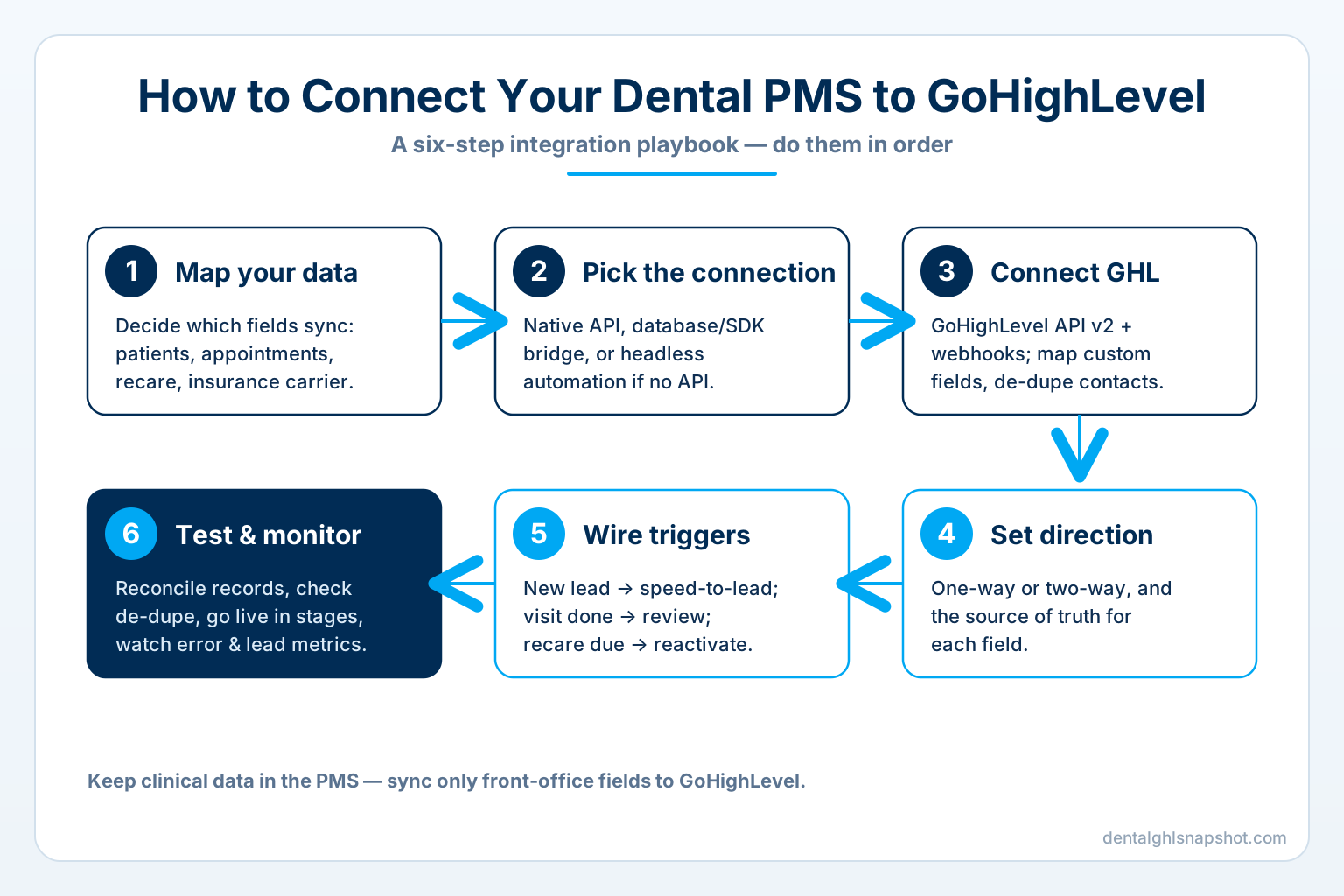
Step 1 — Map your data. Before you connect anything, decide exactly which fields sync and which stay put. The essentials for most practices: patient name, phone, email, appointment date/status, recare/recall date, and insurance carrier. Deliberately leave clinical data out of GoHighLevel — treatment notes, radiographs, and diagnoses belong in the PMS, not the marketing CRM. Keeping protected health information in the clinical system is both a compliance posture and a simplicity win.
Step 2 — Pick the connection method. This is dictated by your software, not your preference:
- Modern API (Open Dental, Dentrix Ascend, Curve, and other cloud systems): connect directly via the vendor’s API for real-time, two-way sync.
- Database or SDK bridge (many on-premise Eaglesoft and legacy Dentrix installs): sync through a supported database connector or developer SDK, usually via a small local agent.
- Headless automation: when a system truly exposes no API, a headless-browser bridge can read and write the data the way a human would — slower and more fragile, but it works. (If it has an API we use it; if it doesn’t, we automate it — either way it ends up talking to GHL.)
Step 3 — Connect GoHighLevel. On the GHL side, you’re working with the API v2 and webhooks. Create the custom fields that mirror your mapped PMS data (recare date, carrier, last visit), and set up the contact model so a synced patient lands as a clean, de-duplicated GoHighLevel contact rather than a fifth copy of “John Smith.”
Step 4 — Set the sync direction and source of truth. For each field, decide: one-way or two-way, and who wins a conflict. A common, safe pattern for dental: the PMS is the source of truth for clinical/appointment data (PMS → GHL), while GoHighLevel owns lead and marketing status (GHL → PMS for new leads). Skipping this step is how practices end up with two systems overwriting each other at 2 a.m.
Step 5 — Wire the triggers. This is where the integration earns its keep. Connect PMS events to GoHighLevel automations:
- New web/phone lead → instant speed-to-lead text and call.
- Appointment booked → confirmation + reminder sequence to cut no-shows.
- Visit completed → review request to the patient’s phone.
- Recare date approaching, no appointment on the books → reactivation sequence.
- New insurance on file → verification workflow.
Step 6 — Test, go live, and monitor. Run a reconciliation on a sample set: create a test patient, confirm it appears correctly on both sides, check the de-dupe logic, and verify no clinical fields leaked into GHL. Then go live in stages and watch the numbers — sync errors, lead response time, and recall fill rate — for the first two weeks. Integrations aren’t “set and forget”; APIs change and edge cases surface, which is exactly why a maintained connection beats a one-off script.
Which dental systems integrate with GoHighLevel
Every major dental platform can be connected to GoHighLevel — the how differs. Here’s the honest landscape (capabilities vary by version and license, so confirm your specific setup):
How major dental systems connect to GoHighLevel
| Plan | Open DentalRecommended | Dentrix / Dentrix Ascend | Eaglesoft | Curve Dental |
|---|---|---|---|---|
| Price | Open API | API / SDK | DB / bridge | Cloud API |
| Feature 1 | Connection: rich, well-documented API plus database access | Connection: Ascend (cloud) exposes a REST API; legacy Dentrix via the Developer Program / connector | Connection: usually database or SDK-level, often via a local agent | Connection: cloud-native with API access |
| Feature 2 | Sync: real-time, two-way is achievable | Sync: two-way where the API/connector allows | Sync: one-way is common; two-way possible with care | Sync: real-time appointment and patient sync |
| Feature 3 | Effort: typically the fastest dental PMS to integrate | Effort: moderate — depends on version and license | Effort: higher on older on-premise installs | Effort: moderate — modern cloud stack |
| Feature 4 | Note: open-source model has driven fast adoption among independents | Note: one of the largest installed bases in U.S. dentistry | Note: reliable once the bridge is built and monitored | Note: good fit for practices already fully in the cloud |
The takeaway isn’t “switch to Open Dental.” It’s that whatever you run, there’s a supported path — and picking the right one up front (step 2) is what separates a clean, maintainable integration from a brittle script that breaks on the next software update.
Build it yourself vs done-for-you
You have three realistic paths, and the right one depends on your in-house technical depth.
1. Native GoHighLevel automations only (no PMS sync). The simplest start: use GoHighLevel for your web forms, missed-call text-back, reminders, and reviews without a live PMS connection. You still re-key patients into the clinical system, but you capture and follow up on leads fast. This is what the pre-built Dental GHL Snapshot delivers out of the box for a one-time $997 — the fastest way to get the front-office automation live (in about 24 hours) while you plan the deeper integration.
2. Off-the-shelf connector (Zapier/Make + vendor API). For practices on API-friendly systems like Open Dental, a low-code connector can move data between the PMS and GoHighLevel for common events. It’s cheaper than custom work but limited: it handles the happy path and struggles with de-duplication, conflict rules, and anything the vendor’s API doesn’t expose.
3. Custom, maintained integration (done-for-you). For two-way sync, conflict handling, legacy systems, or a multi-location DSO, you want a purpose-built bridge that’s monitored and updated as APIs change. That’s the custom GHL development and integration service — we connect any platform (API, webhook, or headless), map your fields, set the source-of-truth rules, and keep it running. For builds that go beyond GHL entirely — patient portals, custom dashboards, bespoke tooling — that’s custom software territory.
Most Houston practices start at path 1 to stop the bleeding on speed-to-lead this week, then move to path 3 once the value is obvious and the double data entry becomes the thing they most want gone.
How to tell the integration is working
Hold the integration to numbers that connect to production, not to “it’s connected”:
- Sync accuracy / error rate. What share of records sync cleanly, first try? You’re aiming for the automated end of that error curve — near 0.14%, not the manual 6.57%.
- Lead response time. Median minutes from lead-created to first contact. The target is minutes, because that’s the speed-to-lead window the data rewards.
- Double-entry hours saved. Ask the front desk how many patients they now type twice. The answer should be “none.”
- Recall fill rate. Percentage of due-for-recare patients who get an appointment on the books — the number that shrinks when recare dates finally flow into GoHighLevel automatically.
- No-show rate. Track it against the ~15% baseline; a synced reminder-and-confirmation loop is what pulls it down.
Read those monthly and you’ll know exactly what the connection is worth. To model it for your own practice, the pricing page and a short walkthrough call are the fastest way to a real number.
Frequently asked questions
Frequently asked questions
How do I connect my dental practice management software to GoHighLevel?
You sync three core data types — patients/contacts, appointments, and recare status — between your PMS and GoHighLevel. The method depends on your software: modern systems like Open Dental, Dentrix Ascend, and Curve connect through their APIs for real-time two-way sync, while older on-premise Eaglesoft or legacy Dentrix installs usually connect via a database/SDK bridge or a headless-browser automation. You map the fields, decide the sync direction and source of truth, wire PMS events to GoHighLevel automations (speed-to-lead, reminders, reviews, recall), then test and monitor. Clinical data stays in the PMS; only marketing/front-office fields sync.
Is integrating my PMS with GoHighLevel the same as migrating to it?
No. Integration keeps your practice management system as the clinical record and builds a bridge so it and GoHighLevel share data automatically — you keep charting exactly where you do now. Migration means moving off a platform entirely (for example, leaving Weave or an old CRM) and bringing your contacts and history into GoHighLevel. Most established Houston practices want integration, not migration.
Which is easiest to integrate — Dentrix, Open Dental, or Eaglesoft?
Open Dental is typically the fastest because it offers a rich, well-documented API plus database access, which is part of why it's grown quickly among independent practices. Dentrix Ascend (the cloud version) exposes a REST API, while legacy on-premise Dentrix connects through the Developer Program or a connector. Eaglesoft usually integrates at the database or SDK level via a local agent, and older installs take more effort. Capabilities vary by version and license, so confirm your specific setup.
Will connecting the two systems put patient clinical data at risk?
Not if it's built correctly. The recommended pattern is to sync only front-office fields — name, contact details, appointment status, recare date, insurance carrier — and deliberately keep clinical records (treatment notes, radiographs, diagnoses) in the PMS, out of the marketing CRM. That keeps protected health information in the clinical system of record and keeps the integration simple. Access controls, opt-out handling, and Texas dental-advertising and HIPAA obligations remain the practice's responsibility.
Why does the integration matter for a Houston practice specifically?
Houston is a large, fast-growing metro (about 7.8 million people) with heavy competition — Texas has 16,692 dentists (2nd-most of any state) but only 54.2 per 100,000 residents, below the U.S. average of 59.5. That means strong demand and tight supply, so the practice that answers new patients fastest and never lets recare slip wins. A synced PMS-to-GoHighLevel pipeline is what makes that speed and follow-through automatic.
Should I build the integration myself or have it done for you?
For API-friendly systems and simple one-way needs, a low-code connector (Zapier/Make) can work. But two-way sync, de-duplication, conflict rules, legacy systems, and multi-location DSOs need a custom, maintained bridge that's updated as APIs change. The done-for-you GHL development and integration service handles whichever path your software requires, and many practices start with the pre-built Dental GHL Snapshot ($997) to get front-office automation live in about 24 hours while the deeper integration is built.
About the author
Devin Okafor is a GoHighLevel Automation Specialist based in Austin, Texas. He builds and ships GoHighLevel snapshots and custom integrations for dental practices and the agencies that serve them — wiring up appointment reminders, speed-to-lead pipelines, review harvesting, insurance follow-up, and PMS-to-GHL data syncs, and keeping them simple enough to maintain. He writes about how the Dental GHL Snapshot is built and why each automation earns its place.
Related posts
- GoHighLevel for Dentists: The Complete Guide — what GHL does for a dental practice and where it fits.
- How to Migrate Your Dental Practice to GoHighLevel (Atlanta) — the sister job: moving off a platform, not integrating with one.
- Speed-to-Lead for Dental Practices — the five-minute rule a synced pipeline lets you actually hit.
- Insurance Verification Automation for Dental Practices — one of the highest-value triggers to wire up.
- Recall & Reactivation for Dental Practices — why syncing recare dates fills the hygiene column.
- Custom Dental Software (Los Angeles) — when you need to build beyond what GHL does off the shelf.