

Short answer: In a market as dense as Seattle — King County has 111 dentists per 100,000 residents, the highest concentration in Washington (UW Center for Health Workforce Studies) — the practices that win the next new patient are the ones that answer first. A growing share of that “first contact” now happens in the comments: someone taps “how much is Invisalign?” under your Reel, or “do you take Delta Dental?” under your ad, and then waits. Comment automation closes that gap. It does two jobs: (1) an AI agent publicly replies to the comment in seconds, and (2) it turns the commenter into a private DM — “just sent you the details!” — where it answers questions, collects the patient’s info, and books the appointment. To set it up: connect your Instagram and Facebook to a social inbox tool, write auto-reply rules for your most common dental questions, add comment-to-DM keyword triggers to your posts and ads, and route qualified DMs into your calendar and CRM. This playbook walks through each step, and the data behind why Seattle practices need it.
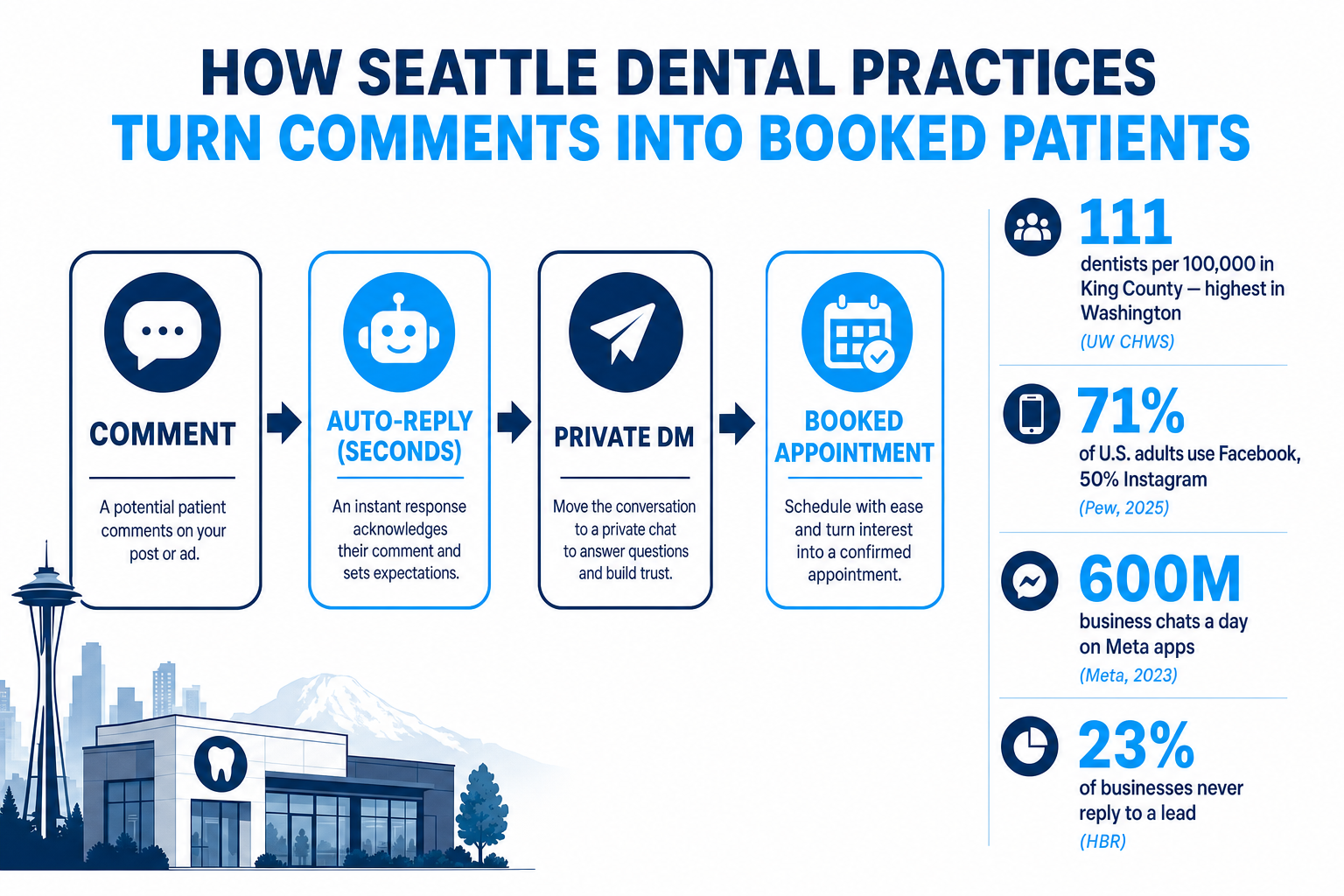
Table of contents
- Why comments are a new-patient channel in Seattle
- What “comment automation” actually means
- Why comments — specifically — drive local reach
- The speed problem a Seattle front desk can’t beat by hand
- How to set up comment automation: 6 steps
- What to actually automate (dental scenarios)
- In-house vs. done-for-you: the honest math
- How to tell if it’s working
- FAQ
Why comments are a new-patient channel in Seattle
For years, a comment under a dental post was treated as background noise — a thumbs-up, maybe a “nice smile!” That era is over. Comments are now where prospective patients start the conversation, and in a market as competitive as Seattle, ignoring them is the same as sending patients to the practice down the block.
Start with how crowded the market is. King County — where Seattle sits — has the highest dentist density in Washington at 111 per 100,000 residents, well above Spokane County’s 71 (UW Center for Health Workforce Studies). For a metro of roughly 740,000 people in the city and about 2.3 million across the county (U.S. Census Bureau), that means a patient searching “cosmetic dentist near me” in Ballard or Capitol Hill is handed a wall of options. Familiarity and responsiveness are what break the tie.
And that audience is genuinely reachable in the feed. Pew Research Center’s 2025 survey of U.S. adults found 71% use Facebook and 50% use Instagram, with Instagram reaching 80% of adults under 30 (Pew, 2025) — the exact cohort weighing Invisalign, whitening, and first-baby pediatric visits. About half of U.S. adults open Facebook every day. When they see your Reel or your boosted new-patient offer, the lowest-friction thing they can do is comment — and that comment is a raised hand.
Share of U.S. adults who use each platform. A majority of your Seattle patients are reachable on Facebook and Instagram. Source: Pew Research Center, 2025.
The behavior shift matters as much as the reach. Meta now reports roughly 600 million conversations between people and businesses every day across Messenger, Instagram, and WhatsApp (Meta, via TechCrunch, 2023). Patients increasingly message a practice instead of calling it — and a public comment is often the on-ramp to that private message. Miss the comment and you usually miss the DM too.
What “comment automation” actually means
“Comment automation” gets used loosely, so let’s be precise. It’s not spam, and it isn’t a bot arguing in your replies. For a dental practice it means two connected jobs:
- Public auto-reply. When someone comments a common question — “cost?”, “do you take my insurance?”, “are you accepting new patients?” — an AI agent posts a helpful, on-brand public reply within seconds: “Great question! We accept most major PPOs — I’ll send you the details in a DM.” The comment never sits cold, and everyone else scrolling sees a responsive, professional practice.
- Comment-to-DM (the keyword mechanic). You invite the action directly: “Comment SMILE and we’ll DM you our new-patient offer.” When someone comments the keyword, the system automatically opens a private direct message with them. This is a native, platform-supported automation on Instagram and Facebook — the same comment-to-DM flow tools like ManyChat run through Meta’s official messaging API — so it’s compliant, not a workaround.
Inside that DM, the AI DM agent takes over: it answers treatment and insurance questions, collects the patient’s name and reason for visit, checks your real availability, and books the appointment straight into your calendar. The comment is the spark; the DM is where the booking happens.
Why comments — specifically — drive local reach
Here’s the part most practices miss: comments aren’t just leads, they’re fuel for reach. Every major platform ranks content partly on engagement, and comments are among the strongest signals because they take more effort than a like. Instagram’s own leadership has repeatedly named comments and sends as core ranking inputs (Later, 2026). When your AI agent replies quickly and sparks a back-and-forth, the post looks “alive,” and the algorithm shows it to more people in your area.
That leverage is bigger than it sounds, because comments have gotten scarce. Median Instagram engagement now hovers around 0.50%, and the format that earns the most active interaction is video: carousels and Reels out-engage static images by a wide margin.
Median Instagram engagement rate by format (%). Carousels and Reels drive the most interaction — and the most comments to automate. Source: Socialinsider, 2025–26.
The practical takeaway for a Seattle practice: post the formats that earn comments (short vertical Reels and swipeable carousels — the backbone of a done-for-you dental social feed), then use comment automation to answer every one of them instantly. Fast replies raise engagement, engagement raises reach, and more reach means more comments to convert. It compounds — which is exactly why leaving comments unanswered quietly caps your growth.
The speed problem a Seattle front desk can’t beat by hand
The case for automating this isn’t philosophical — it’s arithmetic. Response speed is the single biggest lever on whether an inquiry becomes an appointment, and human front desks lose on speed by default.
The canonical study is Harvard Business Review’s audit of 2,241 U.S. companies. It found the average business took 42 hours to respond to a web lead, only 37% responded within an hour, 24% took more than a day, and 23% never responded at all (HBR). Firms that made contact within an hour were nearly 7× more likely to qualify the lead than those who waited just 60 minutes longer.
How fast businesses respond to inbound web leads. Nearly half take more than a day or never reply at all. Source: Harvard Business Review.
The MIT / Lead Response Management research is even sharper on the window: contacting a lead within 5 minutes versus 30 makes you 21× more likely to qualify it, and 100× more likely to even make contact (MIT / LRM summary). Five minutes.
Now picture a real Seattle practice at 2:15 p.m. The front desk is checking in a hygiene patient, verifying a PPO, and answering the phone — while three new comments land under yesterday’s whitening Reel and a DM comes in asking about implants. Even a great team physically cannot reply in five minutes to every one, and the nights-and-weekends volume goes completely dark. This is the same speed-to-lead gap we cover for phones in missed-call text-back and speed-to-lead for dental — comment automation is that fix applied to social. The AI never gets busy, never sleeps, and answers the 9 p.m. commenter in seconds.
How to set up comment automation: 6 steps
Here’s the actual playbook. You can build this yourself in a comment-and-DM automation tool, or have it deployed for you — the steps are the same either way.
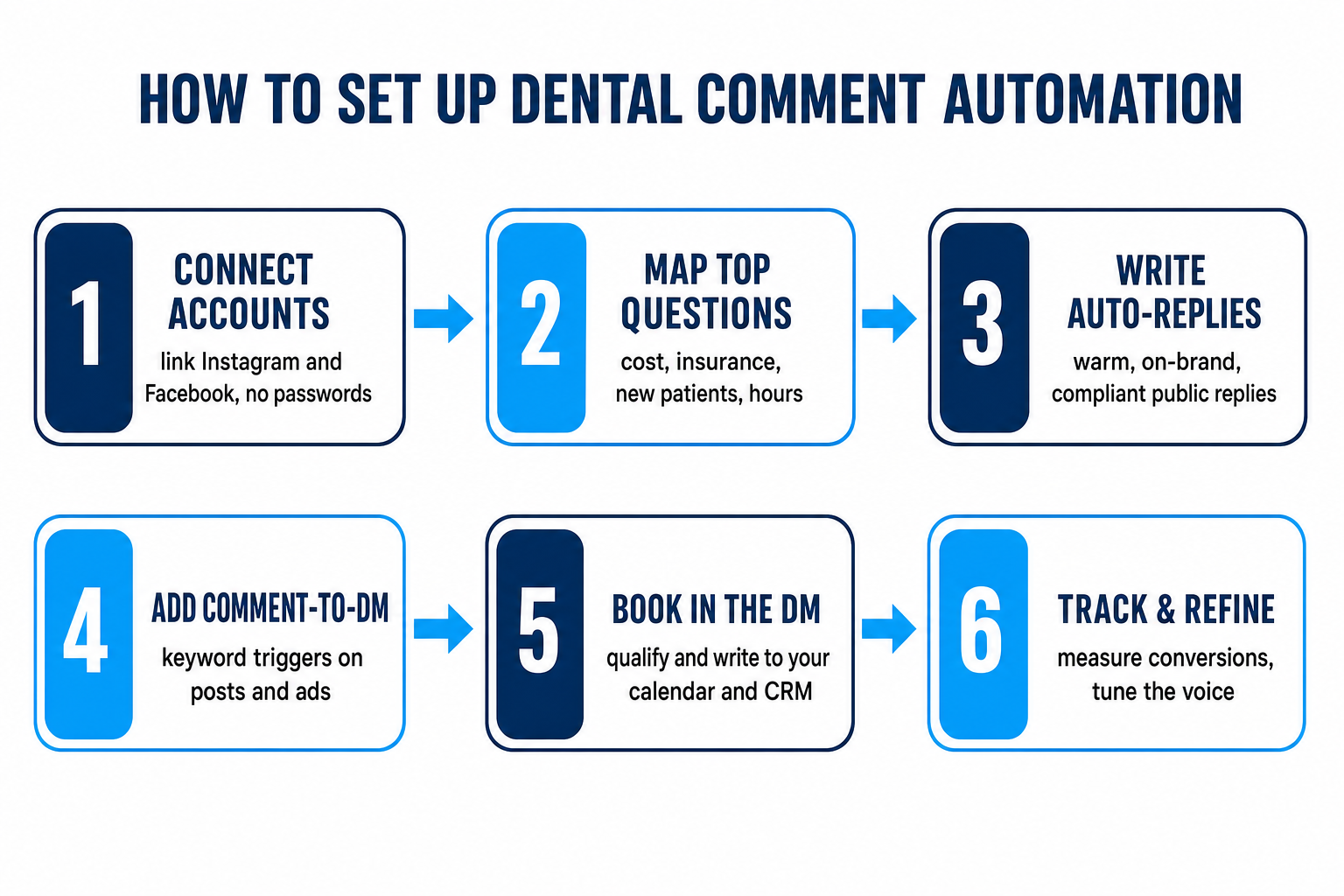
Step 1 — Connect your Instagram and Facebook accounts. Link your Instagram professional account and Facebook Page to a social inbox / automation platform (this is done through Meta’s official connection flow — you never hand over passwords). One connection lets the system read comments, reply publicly, and open DMs on your behalf.
Step 2 — Map your top patient questions. List the 8–12 questions your front desk answers most: cost of Invisalign/veneers, “do you take [insurance]?”, “are you accepting new patients?”, location and parking, emergency availability, financing. These become your automation rules. If you don’t know them cold, pull a week of DMs and comments — the pattern is obvious fast.
Step 3 — Write on-brand public auto-replies. For each common comment, write a short, warm, compliant reply in your practice voice. Rule of thumb: answer the question at a high level publicly, then move the specifics to DM. “We do offer financing! Sending you the options now 👍” Never quote a guaranteed price or insurance benefit in a public comment — keep it to “most PPOs accepted, let’s confirm yours in a DM.”
Step 4 — Add comment-to-DM keyword triggers. On individual posts, Reels, and especially paid ads, add an explicit call to action: “Comment WHITEN for our new-patient whitening offer.” Set the keyword to trigger an automatic DM. This is where volume comes from — a single ad can collect dozens of warm keyword-commenters, each auto-DMed instantly.
Step 5 — Book inside the DM. Configure the DM agent to qualify (name, reason for visit, preferred time), check your live calendar availability, and write the appointment into your CRM. Sync it to the Google Calendar your team already runs on so there’s no double-entry. Every lead and booking should be visible to your front desk with its own login — nothing hidden.
Step 6 — Track, review, and refine. Watch which keywords and questions convert, add new auto-reply rules as fresh questions appear, and hand genuinely complex or clinical threads to a human. Review the transcripts monthly and tune the voice. Automation isn’t “set and forget” — it’s “set, measure, improve.”
What to actually automate (dental scenarios)
Not every comment should be automated, and knowing the line is what separates a system patients love from one that feels robotic. A good split:
- Auto-reply + move to DM: pricing questions, insurance acceptance, “accepting new patients?”, hours/location, financing, new-patient offers, appointment requests. These are high-volume, repetitive, and time-sensitive — exactly what a chairside team can’t reach fast.
- Auto-reply publicly, then a human follows up: detailed clinical questions (“will this crown match my other teeth?”), complaints, or anything emotional. The AI acknowledges warmly and instantly (“Thanks for reaching out — a team member will follow up personally”), so it’s never ignored, but a person closes it.
- Never automate: anything that looks like a clinical diagnosis, a specific benefit guarantee, or a public back-and-forth about someone’s treatment. Move it private, fast.
Pair the whole thing with a review-harvesting workflow and local SEO: social comments build the awareness, reviews and map-pack presence close the loop when the patient finally searches your name.
In-house vs. done-for-you: the honest math
You have three realistic ways to handle this. Here’s the straight comparison.
| Plan | Do nothing / reply by hand | Hire a social/community manager | Done-for-you comment automationRecommended |
|---|---|---|---|
| Price | Staff time | Salary + benefits | From $397/mo |
| Feature 1 | Comments and DMs sit for hours or go dark at night | Dedicated human attention — during their shift only | AI answers comments, DMs & web chat 24/7 in your voice |
| Feature 2 | Can't hit the 5-minute window that wins bookings | Still no true 24/7 coverage without multiple hires | Comment-to-DM triggers on every post and ad |
| Feature 3 | Unanswered comments quietly cap your reach | Single point of failure: PTO, turnover, sick days | Qualifies patients and books into your calendar |
| Feature 4 | New-patient inquiries from social are rarely tracked | Still needs automation tooling and CRM sync | Every lead and booking visible in the CRM you own |
| Feature 5 | Free — but you pay in lost patients | Highest fixed cost of the three | Includes the content engine that creates the comments |
The third column exists because coverage and speed are the two things a chairside practice can’t sustain by hand. A single human — however good — sleeps, takes lunch, and goes on vacation, and the 9 p.m. comment from a prospective implant patient doesn’t wait. Automation compresses the whole thing into one predictable line item and guarantees the metric that drives bookings: an instant, qualified reply, every time. Our done-for-you dental social service is $397/mo for one brand and $997/mo for up to four locations, white-label, and it includes the three AI agents (comments, DMs, and web chat) plus the content engine that creates the inbound comments in the first place.
How to tell if it’s working
Follower count won’t tell you if your comments are converting. Track the numbers that connect to production:
- Response time. Median time to first public reply and first DM. With automation this should be seconds, around the clock — the metric HBR and MIT prove matters most.
- Comments captured → DMs opened. How many public comments the system moved into a private conversation. This is the comment-to-DM conversion that actually matters.
- Booked appointments from social. The only metric that pays the bills — appointments that trace back to a comment or DM, tagged in your CRM.
- After-hours share. What percentage of captured inquiries arrived outside business hours? That’s the volume your old process was silently losing.
- Reach and engagement trend. Because fast replies feed the algorithm, watch whether reach on your Seattle-area posts climbs as response time drops.
Read those five numbers monthly and you’ll know exactly what your comment sections are worth — and how many patients your practice used to leave on the table. To model the economics for your own practice, the pricing page and a quick walkthrough call are the fastest way.
Frequently asked questions
Frequently asked questions
Do dental patients really book through Instagram and Facebook comments and DMs?
Increasingly, yes. 71% of U.S. adults use Facebook and 50% use Instagram (Pew, 2025), and Meta apps now carry roughly 600 million business conversations every day (Meta, via TechCrunch, 2023). In a dense market like Seattle, a growing share of new-patient inquiries starts as a comment under a post or ad rather than a phone call.
Is comment-to-DM automation allowed by Instagram and Facebook?
Yes. Auto-DMing someone who comments a keyword is a native, platform-supported flow that runs through Meta's official messaging API — the same mechanism tools like ManyChat use. It's compliant when you follow the rules: you're responding to people who chose to engage, not cold-messaging strangers, and you honor opt-outs.
How fast does an AI comment agent respond, and why does speed matter so much?
In seconds, 24/7. Speed is decisive: the average business takes 42 hours to answer a web lead and 23% never respond at all (HBR), while contacting a lead within 5 minutes makes you 21× more likely to qualify it (MIT / Lead Response Management). A chairside Seattle front desk can't hit that window by hand — automation can.
Won't automated replies feel robotic to patients?
Not if they're built right. The agent answers common questions warmly in your practice voice and moves specifics to a private DM, while genuinely complex, clinical, or emotional threads are handed to a human. Patients experience a fast, helpful reply instead of silence — which is what most practices give them today.
Will the AI book straight into the calendar my front desk already uses?
Yes. The agent qualifies the patient in the DM, checks your real availability, and writes the appointment into the CRM — and appointments can sync to your Google Calendar so your team sees them in the tool they already run on. Every lead and booking is visible with your own login.
Is this compliant with dental advertising and privacy rules?
It can be, and it must be. Replies educate and book — never promising clinical outcomes or guaranteed insurance benefits — which keeps you clear of Washington dental-board advertising rules. Because comments and DMs aren't secure channels, the agent collects only contact details and reason for visit; keep protected health information out of them, consistent with HIPAA best practice, and honor opt-outs.
How much does done-for-you comment automation cost for a Seattle practice?
Our done-for-you dental social service — which includes the three AI agents for comments, DMs, and web chat plus the content engine that creates the inbound comments — is $397/mo for one brand and $997/mo for up to four locations, white-label. See the social media service for what's included, or book a 20-minute walkthrough.
About the author
Devin Okafor is a GoHighLevel Automation Specialist based in Austin, Texas. He builds and ships GoHighLevel snapshots for dental practices and the agencies that serve them, and has wired up hundreds of workflows for appointment reminders, speed-to-lead, review harvesting, and social automation. He is opinionated about keeping automations simple enough for a busy front desk to actually live with.
Related posts
- Instagram & Facebook DM Automation for NYC Dental Practices — the private-message side of the same system.
- Social Media Marketing for Miami Dental Practices — why short-form video creates the comments worth automating.
- Speed-to-Lead for Dental Practices — the five-minute rule, applied across every channel.
- Missed-Call Text-Back for Dental Practices — the same instant-response fix, for your phone.
- How Dental Practices Earn More Google Reviews — close the loop after the comment converts.