
Bringing on a new dental client should feel exciting not overwhelming.
Yet many agencies and consultants lose momentum during onboarding. Endless setup tasks. Back-and-forth emails. Manual funnel builds. Calendar configuration headaches. Before you know it, two weeks pass and the client still isn’t live.
The good news? It doesn’t have to be that way.
With the right systems in place, you can onboard a new dental client in under 48 hours using a GHL Snapshot—complete with automation, appointment booking, lead capture, and follow-up sequences ready to go.
This guide walks you through exactly how to do it.
Key Takeaways
- You can fully launch a dental marketing system in 48 hours or less
- A pre-built GHL Snapshot eliminates repetitive setup work
- Clear onboarding steps reduce friction and client confusion
- Automation improves client confidence immediately
- Speed of implementation increases retention and referrals
Why Speed Matters in Dental Client Onboarding
Dentists are busy. They want results, not technical explanations.
When a dental practice signs up with you, they expect momentum. If things feel slow or disorganized, doubt creeps in. On the other hand, when they see automation running within days, confidence skyrockets.
Fast onboarding leads to:
Stronger first impressions
- Faster ROI
- Better retention
- Higher upsell potential
- More referrals
The key is preparation—not scrambling after the sale.
What Is a GHL Snapshot and Why It Changes Everything
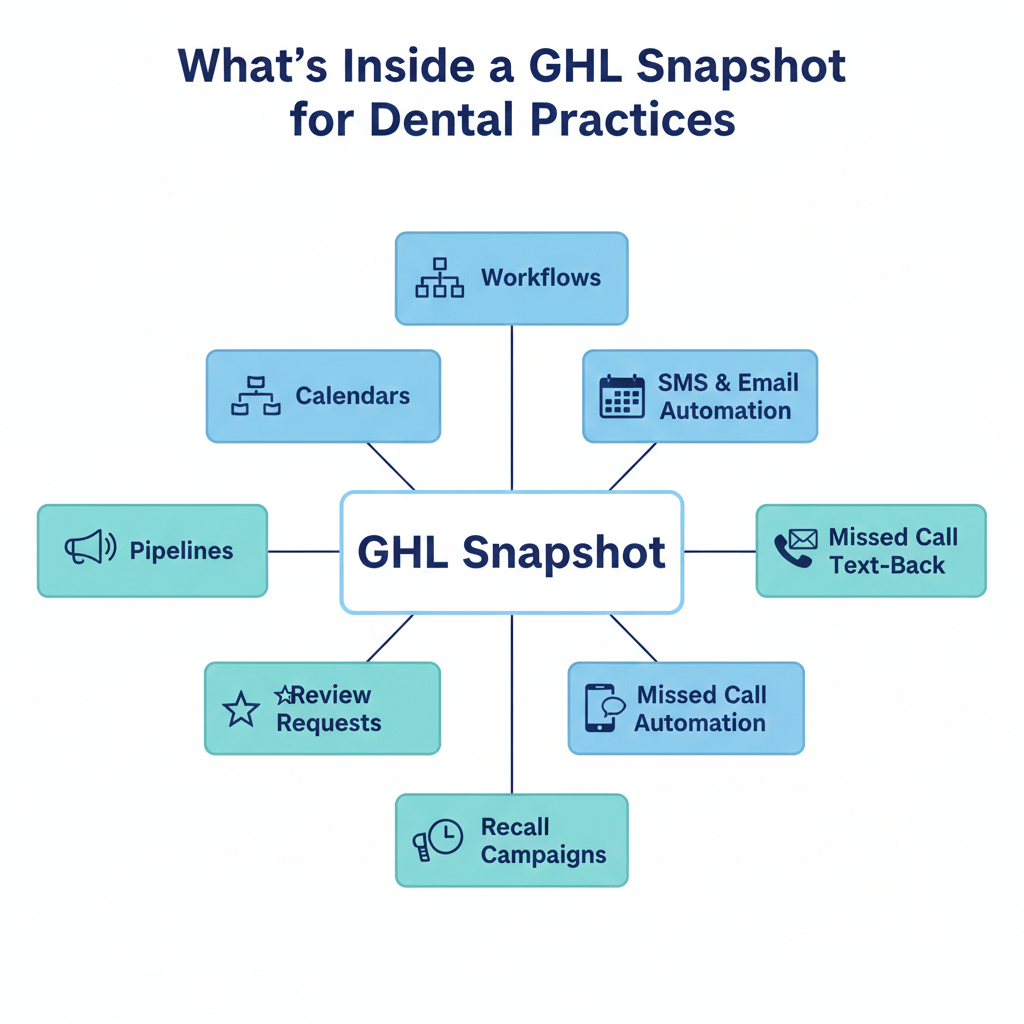
A GHL Snapshot is essentially a pre-built system inside GoHighLevel that can be imported into a new sub-account instantly. It includes workflows, funnels, calendars, triggers, templates, tags, pipelines, and more.
Instead of rebuilding the same dental automation setup from scratch every time, you clone it in minutes.
For dental practices, this might include:
- AI receptionist workflows
- Missed call text-back automation
- Appointment reminders
- New patient nurture sequences
- Review request automation
- Recall campaigns
- Lead tracking pipelines
Think of it as duplicating an entire operational engine with one click.
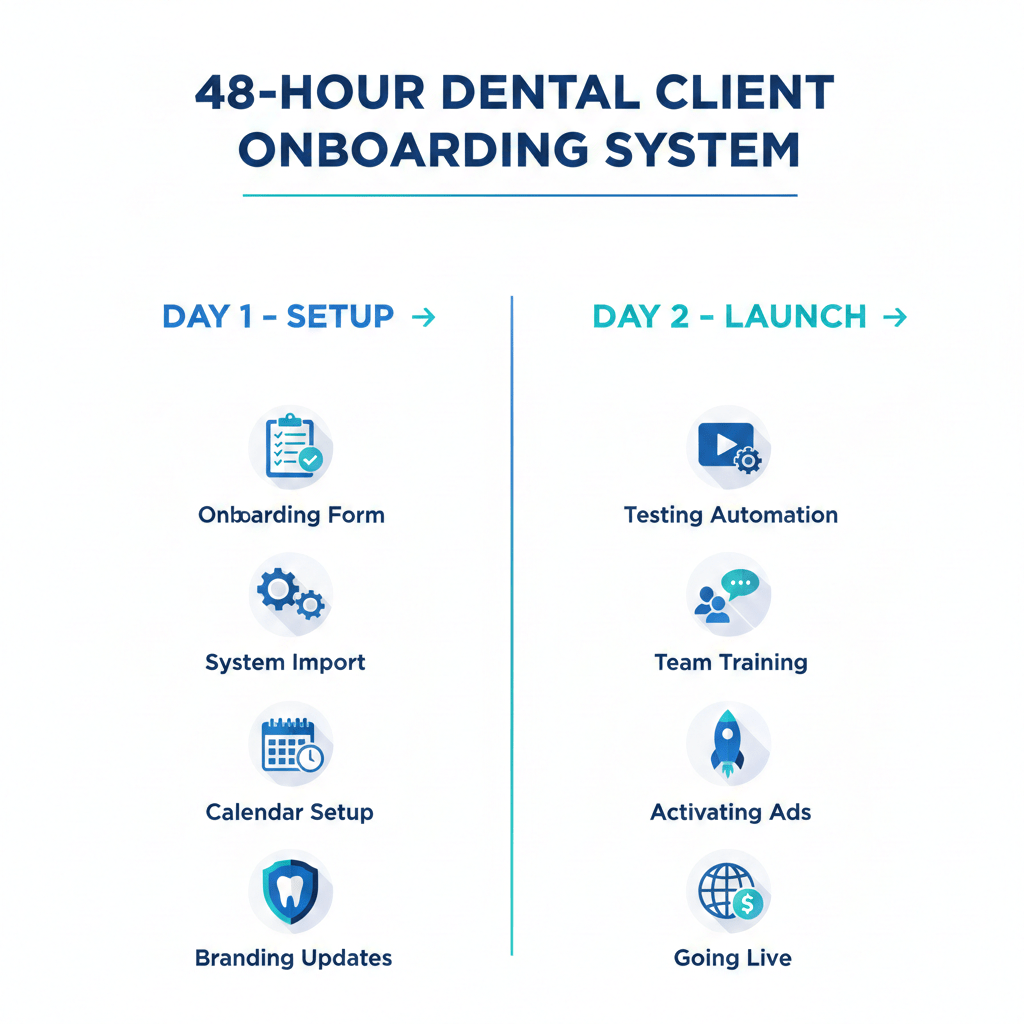
Now let’s walk through the exact 48-hour plan.
Foundation and Setup
The first 24 hours are about installing and customizing.
Step 1: Send the Onboarding Form Immediately
As soon as the client signs, send an onboarding form asking for:
- Business name
- Logo
- Staff names
- Services offered
- Insurance information
- Contact email
- Phone number
- Website domain
- Google Business Profile link
- Calendar availability
Keep it short but comprehensive. The faster they complete it, the faster you launch.
Pro tip: Use automation to send reminders if they haven’t completed it within 12 hours.
Ready to transform your dental practice?
See how CRM automation can streamline your practice and boost efficiency. Schedule a free demo today!
Step 2: Import the GHL Snapshot
Once you have access to their sub-account:
- Create the sub-account
- Import your dental GHL snapshot.
- Verify workflows are active
- Confirm pipelines and tags are installed
This alone saves 10–20 hours of manual building.
You now have:
- Funnels ready
- Automations live
- Calendars created
- Email and SMS templates installed
All in under an hour.
Step 3: Connect Core Integrations
Next, connect:
- Domain
- Email service (Mailgun or SMTP)
- Phone system (LC Phone or Twilio)
- Google Business Profile
- Facebook and Instagram pages
These integrations power your automations.
Without them, workflows may not fire correctly.
Step 4: Configure the Calendar System
Dental practices rely heavily on scheduling.
Set up:
- Consultation calendar
- New patient exam calendar
- Cleaning appointments
- Orthodontic consults
Make sure:
- Time buffers are accurate
- Staff assignments are correct
- Confirmation emails are branded
- Reminder SMS is active
Test-book a fake appointment to verify the system works.
Step 5: Customize Branding
Now personalize everything.
Replace:
- Logo
- Practice name
- Contact info
- Staff signatures
- Treatment pricing
- Address and maps
Because your GHL Snapshot uses custom values, this step should take less than an hour.
Testing and Launch
Step 6: Test Every Automation
Never skip this.
Test:
- Missed call text-back
- AI receptionist script
- Website chat widget
- New lead form submission
- Appointment reminders
- No-show recovery
- Review request automation
- Use a real phone number and email for testing.
You want to see the full journey as a patient would.
Step 7: Train the Dental Team
Keep training simple.
You don’t need a two-hour presentation.
Focus on:
- How to view conversations
- How to reschedule appointments
- How to move opportunities in pipeline
- How to respond manually when needed
- How to pause automation if necessary
Most dental teams only need 20–30 minutes of guidance.
Record the session so they can rewatch it later.
Step 8: Activate Lead Sources
Now connect traffic.
Turn on:
- Facebook lead ads
- Google ads
- Website chat
- GBP messaging
- Call tracking
Once leads begin entering the system, automation handles the rest.
Within 48 hours, the practice has:
- Automated responses
- Appointment booking
- Nurture campaigns
- Review requests
- Recall reminders
And it feels seamless.
Ready to transform your dental practice?
See how CRM automation can streamline your practice and boost efficiency. Schedule a free demo today!
Practical Example of a 48-Hour Launch
Let’s say a cosmetic dentist signs on Monday morning.
By Tuesday evening:
- Their missed calls trigger instant SMS replies
- Website visitors receive chatbot responses
- Leads are nurtured via email and text
- Appointments are auto-confirmed
- No-shows are followed up automatically
- Review requests go out 24 hours after visits
- From the client’s perspective, it feels like magic.
- From your perspective, it’s simply duplicating a system that already works.
That’s the power of a well-built GHL Snapshot.
Common Mistakes to Avoid
- Over-customizing before launch
- Waiting on perfect branding
- Skipping test appointments
- Forgetting to assign staff
- Not setting expectations clearly
- Launch fast. Optimize later.
Frequently Asked Questions
How long does it really take to import a snapshot?
Importing a GHL Snapshot takes only minutes. Customization and integrations typically take the most time, but with preparation, the full process fits within 48 hours.
Do I need technical skills to use a GHL Snapshot?
Basic familiarity with GoHighLevel helps, but you don’t need advanced coding skills. Most customization involves updating settings and branding.
What if the dental client does not complete the onboarding form quickly?
Can this work for orthodontists or specialists?
Yes. The system can be adapted for orthodontics, cosmetic dentistry, implants, and general practices. Minor workflow adjustments may be needed.
What if I want to add AI voice or chatbot features later?
Launch core systems first. Advanced AI enhancements can be layered on after the initial rollout.
Will these automations bother patients with too many messages?
Conclusion
Onboarding a dental client does not need to drag on for weeks.
With a structured 48-hour framework and a properly built GHL Snapshot, you can deliver instant value, build trust quickly, and position yourself as a serious growth partner.
The key is preparation.
Build once. Refine continuously. Deploy repeatedly.
When a dental practice sees automation working within days, they don’t question your expertise — they recommend you.
Ready to transform your dental practice?
See how CRM automation can streamline your practice and boost efficiency. Schedule a free demo today!