Running a dental practice today means juggling patient calls, appointment confirmations, missed follow-ups, insurance questions, and recall reminders all while delivering exceptional care. The truth is, most practices are still relying on manual processes that eat up time and quietly leak revenue.
That’s where automation changes everything.
With GoHighLevel, you can build powerful AI-driven workflows inside a Dental Snapshot that work 24/7 behind the scenes. These workflows don’t just save time — they increase booked appointments, reduce no-shows, and improve patient retention automatically.
In this guide, we’ll walk through five high-impact AI workflows you can implement immediately.
Key Takeaways
- AI workflows can respond to leads within seconds, increasing booking rates
- Automated reminders significantly reduce no-shows
- Missed-call text-back systems recover lost patients automatically
- Nurture sequences convert undecided inquiries into appointments
- Recall automation keeps your hygiene schedule full year-round
AI Lead Capture and Instant Response Workflow
Speed matters. Studies consistently show that leads contacted within five minutes are dramatically more likely to book. In dental marketing, even a 90-second delay can cost you the patient.
This workflow ensures every new inquiry receives an immediate response.
How It Works
Trigger
- Form submission
- Facebook Lead Ad
- Website chat inquiry
- Incoming SMS
Actions
- Send instant SMS response
- Send confirmation email
- Notify front desk
- Add contact to pipeline stage New Lead
Example Setup in GoHighLevel
- Go to Automations → Workflows
- Select “Create from Scratch.”
- Add Trigger Form Submitted
- Add Action: Send SMS
- Add Action: Send Email
- Add Action Add to Pipeline
Sample SMS
“Hi Sarah, thanks for reaching out to Bright Smile Dental. Are you looking for a cleaning, cosmetic consultation, or emergency visit?”
This simple automation transforms your dental snapshot into a 24/7 front desk assistant that never misses a lead.
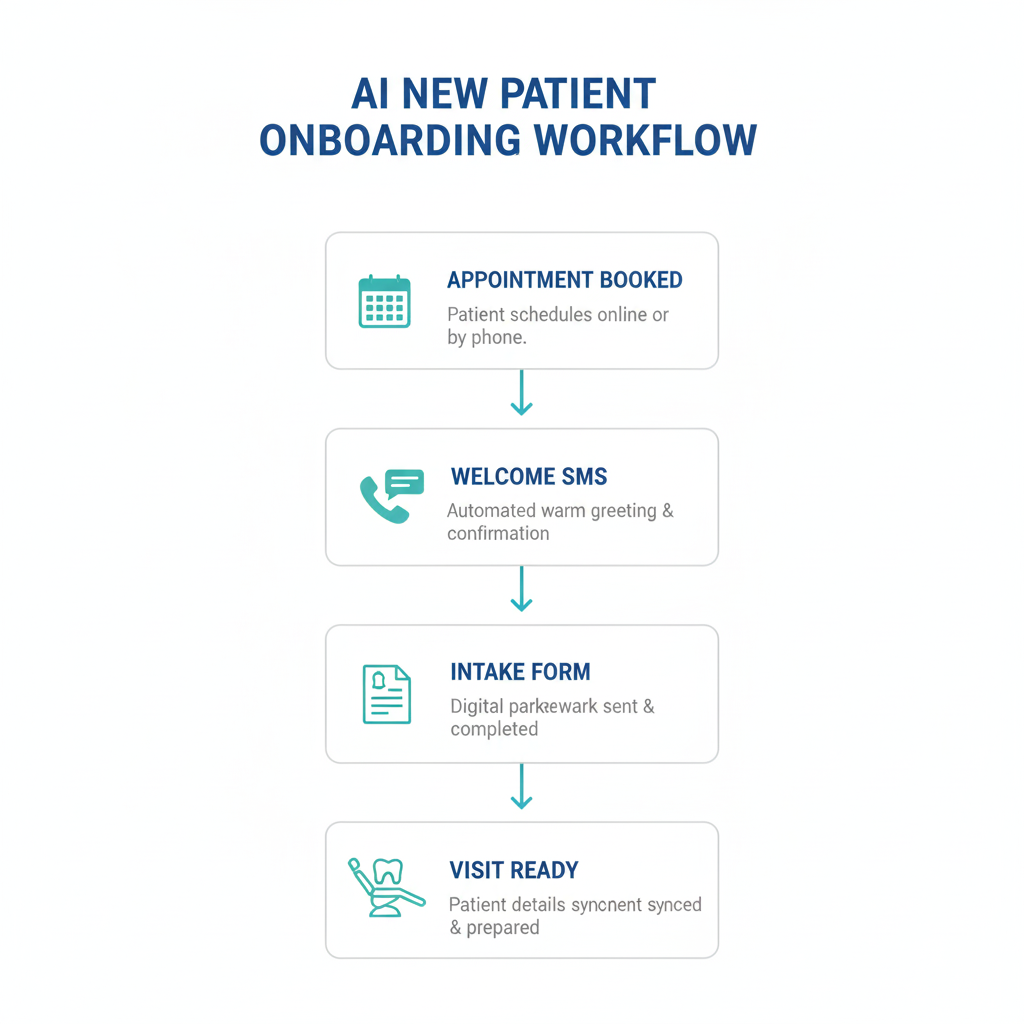
AI Appointment Booking Workflow
Patients don’t want to wait for office hours to schedule. If you’re not offering instant booking, they’ll find a practice that does.
This workflow allows AI to qualify patients and book them directly into your calendar.
What It Includes
- Conversational AI chatbot
- Smart calendar routing
- Automated intake form delivery
- Confirmation messages
Workflow Structure
Trigger
- Contact replies with interest
- Chatbot conversation reaches booking intent
Actions
- Send booking link
- Assign calendar based on procedure
- Tag as Booked Consultation
- Send confirmation email and SMS
Pro Tip
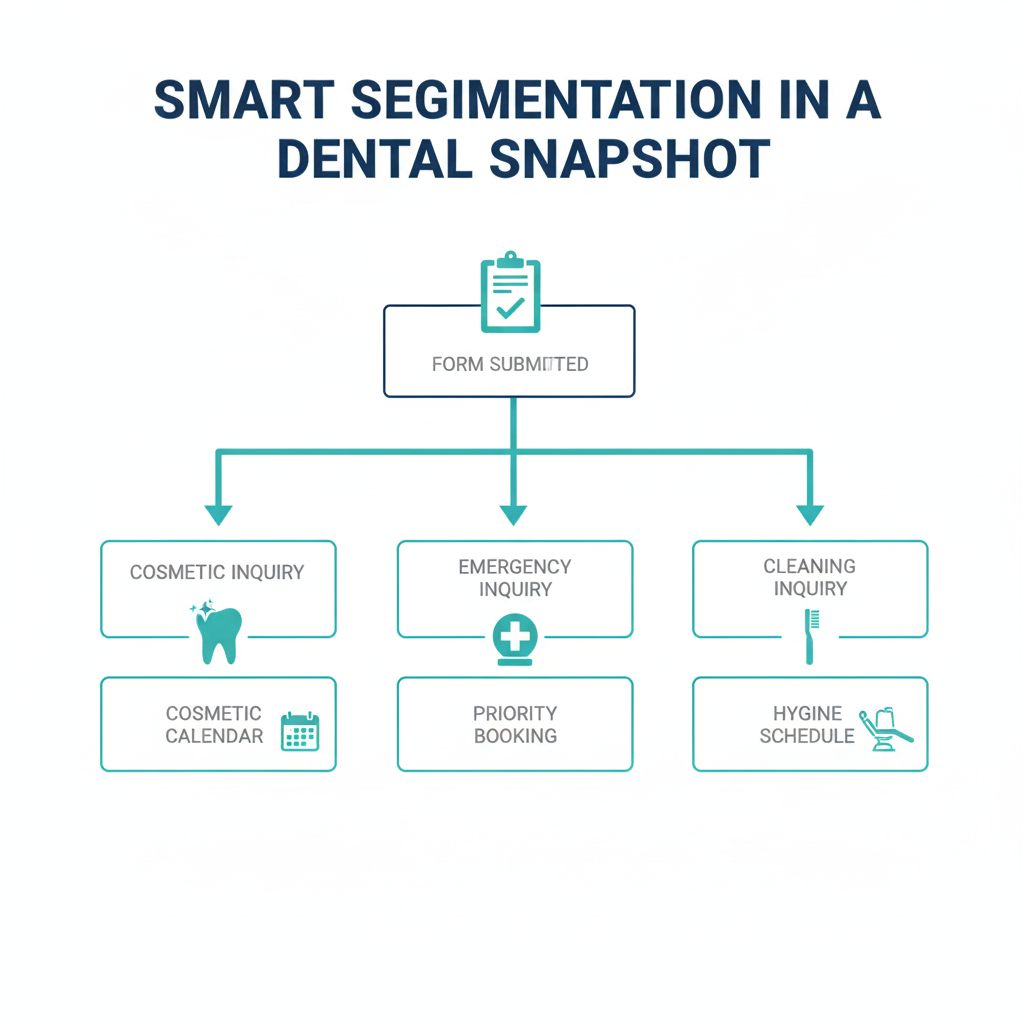
Use conditional logic inside the workflow:
If patient selects “Emergency”
- Route to priority calendar
- Notify staff immediately
If patient selects “Cleaning”
- Send hygiene calendar
This creates a smarter dental snapshot that adjusts automatically to patient intent.
AI No-Show Reduction and Reminder Workflow
No-shows cost practices thousands per month. The solution is layered, intelligent reminders.
Instead of sending just one reminder, build a sequence.
Reminder Timeline
- Immediately after booking
- 24 hours before appointment
- 3 hours before appointment
- 15 minutes before appointment
- Workflow Setup
Trigger
- Appointment Confirmed
Actions
- Send confirmation SMS
- Send reminder email
- Send day-of SMS
If no confirmation reply → Send follow-up reminder
Advanced Layer
Add a condition:
If patient replies CANCEL
- Automatically send reschedule link
- Move to Cancelled stage
- Notify front desk
This workflow alone can reduce no-shows by 50 to 75 percent when implemented correctly.
Ready to transform your dental practice?
See how CRM automation can streamline your practice and boost efficiency. Schedule a free demo today!
AI Missed-Call Text-Back Workflow
Here’s a painful statistic. Many dental practices miss 30 to 50 percent of inbound calls. Each missed call is potentially a lost patient.
An AI missed-call text-back workflow fixes that instantly.
How It Works
Trigger
- Inbound call status Missed
- Actions
- Wait 30 seconds
- Send SMS
Example Message
“Sorry we missed your call. This is Bright Smile Dental. How can we help you today? You can reply here to book instantly.”
Why This Matters
Patients don’t usually call twice. This automation reopens the conversation and converts missed calls into active leads.
Inside a properly built Dental Snapshot, this workflow becomes a silent revenue generator.
AI Recall and Reactivation Workflow
Patient retention is where real profitability lives. Hygiene recalls and overdue treatment reactivation can dramatically increase monthly revenue without spending on ads.
This workflow automatically reaches out to inactive patients.
Trigger Options
- The last appointment was 6 months ago
- Treatment plan not completed
- No appointment scheduled
Workflow Actions
- Send recall SMS
- Send email reminder
- Add limited-time incentive
- Follow up with voicemail drop
Sample Recall Message
“Hi John, it’s time for your 6-month cleaning at Bright Smile Dental. Reply YES and we’ll send you available times.”
Step-by-Step Setup
Create a smart list filtering the last appointment date.
Use the workflow trigger “Contact Added to Smart List
- Add SMS action
- Add Wait step
- Add second follow-up message
This workflow ensures your schedule stays full without constant manual effort.
Bringing It All Together in a Dental Snapshot
When these five workflows are packaged together inside one Dental Snapshot, you create a complete patient journey automation system:
- Lead capture
- Qualification
- Booking
- Confirmation
- Follow-up
- Retention
The real power comes from integration. Each workflow feeds into the next stage of the patient lifecycle. Instead of isolated automations, you build a unified growth engine.
And because GoHighLevel allows snapshot duplication, you can replicate this system across multiple locations or clients with one click.
Ready to transform your dental practice?
See how CRM automation can streamline your practice and boost efficiency. Schedule a free demo today!
Frequently Asked Questions
What is a Dental Snapshot in GoHighLevel?
A Dental Snapshot is a pre-built automation system inside GoHighLevel tailored specifically for dental practices. It includes workflows, funnels, calendars, tags, and messaging templates designed for patient acquisition and retention.
Do I need technical skills to build these workflows?
Basic familiarity with GoHighLevel helps, but most workflows use simple triggers and actions. Once you understand the structure of Trigger → Action → Condition, it becomes straightforward.
Can AI really reduce no-shows?
Yes. Automated multi-layer reminders and easy rescheduling links significantly improve attendance rates. Many practices report cutting no-shows in half.
How quickly will I see results?
Lead response workflows produce immediate impact. Recall and reactivation campaigns typically show measurable results within 30 days.
Is this compliant with patient privacy regulations?
You must ensure HIPAA-compliant messaging practices and secure integrations. Always configure your system according to healthcare communication guidelines.
Conclusion
Dental practices today can no longer rely on manual systems alone. The combination of AI and automation inside GoHighLevel gives you a competitive edge that works around the clock.
By implementing these five AI workflows instant lead response, smart booking, no-show reduction, missed-call recovery, and recall automation you transform your Dental Snapshot into a complete growth engine.
The best part is this system doesn’t replace your team. It empowers them. Your staff spends less time chasing confirmations and more time delivering exceptional patient care.
Start with one workflow, measure the impact, and expand from there. Once you see how much smoother your operations run, you’ll wonder how you ever managed without it.
Ready to transform your dental practice?
See how CRM automation can streamline your practice and boost efficiency. Schedule a free demo today!